Review Your Cart

Your cart is empty.

You haven't added any eSIM packages yet. Start exploring our plans to get connected!

Browse our eSIM Packages
🎉 Welcome offer: 20% off with promo code FIRSTWELCOME20

Spain Spain   / Puerta de Alcalá

Golden-hour exterior view of Puerta de Alcalá in Madrid with the full triumphal arch and surrounding plaza

Puerta de Alcalá eSIM: Madrid Data That Works Across Spain

You are stepping out near El Retiro Park with Puerta de Alcalá in front of you, Google Maps open for the next stop, and your ride or Metro route already depending on live data. eSIMno lets you buy your Spain eSIM in minutes, install it before the trip, and switch it on after landing so your phone is ready the moment you cross Plaza de la Independencia.
View Plans
GET A FULL20%OFFon your first order
Use code: FIRSTWELCOME20

Stay connected,
wherever you go

Seamless global eSIM coverage

Explore our plans below

Plan Your Trip

Tell us what you'll do and how long you'll be away — we'll highlight the right plan.

7 days
1102030

What will you do?

Tap an activity above to see which plan fits your trip

Already a customer?

EARN UP TOON EVERY FRIEND'S PURCHASE
NETWORK: Movistar & Orange The speed may vary depending on the location.

Quick Facts

Language
Valencian (Español)
Currency
Euro (EUR, €)
Time Zone
Central European Time (UTC+1)
Dialing Code
+34
Power Plug
Type C, E, F (round 2-pin, common across most of Europe)
Emergency
112
eSIMno Networks
Movistar, Orange

How to Get Your eSIM

  1. Pick Your Spain Plan Before The Trip
    Choose the data amount that fits your Madrid stay before you fly. If Puerta de Alcalá is one stop on a wider Spain itinerary, buy once for the whole country instead of planning another SIM change after Madrid.
  2. Install It While You Still Have Stable WiFi
    Set up the eSIM QR at home or at your hotel before heading out. That way you are not standing by Plaza de la Independencia trying to install a plan while traffic circles the monument and your map keeps reloading.
  3. Activate After Landing In Spain
    Turn the eSIM on after landing, once phone use is allowed again. By the time you leave the airport train, Metro, or taxi and walk toward Puerta de Alcalá, your data is already live for directions, messaging, and booking apps.
  4. Use Data For The First Move From The Monument
    From Puerta de Alcalá, travelers usually split three ways: into El Retiro, west toward the Prado area, or down to the nearest Metro connection. Live data helps you compare walking times, call Cabify or Uber, and pull up the exact route instead of guessing at the roundabout.
  5. Keep Your Home SIM On For Voice
    eSIMno is data-only, so your home SIM can stay active for incoming calls on your usual number with no special setup. For outgoing calls, use WhatsApp, FaceTime, Telegram, or another internet-based app over your eSIM data and avoid roaming voice charges from your home carrier.

Traveler Tips

  • If you want cleaner photos of Puerta de Alcalá, go early around 08:00-09:00 before the traffic ring and Retiro entrances get busier; that is also the easiest time to upload and share photos on the spot.
  • Puerta de Alcalá is a walking pivot between El Retiro, the Prado axis, and Serrano, so keep live maps open instead of relying on one screenshot; a 10-minute wrong turn here can send you toward the wrong side of Plaza de la Independencia.
  • For the ride back after sunset, compare Cabify and Uber on your phone at the monument instead of walking off to hunt a pickup point first; fare display and wait time change block by block around the roundabout.
  • If your home SIM stays active for voice, leave mobile data assigned to the eSIMno line only. That keeps WhatsApp, maps, and browsing on your Spain plan while your regular number remains reachable for incoming calls.
  • Bring your eSIM online before a museum-heavy day around Retiro and the Prado area. Timed-entry emails, reservation confirmations, and navigation between stops all land on the same phone within a 2-3 km stretch.

Why Data Matters at Puerta de Alcalá

Puerta de Alcalá is not a destination where you arrive, stare for 5 minutes, and leave with no other decisions to make. It sits at a real movement point in Madrid: El Retiro to one side, the museum corridor toward Museo Nacional del Prado to another, and the shopping and dining streets around Serrano and Salamanca close by. That means your phone becomes a live planning tool the second you arrive. You are checking Google Maps for the fastest walking route, opening Citymapper to compare Metro and bus options, and using Cabify or Uber when the heat, rain, or timing makes a car the better call. Without working data, the monument is easy to find but the next 30 minutes of your day become guesswork.

Data also matters because this area compresses several phone-based tasks into one short stretch. A traveler can leave Puerta de Alcalá, reserve lunch near Retiro, pull up an entry confirmation for the Prado, then message friends to meet at Puerta del Sol later the same afternoon. Add translation for menus, Google reviews for nearby cafés, and cloud backup for photos shot at the arch, and the need is not just “internet” in the abstract. It is active, minute-by-minute use. That is why eSIMno plans for Puerta de Alcalá, Madrid, Spain work better than hoping for random WiFi during a walking day in central Madrid.

The venue itself is outdoors, but the practical challenge is transition. One minute you are in open plaza space, the next you are descending into the Metro, entering Retiro through a side gate, or moving toward museum ticket checks. Having data already active means your route keeps working through each handoff. It is the difference between flowing from monument to museum to dinner, and stopping at each step to reconnect, reload, and figure out where the plan went next.

Visiting Puerta de Alcalá

Puerta de Alcalá is an open-air landmark on Plaza de la Independencia, so there is no entry ticket, security lane, or timed slot to manage at the monument itself. The practical issue is circulation: you will view it from the surrounding pavements, nearby crossings, and the Retiro side rather than from a controlled visitor queue. That makes live navigation more useful than a saved screenshot, especially if you are linking the stop with a museum booking, a lunch reservation, or a walk deeper into Salamanca.

The easiest way to work Puerta de Alcalá into a day is to pair it with nearby stops rather than treat it as a standalone excursion. It fits naturally before or after Retiro, on the walk toward the museum zone, or as a meeting point before heading into central Madrid. Morning light is cleaner for photos, while evening gives the arch a stronger atmosphere but also creates more demand for rides and restaurant checks on your phone.

Because the stop itself is brief, this is exactly the kind of place where instant data helps. You are not settling in for an hour with a stable connection. You are arriving, deciding, moving, and booking the next thing quickly. That makes an already-installed eSIM more useful here than trying to solve connectivity after you are standing at the roundabout.

Retiro Side Approach

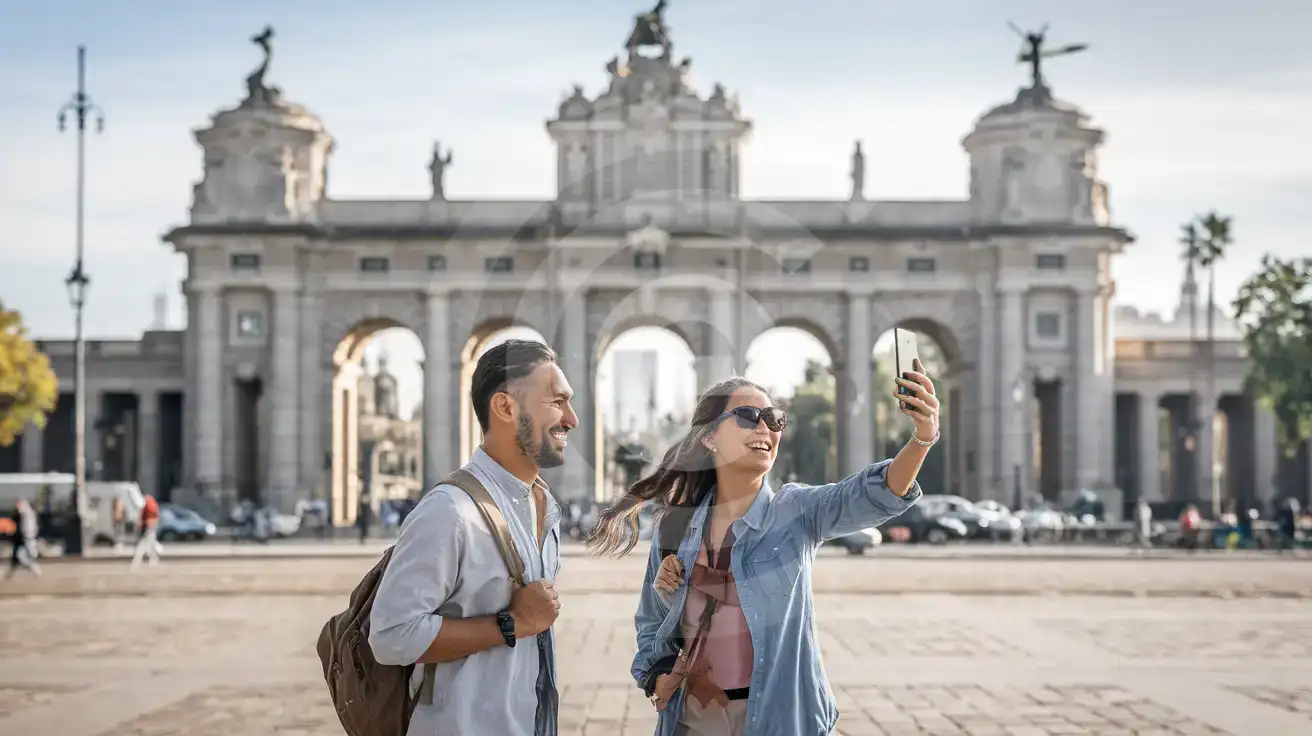
Mixed couple near the El Retiro side of Puerta de Alcalá in Madrid with the monument visible behind them
At Puerta de Alcalá, Madrid, Spain, having data ready helps you move straight from the arch to Retiro, museums, or a ride pickup.

Compare eSIM Options at Puerta de Alcalá

Recommended
Local SIM / Operator
Roaming
Setup timeStore visit + paperworkAuto
No local ID neededLocal ID requiredUse home account
SpeedCarrier-gradePartner-dependent
Travel supportValencian onlyHome carrier hours
Keep home numberReplaces itSame number
Cost predictabilityBills can spikeBill-shock risk
Typical pricing
$12-18 / day
Typical day-pass tariff varies by home carrier

PRICING — PICK YOUR ESIMNO PLAN

Light traveler
5GB / 30d
$11.90
20% off with code FIRSTWELCOME20on your first order
≈ $9.52 USD with code
Buy now
Heavy traveler
20GB / 30d
$28.90
20% off with code FIRSTWELCOME20on your first order
≈ $23.12 USD with code
Buy now

Frequently Asked Questions (FAQs)

Install it before your trip, then switch it on after landing in Spain. By the time you reach Puerta de Alcalá from Madrid-Barajas or step out near Retiro, your phone can already load maps, ride apps, and restaurant bookings without any setup delay.

Yes, because the arch is usually part of a moving day rather than a long standalone visit. Around Puerta de Alcalá you are deciding between El Retiro, the Prado side, Serrano, or Puerta del Sol, and each next move depends on live directions, ride timing, or bookings on your phone.

Yes. eSIMno is a data-only option, so your home SIM can stay active for incoming calls while you walk between Puerta de Alcalá, Retiro, and the museum district. For outgoing calls, use WhatsApp, FaceTime, Telegram, or another internet-calling app over eSIMno data.

Early morning is the cleanest window for photos and easier crossings around Plaza de la Independencia, while evening gives you stronger atmosphere and lights. If you are planning dinner or a museum stop right after Puerta de Alcalá, evening data access matters more because you will be checking live ride times and reservation details on the spot.

From Puerta de Alcalá you can walk into El Retiro, head west toward the Prado axis, or call a ride toward neighborhoods farther out. The key is having data at the monument itself so Google Maps, Citymapper, Cabify, or Uber can show the quickest option before you start circling the roundabout on foot.

GET A FULL20%OFFon your first order
Use code: FIRSTWELCOME20

Stay connected,
wherever you go

Seamless global eSIM coverage

Get Started
Puerta de Alcalá sits on one of the busiest visitor crossroads in Madrid: the edge of Retiro, the Salamanca side streets, and the museum axis running toward central Madrid. That sounds simple until you are outside with a half-loaded map, trying to decide whether to walk to Prado, call a Cabify, or head underground for the Metro. Mobile data matters here because the decisions happen in motion. You are checking live route times, opening restaurant bookings nearby, sharing your location with friends, and pulling up opening-hour info while you stand at the roundabout itself. A Spain eSIM solves that before the first detour starts. This is also a strong point in the day to have your setup already done. If you landed through Madrid-Barajas, install on hotel or home WiFi before travel, then activate after landing when phone use is allowed again. By the time you reach Retiro or the Puerta de Alcalá crossing, your device can already handle maps, messaging, photo backup, and app-based rides without searching for a SIM shop in central Madrid. That is a better fit for a short city break, a museum-heavy day, or a business trip with one spare afternoon. The bigger advantage is that your plan does not stop at this monument. Travelers who start at Puerta de Alcalá often continue to Atocha, Bernabéu, Toledo day trips, or onward across Spain. One eSIM purchase covers the Madrid visit and keeps working on the rest of the country itinerary, so you do not need one setup for this landmark and another for the next city.
Back to Spain
No more SIM kiosks

No more SIM kiosks

Skip the airport queues. Install your eSIM at home, activate when you land.

no roaming charges

No roaming surprises

Forget the $200 phone bill three weeks after your trip. Plain pricing, no hidden fees.

keep your physical sim

Keep your home number

Dual-SIM means your physical SIM stays active for calls and texts. eSIM handles only data.

easy installation

Setup in 2 minutes

Scan QR code, follow on-screen steps, you're connected. Works on any eSIM-compatible phone.

Pay SafelyVisa CardMaster CardGoogle PayPayPalApple Pay

How does eSIMNo Works?

Experience seamless global connectivity with our personal eSIM service. Enjoy faster speeds, wider coverage, and the convenience of online purchasing.

Buy a Data Plan

Buy a Data Plan

Search for your destination and pick any data plan

Step 1

Install your eSIM

Install your eSIM

Easy installation via qr code

Step 2

Activate Your eSIM

Activate Your eSIM

Only active when you are ready to use data

Step 3

Advantages

24/7 Customer Support

Reach our team via WhatsApp and email during business hours. Quick answers to common questions available anytime through our automated assistant.

Immediate delivery

Your eSIM arrives by email within minutes. Install it before you board your flight.

Worldwide Coverage

One eSIM, 160+ countries. Land anywhere and connect instantly — no SIM swapping, no roaming charges.

Check Compatibility

Check Compatibility

Before buying and installing an eSim, check if your phone supports one

Check if your phone is eSIM compatible

As you feel the need to use eSIM on your phone, the first question that arises is: does your mobile support eSIMs? And do eSIM-compatible devices work in all regions worldwide?

Some phones that support eSIM technology

  • IPhone XS and Later
  • Samsung Galaxy S20 and Later
  • Pixel 4 and Later
  • Xiaomi 12T Pro and Later
All eSIM-Compatible Phones

Frequently Asked Questions (FAQs)

Find helpful information to answer your questions

Is unlimited data really unlimited?
Unlimited plans provide unlimited data at high speed (4G/5G) up to a fair-use threshold defined per plan. Beyond that threshold, speeds may be reduced to 128 Kbps for the remainder of the validity period - still usable for messaging and basic browsing, but slower for streaming and video calls.
What data plans are available for the Spain eSIM?
eSIMno provides various data plans ranging from 1 GB to unlimited data, with options from 7 days to 90 days of service. Plans also include regional and lifetime options for travelers who want flexibility across multiple destinations.
Will I get notifications when my data is running low?
Yes. eSIMno sends email and push notifications when you've used 50%, 80%, and 100% of your data allowance. You can also check usage anytime in the eSIMno Center or in your phone's cellular settings to track consumption in real time.
Does the eSIM work on cruise ships or airplanes?
eSIMs use ground-based cellular networks, so they don't work in flight or at sea outside coastal coverage. They activate as soon as you connect to a partner network on land. For in-flight or maritime data, you'll need the airline or ship's onboard Wi-Fi.
Should I enable data roaming for the eSIM?
Yes - you must enable data roaming for the eSIM line, even though there are no roaming charges. The eSIM connects to a local partner network and your phone treats this as roaming. Enable it: iPhone > Settings > Cellular > eSIMno line > Data Roaming ON; Android > Settings > Network > SIMs > eSIMno > Roaming ON. This setting only affects the eSIM, not your home SIM.
What makes eSIMno different from other eSIM services?
eSIMno partners directly with local operators in over 200 countries, eliminating intermediaries. This direct relationship lets us offer competitive pricing, extensive coverage, and faster activation than resellers who route data through third parties.
What happens if I pause my trip and return home?
Your eSIM keeps its validity period running whether you're using it or not - pausing your trip doesn't pause the timer. If you return home, the eSIM stays dormant on your device until you travel again or it expires. You can disable it in cellular settings to avoid accidental usage.
Can I use the eSIM on more than one device?
Each eSIM profile is tied to a single device once activated. If you need data on multiple devices (e.g., phone and tablet), you can either purchase separate eSIMs for each device or use the Personal Hotspot feature on your phone to share data with other devices.
Do I need to deactivate my original SIM?
We recommend turning off cellular data and data roaming on your original SIM while abroad to avoid accidental roaming charges. You don't need to physically remove the SIM - just disable data and set the eSIM as your primary data line.
Which eSIM is best for travelling to Spain?
eSIMno is an excellent option for travelers heading to Spain. We offer a diverse range of eSIM plans - including regional, local, and lifetime options - with reliable coverage on local networks.
How can I verify if my eSIM is activated?
There are two clear indicators: (1) your phone's status bar shows the local carrier name once you arrive at your destination, and (2) the data icon (4G, LTE, or 5G) appears next to the eSIMno line in your cellular settings. If neither shows up, toggle airplane mode off and on, or restart your phone.
How do I set up the eSIM on my device?
The fastest way is straight from your order confirmation email, which now contains - for each eSIM - the QR code, a one-tap install link, and the SM-DP+ / activation codes. On the phone you'll use, tap the one-tap install link; or, to use the QR, show it on another screen or a printout and scan it with that same phone (not another phone); or enter the codes manually. The email also has an "Install eSIM" button that opens your eSIM's detail page and launches the install pop-up (sign in if prompted), and you can reach the same pop-up anytime via Profile > My eSIMs > find your plan (shown as "Ready to install") > Install. After installing, turn Data Roaming ON for your eSIMno line (iPhone: Settings > Cellular; Android: Settings > Connections/Network) - without it the eSIM installs but shows no internet. Full guide in Help & Support.

Use Your Free Credit

You can earn up to 15% commission from your friends' purchases with your Reference code. Plus, your friends will get $2 off their first purchase when they use your code!

FIND OUT HOW
Refer a friend

Refer

A FRIEND

Step into the world of E-SIM, bring your friends and benefit together!