Review Your Cart

Your cart is empty.

You haven't added any eSIM packages yet. Start exploring our plans to get connected!

Browse our eSIM Packages
🎉 Welcome offer: 20% off with promo code FIRSTWELCOME20

United States United States   / Space Needle

The Space Needle tower rising above Seattle Center at golden hour with Elliott Bay and the Olympic Mountains in the background

Space Needle eSIM: Seattle Data That Works Across the USA

You're heading up to the Space Needle observation deck with your timed-entry QR on your phone, sunset photos ready to share, and the Link Light Rail schedule back to Seattle-Tacoma International Airport still sitting in your browser. eSIMno gets your USA data ready before you board, so everything loads the moment you step off the elevator at 520 feet.
View Plans
GET A FULL20%OFFon your first order
Use code: FIRSTWELCOME20

Stay connected,
wherever you go

Seamless global eSIM coverage

Explore our plans below

Plan Your Trip

Tell us what you'll do and how long you'll be away — we'll highlight the right plan.

7 days
1102030

What will you do?

Tap an activity above to see which plan fits your trip

Already a customer?

EARN UP TOON EVERY FRIEND'S PURCHASE
NETWORK: AT&T & Verizon Wireless The speed may vary depending on the location.

Quick Facts

Time Zone
Pacific Time (UTC-8 / UTC-7 DST)
Dialing Code
+1
Currency
US Dollar (USD, $)
Power Plug
Type A, B (flat 2-pin, common across North America)
Language
English
Emergency
911 (police, fire, ambulance)
eSIMno Networks
AT&T, Verizon Wireless

How to Get Your eSIM

  1. Pick your USA data plan
    Choose a plan size that matches your trip length — a weekend visit to the Space Needle needs less than a two-week Pacific Northwest road trip. Select before you leave home.
  2. Install over WiFi before departure
    Scan the QR code eSIMno emails you while you're still on your home network. The profile installs in under 2 minutes; no physical card, no kiosk queue at Sea-Tac.
  3. Keep your home SIM active for calls
    Your phone's dual-SIM mode lets the eSIM handle data while your home number stays reachable for incoming calls. No forwarding setup needed — both lines run simultaneously.
  4. Activate after landing at Sea-Tac
    Switch off airplane mode once you taxi to the gate. Your eSIM connects to AT&T or Verizon towers before you reach baggage claim — directions to the Link Light Rail load instantly.
  5. Head to the Space Needle with data ready
    By the time you're walking from the Seattle Center Monorail to the tower base, your timed-entry QR is already pulled up and your sunset photo uploads are queued.

Traveler Tips

  • Book your timed-entry slot 2-3 days ahead during summer weekends — the sunset window (7-9 PM July/August) sells out first, and your confirmation email needs data to load at the gate.
  • The Loupe rotating glass floor completes a 360-degree turn in 45 minutes — plan your visit length around that rotation if you want the full perspective.
  • Download offline maps for Seattle Center before you ride the elevator up; signal can dip briefly in the enclosed shaft, and you'll want directions ready the moment you step out.
  • Use OneBusAway or Google Maps with live traffic for transit back to downtown — the Route 8 bus and the Seattle Center Monorail both depart within a 5-minute walk of the tower base.
  • Keep your home SIM on for incoming calls; outgoing calls work best over WhatsApp or FaceTime using your eSIM data to avoid roaming charges on your home line.

Why Data Matters at the Space Needle

The Space Needle observation deck sits at 520 feet with floor-to-ceiling glass and open-air sections that invite photos, videos, and immediate sharing. Your timed-entry confirmation arrives as a QR code — pull it up at the gate scanner, and you're past the queue in seconds. Without data, you're hunting for WiFi credentials while the line behind you grows.

Once you're up top, the data tasks multiply. Google Maps identifies Mount Rainier, the Olympic range, and Elliott Bay from the railing vantage. Instagram uploads of The Loupe glass floor demand bandwidth that the observation deck's shared WiFi rarely delivers during peak hours. Group chats with the friends meeting you at Pike Place Market need real-time message sync, not delayed delivery after you descend.

The return trip needs data just as much. The Seattle Center Monorail runs every 10 minutes to Westlake Center; OneBusAway tracks the Route 3 and Route 4 buses toward Capitol Hill. Lyft and Uber surge pricing spikes after sunset — checking both apps before you commit saves $8-12 on a short ride to Belltown or South Lake Union. eSIMno plans for Space Needle, Seattle, Washington, United States keep everything running from the elevator lobby to your dinner reservation confirmation at a Queen Anne restaurant.

Visiting the Space Needle

The tower opens daily from around 9:00 AM, with last entry roughly one hour before closing — summer hours extend to 10:00 or 11:00 PM, winter hours pull back to 9:00 PM. Timed-entry slots book online; standard adult tickets run approximately $35-$45, with youth and senior discounts available. The Day & Night ticket allows two visits within 24 hours for both daylight panoramas and city-light views.

Getting There

From Sea-Tac Airport, the Link Light Rail 1 Line reaches Westlake Station in 38 minutes; transfer to the Seattle Center Monorail for a 2-minute ride directly to the tower campus. King County Metro Routes 1, 2, 8, and 13 stop within a 3-minute walk. From Downtown Seattle, the walk north along the waterfront takes 20-25 minutes with a moderate uphill finish on Broad Street.

What to Expect

The Observation Deck (Level 520) offers 360-degree views with inward-leaning glass Skyrisers. One level below, The Loupe glass floor rotates slowly — a 45-minute full turn. The Atmos Wine Lounge serves Pacific Northwest wines if you want to slow down mid-visit. Personal photography is allowed; tripods and selfie sticks are restricted without prior arrangement.

Capturing the View

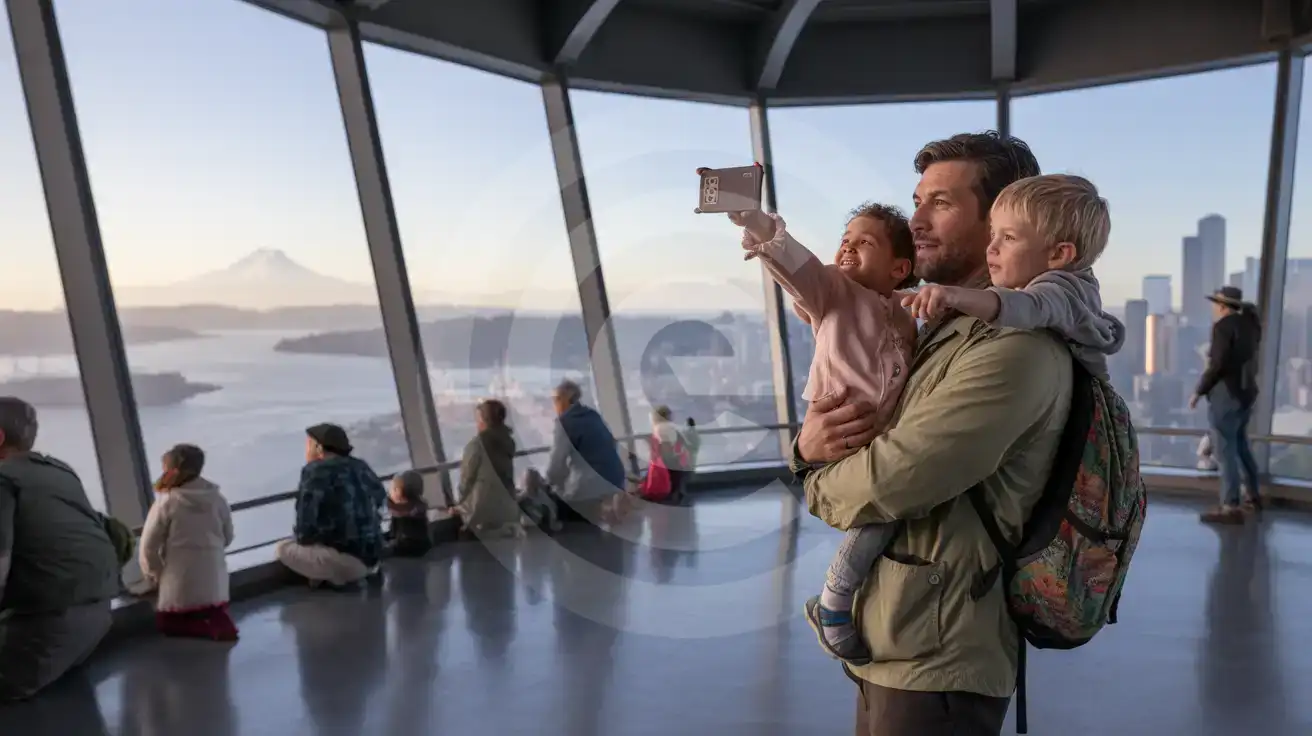
A family photographing the Seattle skyline from inside the Space Needle Observation Deck with Mount Rainier visible in the distance
Activate your eSIM before the elevator ride so sunset photos upload while you're still at 520 feet.

Compare eSIM Options at Space Needle

Recommended
Local SIM / Operator
Roaming
Setup timeStore visit + paperworkAuto
No local ID neededSSN/Credit checkUse home account
SpeedCarrier-gradePartner-dependent
Travel supportEnglish onlyHome carrier hours
Keep home numberReplaces itSame number
Cost predictabilityBills can spikeBill-shock risk
5GB / 30 daysLight traveler
15GB / 30 days
$45.00
~$45.00/mo + taxes & fees.
$12-18 / day
$15.00
Typical day-pass tariff varies by home carrier
10GB / 30 daysStandard travelerMost popular
20GB / 30 daysHeavy traveler

Frequently Asked Questions (FAQs)

Install the eSIM profile at home over WiFi before your flight. Once your plane taxis to the gate at Sea-Tac, switch off airplane mode — your phone connects to local towers before you reach the Link Light Rail platform, and your timed-entry QR loads by the time you're walking through Seattle Center.

The observation deck at 520 feet has strong macro coverage from AT&T and Verizon towers across the Seattle Center campus. Signal stays reliable through the floor-to-ceiling glass walls; the brief elevator ride may dip momentarily, but data reconnects the instant the doors open at the top.

Your phone's dual-SIM mode handles this automatically. The eSIMno data plan runs alongside your home SIM — incoming calls reach your home number as usual, and outgoing calls work best over WhatsApp or FaceTime using eSIM data to avoid roaming charges on your home line.

A half-day visit with moderate photo sharing, maps navigation, and rideshare booking uses roughly 500 MB to 1 GB. If you're uploading video from The Loupe glass floor or streaming a live video call to share the sunset view, plan for 1.5-2 GB for the day.

The same eSIM keeps working across the entire USA. Head to Portland for the weekend, fly to San Francisco, or drive up to Vancouver's border — your data plan stays active on AT&T and Verizon towers nationwide without any second purchase or reconfiguration.

OneBusAway tracks King County Metro buses in real time; Google Maps with live traffic handles Link Light Rail schedules from Sea-Tac and walking directions from the Seattle Center Monorail station. Both apps need data to refresh — the eSIM keeps them current while you navigate the 2-minute monorail ride to the tower base.

GET A FULL20%OFFon your first order
Use code: FIRSTWELCOME20

Stay connected,
wherever you go

Seamless global eSIM coverage

Get Started
The Space Needle observation deck sits 520 feet above Seattle Center, and your phone does the heavy lifting from the moment you arrive. Timed-entry confirmations, The Loupe glass-floor photos uploading to your group chat, rideshare pickup coordination for dinner in Capitol Hill — each task needs data that works without hunting for the venue's WiFi password. An eSIM installed before departure means your phone connects the instant you switch off airplane mode after landing at Sea-Tac. Seattle's signature tower draws visitors year-round, and the data demands stay consistent whether you're catching a winter sunset or a summer golden hour. Google Maps directions from the Seattle Center Monorail station, OneBusAway for the return bus to Pike Place Market, Resy for a post-visit reservation at a Belltown restaurant — each app expects reliable signal, not the patchy coverage of a crowded observation deck WiFi. Your eSIM runs on AT&T and Verizon towers, the same networks local commuters use. The plan you buy for the Space Needle visit keeps working across the entire country. Head to Portland for the weekend, fly to San Francisco for a connecting trip, or extend to a cross-country route — same eSIM, same data, no second purchase. Activate once, use everywhere from the Puget Sound ferry terminal to the far side of the Rockies.
Back to United States
No more SIM kiosks

No more SIM kiosks

Skip the airport queues. Install your eSIM at home, activate when you land.

no roaming charges

No roaming surprises

Forget the $200 phone bill three weeks after your trip. Plain pricing, no hidden fees.

keep your physical sim

Keep your home number

Dual-SIM means your physical SIM stays active for calls and texts. eSIM handles only data.

easy installation

Setup in 2 minutes

Scan QR code, follow on-screen steps, you're connected. Works on any eSIM-compatible phone.

Pay SafelyVisa CardMaster CardGoogle PayPayPalApple Pay

How does eSIMNo Works?

Experience seamless global connectivity with our personal eSIM service. Enjoy faster speeds, wider coverage, and the convenience of online purchasing.

Buy a Data Plan

Buy a Data Plan

Search for your destination and pick any data plan

Step 1

Install your eSIM

Install your eSIM

Easy installation via qr code

Step 2

Activate Your eSIM

Activate Your eSIM

Only active when you are ready to use data

Step 3

Advantages

24/7 Customer Support

Reach our team via WhatsApp and email during business hours. Quick answers to common questions available anytime through our automated assistant.

Immediate delivery

Your eSIM arrives by email within minutes. Install it before you board your flight.

Worldwide Coverage

One eSIM, 160+ countries. Land anywhere and connect instantly — no SIM swapping, no roaming charges.

Check Compatibility

Check Compatibility

Before buying and installing an eSim, check if your phone supports one

Check if your phone is eSIM compatible

As you feel the need to use eSIM on your phone, the first question that arises is: does your mobile support eSIMs? And do eSIM-compatible devices work in all regions worldwide?

Some phones that support eSIM technology

  • IPhone XS and Later
  • Samsung Galaxy S20 and Later
  • Pixel 4 and Later
  • Xiaomi 12T Pro and Later
All eSIM-Compatible Phones

Frequently Asked Questions (FAQs)

Find helpful information to answer your questions

When should I set up my eSIM?
A Wi-Fi connection is required to install your eSIM, so we recommend setting it up before you leave home. Activation can happen later, either right before departure or after you land at your destination - but the initial QR scan needs Wi-Fi.
What customer support is available if I have issues?
eSIMno offers 24/7 support via WhatsApp and email. Our human support team - not bots - handles installation help, troubleshooting, billing questions, and refund inquiries. Most issues are resolved within minutes during business hours and within a few hours overnight.
What should I do if I lose my activation QR code?
You can't really lose it - your QR code is in your order confirmation email, and also in the install pop-up on the website. To reopen it any time before activation, tap "Install eSIM" in your order email, or sign in at esimno.com and go to Profile > My eSIMs > Install. Both show the QR code together with the one-tap install link and the manual SM-DP+ / activation code. Note the install codes are one-time-use: once the eSIM is installed on a device they can't be reused - reopen the installer (My eSIMs > Install) to display a fresh QR if you need one.
Can I buy an eSIM for someone else as a gift?
Yes. Purchase the eSIM with your own details, then forward your order confirmation email - or share the "Install eSIM" link from it - with the recipient so they can install it on their own phone (the email contains the QR code and the manual SM-DP+ / activation codes). Make sure their device is eSIM-compatible first - installation usually cannot be reversed once completed.
Does the eSIM work in rural areas and small towns?
Coverage depends on the partner network's reach in United-states. Major cities, tourist areas, and highways typically have strong 4G/5G coverage. Remote rural areas may have weaker signal or fall back to 3G. Download offline maps before heading off the beaten path.
Which eSIM is best for travelling to United-states?
eSIMno is an excellent option for travelers heading to United-states. We offer a diverse range of eSIM plans - including regional, local, and lifetime options - with reliable coverage on local networks.
Can I make phone calls or send SMS?
eSIMno is a data-only service, so you can't make traditional voice calls or send SMS through the eSIM line. However, you can use messaging and calling apps over data - WhatsApp, iMessage, FaceTime, Telegram, Signal, and Google Meet all work normally.
How do I activate the United-states eSIM?
Your eSIMno order confirmation email contains your QR code, your SM-DP+ address and activation code, a one-tap install link, and an "Install eSIM" button - so you can install right from the email. The same options are also on the website: sign in at esimno.com and go to Profile > My eSIMs > your plan > Install. To install, use any ONE of these methods: (1) on the phone you are setting up, tap the one-tap install link/button (iPhone on iOS 17.4+ or Android 9+); (2) use the QR code - because a phone cannot scan its own screen, show this QR on another screen (computer/tablet) or a printout and scan it WITH the phone you are setting up (never with someone else's phone, or the eSIM would install on that phone); or (3) enter the SM-DP+ address and activation code manually. Your United-states eSIM activates automatically when you connect to a local network at your destination.
Will my eSIM work in airports immediately after landing?
Yes - eSIMs typically connect within seconds of switching off airplane mode at the gate. Major airports have strong cellular coverage from local partner networks, so you'll have data before reaching baggage claim. No setup needed at arrival.
Will the eSIM affect my phone's battery life?
Running two SIM lines (physical + eSIM) uses slightly more battery than one, since the phone monitors both networks. The difference is usually 5-10% over a full day. To minimize impact, disable the line you're not actively using or turn off cellular data on the inactive line.
What payment methods does eSIMno accept?
eSIMno accepts major credit and debit cards (Visa, Mastercard, American Express), PayPal, Apple Pay, and Google Pay. All transactions are processed through secure encrypted gateways, and we don't store full card details on our servers.
Can I use my SIM card and eSIM at the same time?
Yes. On dual-SIM devices (most modern iPhones and Android phones), you can run your physical SIM and the eSIM simultaneously. Use your home SIM for calls and SMS, and the eSIM for mobile data. Keep in mind that leaving your home SIM active may trigger roaming charges if you use it for calls or texts abroad.

Use Your Free Credit

You can earn up to 15% commission from your friends' purchases with your Reference code. Plus, your friends will get $2 off their first purchase when they use your code!

FIND OUT HOW
Refer a friend

Refer

A FRIEND

Step into the world of E-SIM, bring your friends and benefit together!