Review Your Cart

Your cart is empty.

You haven't added any eSIM packages yet. Start exploring our plans to get connected!

Browse our eSIM Packages
🎉 Welcome offer: 20% off with promo code FIRSTWELCOME20

United States United States   / Brooklyn Bridge

Brooklyn Bridge spanning the East River at golden hour with Manhattan skyline and Gothic stone towers

Brooklyn Bridge eSIM: NYC Landmark Data Across All 50 States

You're walking onto the elevated wooden promenade of the Brooklyn Bridge with skyline photos to upload, a dinner reservation in DUMBO to confirm, and rideshare pickup coordinates to send your group waiting at Central Park. With eSIMno, your USA data plan activates the moment you switch off airplane mode after landing at JFK — no SIM kiosk queue, no hunting for café WiFi along the East River waterfront.
View Plans
GET A FULL20%OFFon your first order
Use code: FIRSTWELCOME20

Stay connected,
wherever you go

Seamless global eSIM coverage

Explore our plans below

Plan Your Trip

Tell us what you'll do and how long you'll be away — we'll highlight the right plan.

7 days
1102030

What will you do?

Tap an activity above to see which plan fits your trip

Already a customer?

EARN UP TOON EVERY FRIEND'S PURCHASE
NETWORK: AT&T & Verizon Wireless The speed may vary depending on the location.

Quick Facts

Time Zone
Eastern Time (ET, UTC−5 / UTC−4 DST)
Dialing Code
+1
Currency
US Dollar (USD, $)
Power Plug
Type A, B (flat 2-pin, common across North America)
Language
English
Emergency
911 (police, fire, ambulance)
eSIMno Networks
AT&T, Verizon Wireless

How to Get Your eSIM

  1. Pick Your USA Data Plan
    Choose from 1GB to unlimited packages based on your trip length. A week-long NYC visit with daily bridge walks, transit navigation, and photo uploads runs smoothly on 5-10GB.
  2. Install at Home Before Your Flight
    Scan the QR code over your home WiFi and save the eSIM profile. The whole process takes under 3 minutes on iPhone (XS or newer) or recent Android devices with eSIM support.
  3. Activate After Landing at JFK or Newark
    Once your flight taxis to the gate, switch off airplane mode. Your phone connects to AT&T or Verizon automatically — data is live before you reach the immigration queue.
  4. Set eSIMno as Your Data Line
    In your phone's cellular settings, assign the eSIMno profile as primary for mobile data. Keep your home SIM active for incoming calls and texts if you need to receive them abroad.
  5. Walk Onto the Bridge With Full Signal
    By the time you reach the wooden promenade from either the Manhattan or Brooklyn entrance, your maps, camera uploads, and group chats are already working.

Traveler Tips

  • Cross early — the promenade is quietest before 8:00 AM, and morning light from the Brooklyn side frames the Lower Manhattan skyline perfectly for photos.
  • Start from the Brooklyn entrance near High Street (A/C trains) for the classic toward-Manhattan walk with One World Trade Center centered between the cables.
  • Rideshare pickup on the Brooklyn side works best at Washington Street under the Manhattan Bridge — drop a precise pin via your maps app to avoid driver confusion in the DUMBO one-way grid.
  • Download offline maps of Lower Manhattan and DUMBO before crossing; cellular signal is strong on the bridge but having a backup saves battery.
  • Keep your home SIM active for incoming calls — eSIMno handles data, your home line handles voice without roaming if you don't dial out.
  • The full crossing takes 30-45 minutes at a walking pace with photo stops; budget extra time if you want to linger at the mid-span Manhattan skyline view.

Why Data Matters on the Brooklyn Bridge

The Brooklyn Bridge promenade has no dedicated WiFi — you're relying on cellular the entire 1.1-mile walk. AT&T and Verizon both maintain strong macro coverage across the span, with signal holding steady from the City Hall Park entrance on the Manhattan side through to the DUMBO stairs in Brooklyn. That coverage matters because the bridge isn't just a photo op; it's a transit corridor where navigation, coordination, and real-time booking happen simultaneously.

Rideshare pickup from either end requires precise pin placement. On the Brooklyn side, the Washington Street underpass and the Front Street curbside zone each have different wait times depending on traffic flow from the BQE. On the Manhattan side, Park Row and the Fulton Street transit hub serve as primary zones, but surge pricing spikes around rush hour. Having live Uber and Lyft apps running lets you compare wait times and pricing before you commit — a two-minute data check can save a 15-minute wait or a $12 surge premium.

Photo uploads, group-chat coordination, and live-streaming all demand steady bandwidth. The bridge's mid-span view — One World Trade Center framed between the suspension cables — is one of the most photographed urban vistas in the country. Uploading a 4K video clip or a burst of high-res shots to Instagram or iCloud while walking means your content reaches followers before you've even reached the other side. eSIMno plans for Brooklyn Bridge, New York City, New York, United States keep that pipeline open without hunting for a café hotspot in DUMBO afterward.

Transit connections at either end also depend on real-time data. The A/C trains at High Street, the 4/5/6 at Brooklyn Bridge-City Hall, and the J/Z at Chambers Street all run on schedules that shift with service alerts. Citymapper and Google Maps with live MTA feed integration show you the next train in real time — information that's useless without working data. The same applies to the NYC Ferry East River route if you're continuing to Governors Island or Wall Street Pier 11.

Visiting Brooklyn Bridge

The bridge is open 24 hours, 365 days a year, with no admission fee or ticket required. Pedestrians and cyclists share the elevated central promenade, with cyclists on the north side and walkers on the south — stay in your lane to avoid collisions during busy periods. The Manhattan entrance sits across from City Hall Park, accessible from the Brooklyn Bridge-City Hall subway station (4/5/6 trains) or Chambers Street (J/Z). The Brooklyn entrance is near Cadman Plaza, a short walk from High Street (A/C) or York Street (F).

Photography is unrestricted across the entire span, including tripods during off-peak hours, though the narrow walkway makes tripod setup impractical when crowds are heavy. Drone use is prohibited under FAA and NYC regulations. Commercial shoots require a permit from the Mayor's Office of Media and Entertainment. The wooden planks can be uneven in places — comfortable walking shoes beat dress shoes for the full crossing.

Crossing the Brooklyn Bridge

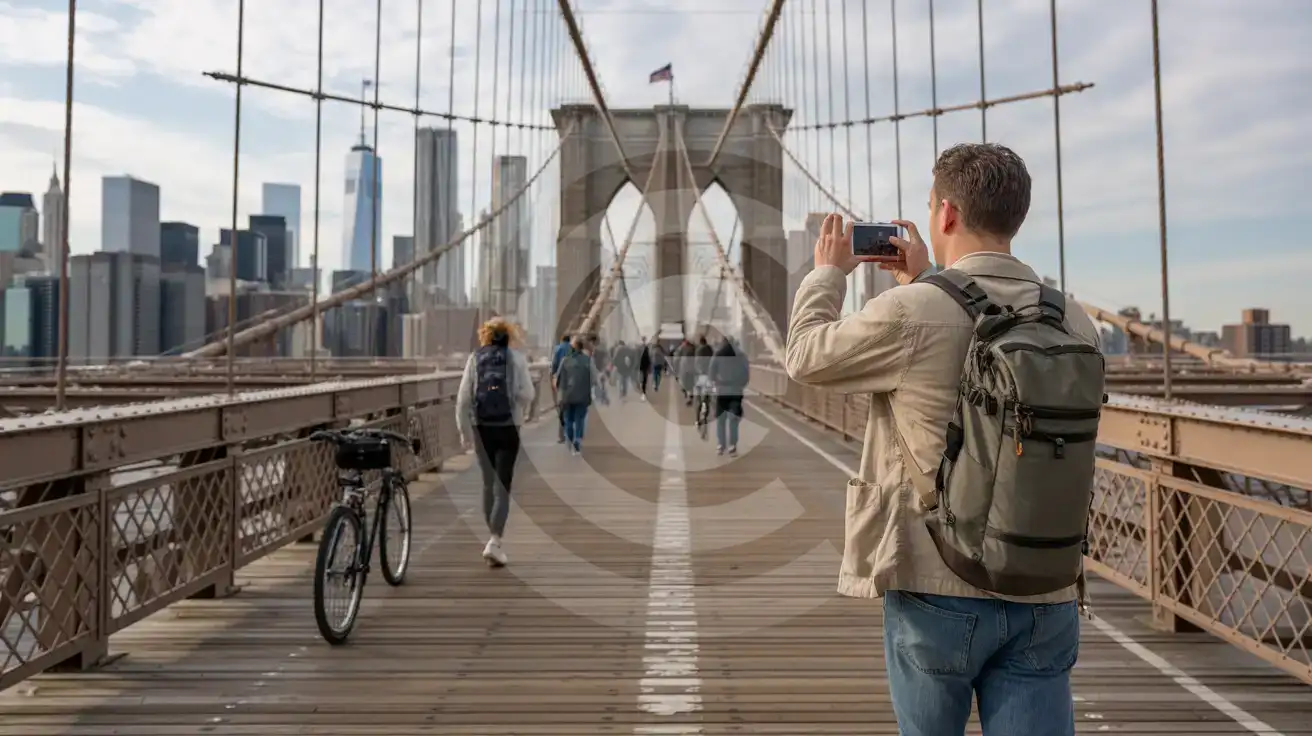
Solo male traveler photographing the Brooklyn Bridge Gothic tower and Manhattan skyline from the wooden pedestrian promenade
Activate your eSIM before departure so your bridge-crossing photos upload while you walk.

Compare eSIM Options at Brooklyn Bridge

Recommended
Local SIM / Operator
Roaming
Setup timeStore visit + paperworkAuto
No local ID neededSSN/Credit checkUse home account
SpeedCarrier-gradePartner-dependent
Travel supportEnglish onlyHome carrier hours
Keep home numberReplaces itSame number
Cost predictabilityBills can spikeBill-shock risk
5GB / 30 daysLight traveler
15GB / 30 days
$45.00
~$45.00/mo + taxes & fees.
$12-18 / day
$15.00
Typical day-pass tariff varies by home carrier
10GB / 30 daysStandard travelerMost popular
20GB / 30 daysHeavy traveler

Frequently Asked Questions (FAQs)

Install the eSIM profile at home over WiFi before your flight, then activate it after landing — by the time you're walking from the 4/5/6 platform at Brooklyn Bridge-City Hall toward the promenade entrance, your phone is already pulling directions and uploading photos.

The bridge itself has no dedicated WiFi network. The waterfront parks at either end — Brooklyn Bridge Park and City Hall Park — offer municipal hotspots, but these drop under heavy tourist traffic and require registration. eSIMno bypasses all of that with direct cellular access on AT&T or Verizon.

Yes — dual-SIM mode lets your home SIM stay active for incoming calls and texts while eSIMno handles all your data. Use WhatsApp, FaceTime, or Google Meet for outgoing calls over data to avoid roaming charges on your home line.

On the Brooklyn side, drop a pin at Washington Street under the Manhattan Bridge overpass or along Front Street — both zones have better driver access than the narrow DUMBO side streets. On the Manhattan side, Park Row near City Hall or the Fulton Street transit hub work well. Live Uber and Lyft apps over your eSIM data let you compare wait times and surge pricing before you request.

The same plan covers all 50 states — you can walk the bridge in the morning, catch a game at Yankee Stadium in the Bronx that evening, and drive to the Jersey Shore the next day without switching plans or buying additional data.

A full crossing with photo uploads, real-time navigation, and rideshare coordination uses roughly 200-400MB. If you're live-streaming the mid-span Manhattan view or uploading 4K video clips, budget closer to 1GB for the day. Multi-day NYC trips with daily transit, maps, and social media run comfortably on 5-10GB plans.

GET A FULL20%OFFon your first order
Use code: FIRSTWELCOME20

Stay connected,
wherever you go

Seamless global eSIM coverage

Get Started
The Brooklyn Bridge pedestrian promenade runs 1.1 miles between Manhattan's City Hall Park and Brooklyn's DUMBO waterfront, with the elevated wooden walkway sitting above vehicle lanes and offering unobstructed views of the harbor, the Statue of Liberty, and the Manhattan skyline. Travelers crossing on foot need working data for real-time navigation, group coordination, and the stream of photos headed to social feeds. An eSIMno plan purchased before departure means your phone connects to AT&T or Verizon the moment you clear customs at JFK or Newark — no activation delay, no physical card to fumble with while walking. The bridge itself has no dedicated WiFi network, and the waterfront parks on either end offer only patchy municipal hotspots that drop under tourist-season crowds. Rideshare pickup from the Brooklyn side requires precise pin placement on Washington Street or under the Manhattan Bridge overpass; from the Manhattan side, the closest zones cluster around Park Row and the Fulton Street transit hub. Both scenarios demand reliable mobile data to avoid the wrong pickup point and a driver circling blocks you can't redirect. eSIMno coverage extends far beyond the bridge — the same plan works at Yankee Stadium in the Bronx, across the Jersey Shore beaches, and through a road trip to Niagara Falls or down to Washington D.C. Buy once, install at home over WiFi, and activate after your flight lands. Your phone becomes your map, your ticket wallet, and your group-chat hub from the moment you step onto the promenade.
Back to United States
No more SIM kiosks

No more SIM kiosks

Skip the airport queues. Install your eSIM at home, activate when you land.

no roaming charges

No roaming surprises

Forget the $200 phone bill three weeks after your trip. Plain pricing, no hidden fees.

keep your physical sim

Keep your home number

Dual-SIM means your physical SIM stays active for calls and texts. eSIM handles only data.

easy installation

Setup in 2 minutes

Scan QR code, follow on-screen steps, you're connected. Works on any eSIM-compatible phone.

Pay SafelyVisa CardMaster CardGoogle PayPayPalApple Pay

How does eSIMNo Works?

Experience seamless global connectivity with our personal eSIM service. Enjoy faster speeds, wider coverage, and the convenience of online purchasing.

Buy a Data Plan

Buy a Data Plan

Search for your destination and pick any data plan

Step 1

Install your eSIM

Install your eSIM

Easy installation via qr code

Step 2

Activate Your eSIM

Activate Your eSIM

Only active when you are ready to use data

Step 3

Advantages

24/7 Customer Support

Reach our team via WhatsApp and email during business hours. Quick answers to common questions available anytime through our automated assistant.

Immediate delivery

Your eSIM arrives by email within minutes. Install it before you board your flight.

Worldwide Coverage

One eSIM, 160+ countries. Land anywhere and connect instantly — no SIM swapping, no roaming charges.

Check Compatibility

Check Compatibility

Before buying and installing an eSim, check if your phone supports one

Check if your phone is eSIM compatible

As you feel the need to use eSIM on your phone, the first question that arises is: does your mobile support eSIMs? And do eSIM-compatible devices work in all regions worldwide?

Some phones that support eSIM technology

  • IPhone XS and Later
  • Samsung Galaxy S20 and Later
  • Pixel 4 and Later
  • Xiaomi 12T Pro and Later
All eSIM-Compatible Phones

Frequently Asked Questions (FAQs)

Find helpful information to answer your questions

Will my home phone number receive calls while I use the eSIM?
Yes - if your home SIM stays installed and active, calls and SMS to your home number arrive normally. The eSIM only handles data; voice service stays on your home line. Just remember that incoming calls and texts to your home number while abroad may trigger roaming charges from your home carrier.
What makes eSIMno different from other eSIM services?
eSIMno partners directly with local operators in over 200 countries, eliminating intermediaries. This direct relationship lets us offer competitive pricing, extensive coverage, and faster activation than resellers who route data through third parties.
Is unlimited data really unlimited?
Unlimited plans provide unlimited data at high speed (4G/5G) up to a fair-use threshold defined per plan. Beyond that threshold, speeds may be reduced to 128 Kbps for the remainder of the validity period - still usable for messaging and basic browsing, but slower for streaming and video calls.
Does the eSIM work on cruise ships or airplanes?
eSIMs use ground-based cellular networks, so they don't work in flight or at sea outside coastal coverage. They activate as soon as you connect to a partner network on land. For in-flight or maritime data, you'll need the airline or ship's onboard Wi-Fi.
How do I top up my United-states eSIM?
To top up your United-states eSIM data, log in to the 'My eSIMs' section in the eSIMno Center on our website or mobile app. Select the eSIM you want to top up and follow the on-screen instructions to add more data without losing your current connection.
Can I use my SIM card and eSIM at the same time?
Yes. On dual-SIM devices (most modern iPhones and Android phones), you can run your physical SIM and the eSIM simultaneously. Use your home SIM for calls and SMS, and the eSIM for mobile data. Keep in mind that leaving your home SIM active may trigger roaming charges if you use it for calls or texts abroad.
What customer support is available if I have issues?
eSIMno offers 24/7 support via WhatsApp and email. Our human support team - not bots - handles installation help, troubleshooting, billing questions, and refund inquiries. Most issues are resolved within minutes during business hours and within a few hours overnight.
What happens when my data plan runs out?
When you use up your data allowance, your connection stops until you top up or purchase a new plan. You can top up directly from the eSIMno Center while connected to Wi-Fi, or buy a new plan if your validity period has expired.
When should I set up my eSIM?
A Wi-Fi connection is required to install your eSIM, so we recommend setting it up before you leave home. Activation can happen later, either right before departure or after you land at your destination - but the initial QR scan needs Wi-Fi.
Do I need to remove my eSIM after my trip?
You don't have to remove it. Once your data plan expires, the eSIM simply stops providing data. You can leave the dormant profile on your phone and reuse it next time by purchasing a new plan, or delete it from cellular settings to free up an eSIM slot.
Can I use the eSIM for my smartwatch?
Some smartwatches (Apple Watch Cellular, Samsung Galaxy Watch LTE) support eSIM, but they typically require a plan from your home carrier rather than a travel eSIM. eSIMno plans are designed for phones and tablets - check device compatibility before purchase if you intend to use a wearable.
Can I use the eSIM on more than one device?
Each eSIM profile is tied to a single device once activated. If you need data on multiple devices (e.g., phone and tablet), you can either purchase separate eSIMs for each device or use the Personal Hotspot feature on your phone to share data with other devices.

Use Your Free Credit

You can earn up to 15% commission from your friends' purchases with your Reference code. Plus, your friends will get $2 off their first purchase when they use your code!

FIND OUT HOW
Refer a friend

Refer

A FRIEND

Step into the world of E-SIM, bring your friends and benefit together!