Review Your Cart

Your cart is empty.

You haven't added any eSIM packages yet. Start exploring our plans to get connected!

Browse our eSIM Packages
🎉 Welcome offer: 20% off with promo code FIRSTWELCOME20

United States United States   / Gondola Rides at The Venetian

Venetian-style gondolas gliding along the Grand Canal inside The Venetian Las Vegas with painted sky ceiling and ornate bridges

Gondola Rides at The Venetian eSIM: Las Vegas Data That Works Across All USA

You're stepping aboard a gondola at The Venetian with your phone ready to capture the painted ceiling and singing gondolier, a dinner reservation at The Forum Shops at Caesars to confirm, and a rideshare pickup to coordinate after you disembark. With eSIMno, your USA data activates before you leave home — by the time your gondola glides under the Rialto Bridge replica, you're already uploading that perfect canal shot.
View Plans
GET A FULL20%OFFon your first order
Use code: FIRSTWELCOME20

Stay connected,
wherever you go

Seamless global eSIM coverage

Explore our plans below

Plan Your Trip

Tell us what you'll do and how long you'll be away — we'll highlight the right plan.

7 days
1102030

What will you do?

Tap an activity above to see which plan fits your trip

Already a customer?

EARN UP TOON EVERY FRIEND'S PURCHASE
NETWORK: AT&T & Verizon Wireless The speed may vary depending on the location.

Quick Facts

Language
English
Currency
US Dollar (USD, $)
Time Zone
Pacific Time (UTC-8 / UTC-7 DST)
Dialing Code
+1
Power Plug
Type A, B (flat 2-pin, common across North America)
Emergency
911 (police, fire, ambulance)
eSIMno Networks
AT&T, Verizon Wireless

How to Get Your eSIM

  1. Pick Your USA Data Plan
    Choose a plan sized for your Vegas trip — light browsing and maps, or heavier video uploads from the gondola and shows. Plans cover all 50 states, not just Nevada.
  2. Install at Home Before Your Flight
    Scan the QR code over your home WiFi while packing. The profile sits dormant until you activate it — no data charges until you're ready.
  3. Activate After Landing at Harry Reid International
    Once the aircraft reaches the gate and you switch off airplane mode, enable your eSIM line. By the time you clear the terminal and reach the taxi queue, data is live.
  4. Keep Your Home SIM for Calls
    Your home number stays active for incoming calls and texts. Use WhatsApp, FaceTime, or Google Meet over eSIM data for outgoing calls — avoids roaming charges on voice.
  5. Board the Gondola With Data Ready
    Walk through The Venetian lobby, descend to the Grand Canal Shoppes, and step onto the boarding dock. Your phone is already connected — share the gondolier's serenade live or confirm your next reservation without hunting for casino WiFi.

Traveler Tips

  • Gondola rides last 10-15 minutes; the outdoor canal route at St. Mark's Square offers Strip views while the indoor route passes under the painted ceiling — check availability for both at the boarding dock near the casino floor.
  • Peak wait times hit Friday and Saturday evenings after 6 PM; booking a timed slot through The Venetian's official site saves queuing — the confirmation QR loads faster on your own data than on congested lobby WiFi.
  • The Grand Canal Shoppes corridor has strong cellular signal throughout, but deeper inside the casino floor, coverage can dip — your eSIM data still beats the overloaded guest WiFi during convention weeks.
  • Combine the gondola with dinner at a Grand Canal restaurant; OpenTable and Resy confirmations require data to update real-time availability.
  • After your ride, the High Roller observation wheel is a 12-minute walk north along the LINQ Promenade — Google Maps live directions help navigate the connected casino corridors.

Why Data Matters at The Venetian Gondola

The gondola experience at The Venetian is built for sharing — a singing gondolier, the turquoise canal reflecting faux-Renaissance facades, the painted Sistine-style ceiling overhead. Most riders have phones out within seconds of boarding. Uploading a 30-second video clip to Instagram or TikTok mid-ride requires steady data; the casino-floor WiFi network competes with thousands of guests and rarely delivers the upload speed you need in real time.

Beyond the canal itself, The Venetian complex sprawls across 36 floors and connects directly to the Palazzo and the Sands Expo convention center. Navigating from the gondola dock to a specific restaurant — say, a reservation at Buddy V's Ristorante or Yardbird Southern Table — involves multiple escalator levels and corridor turns. Google Maps indoor positioning and real-time directions save the guesswork. Rideshare pickup coordinates matter too: Uber and Lyft pickups at The Venetian funnel to specific valet zones on Koval Lane, not the main Strip entrance. Your app needs data to display the correct pin and driver ETA.

Convention attendees at CES or MAGIC who squeeze in a gondola ride between sessions rely on Slack, Teams, and email staying live. The eSIM line keeps work apps connected while the casino WiFi login-screen hassle stays out of the way. After the ride, the same data plan that worked inside the Grand Canal Shoppes keeps working at eSIMno plans for Gondola Rides at The Venetian, Las Vegas, Nevada, United States — whether you head to the Fountains of Bellagio, drive out to Red Rock Canyon, or fly onward to another US city entirely.

Visiting the Gondola Rides

Hours and Boarding

Gondola rides operate from late morning until late evening, with extended hours on weekends. The indoor canal route boards near the casino floor; the outdoor St. Mark's Square route boards at the plaza entrance facing Las Vegas Boulevard. Both queues accept walk-ups, but timed reservations through The Venetian's site reduce wait times during peak periods.

Getting There

From Harry Reid International Airport, the drive to The Venetian runs 15-20 minutes outside rush hour via Paradise Road or the I-15 north. Rideshare pickup zones at the airport are on Level 2 of Terminal 1; the app shows live driver location once your eSIM data is active. The Las Vegas Monorail stops at the Harrah's/The LINQ station, a 10-minute covered walk south to The Venetian's main entrance.

What to Expect

Each gondola seats up to four passengers. The gondolier narrates and sings throughout the 10-15 minute ride. Photography is encouraged — the painted ceiling and arched bridges make strong backdrops. After disembarking, the Grand Canal Shoppes stretch in both directions with dining, retail, and live street performers.

Capturing the Moment

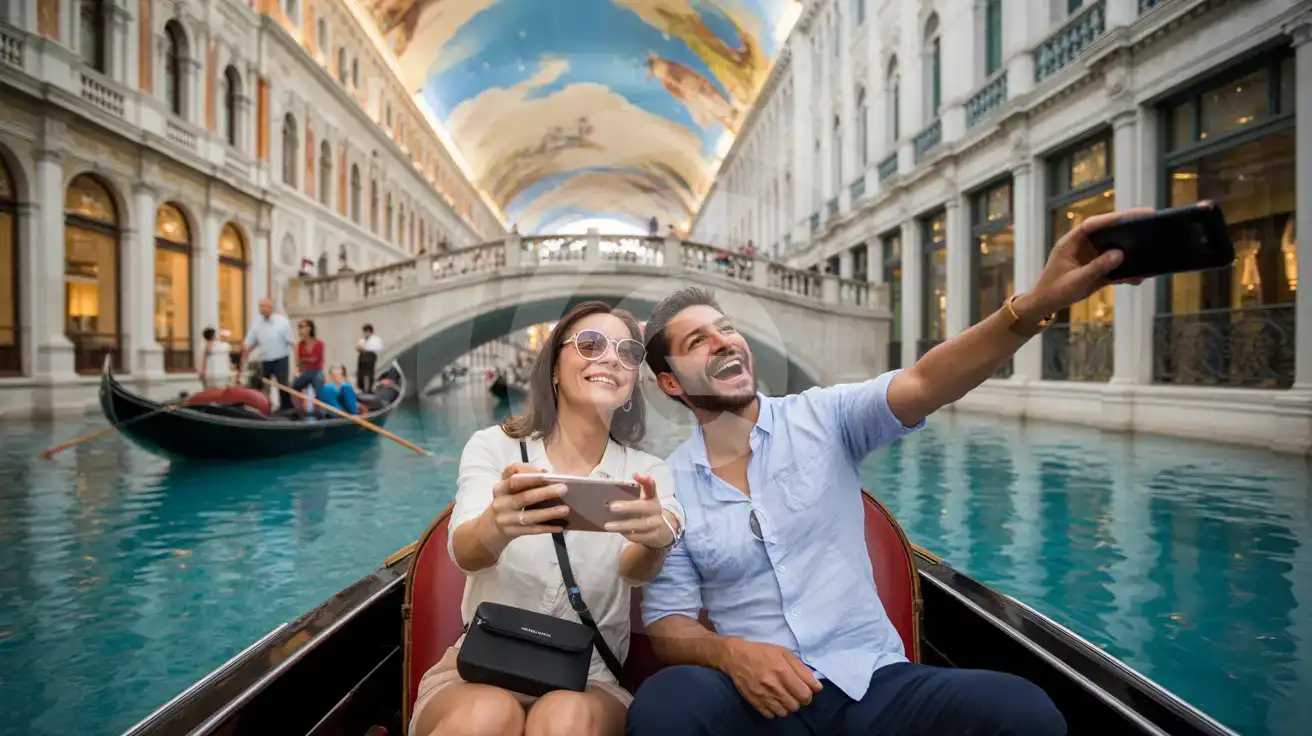
Couple filming the painted ceiling from a gondola inside The Venetian Grand Canal Shoppes Las Vegas
Activate your eSIM before boarding so your Venetian gondola video uploads while the gondolier is still singing.

Compare eSIM Options at Gondola Rides at The Venetian

Recommended
Local SIM / Operator
Roaming
Setup timeStore visit + paperworkAuto
No local ID neededSSN/Credit checkUse home account
SpeedCarrier-gradePartner-dependent
Travel supportEnglish onlyHome carrier hours
Keep home numberReplaces itSame number
Cost predictabilityBills can spikeBill-shock risk
5GB / 30 daysLight traveler
15GB / 30 days
$45.00
~$45.00/mo + taxes & fees.
$12-18 / day
$15.00
Typical day-pass tariff varies by home carrier
10GB / 30 daysStandard travelerMost popular
20GB / 30 daysHeavy traveler

Frequently Asked Questions (FAQs)

Install the eSIM profile at home over WiFi before your flight. Once your aircraft lands at Harry Reid International and you switch off airplane mode, enable the eSIM line — by the time you're in the rideshare heading up Las Vegas Boulevard toward The Venetian, your phone is already pulling directions and confirming your gondola reservation.

Yes. The indoor canal area and surrounding shops sit within The Venetian's main building, where AT&T and Verizon macro coverage reaches through the structure. Signal strength stays stronger and more consistent than the congested guest WiFi network that thousands of casino visitors share simultaneously.

Absolutely. Your home SIM stays in the phone for incoming calls and texts — no forwarding setup needed. Use eSIMno data for WhatsApp, FaceTime, or Google Meet calls to avoid roaming charges on outgoing voice. The eSIM handles all your data-hungry tasks: uploading gondola videos, checking OpenTable for a Grand Canal restaurant, coordinating rideshare pickup on Koval Lane.

A gondola ride with video recording, photo uploads, and real-time messaging runs through roughly 300-500 MB if you share content immediately. Add navigation through the casino corridors, a dinner reservation lookup, and a rideshare trip, and a 1-2 GB plan comfortably covers a full day at The Venetian and surrounding Strip attractions.

Yes. The same plan that works inside The Venetian covers all 50 states. Drive out to Red Rock Canyon National Conservation Area for a morning hike, head south to Hoover Dam for the afternoon tour, or fly onward to Los Angeles or New York — your data stays live without buying a second SIM or switching plans.

Rideshare is the fastest option — the pickup zone is on Level 2 of Terminal 1, and the drive runs 15-20 minutes outside rush hour. The Uber or Lyft app needs data to display your driver's location and the correct pickup pin. Alternatively, the Las Vegas Monorail connects the airport area to the Harrah's/LINQ station, a 10-minute covered walk south to The Venetian's main entrance.

GET A FULL20%OFFon your first order
Use code: FIRSTWELCOME20

Stay connected,
wherever you go

Seamless global eSIM coverage

Get Started
Gondola Rides at The Venetian sit inside one of the Strip's most photographed indoor environments — the Grand Canal Shoppes with their faux-Venetian architecture, turquoise waterway, and elaborate painted-sky ceiling. Data matters here because the experience is inherently shareable: the singing gondolier, the ornate bridges, the crowds gathered at the canal railings. Uploading video or photos in real time beats waiting for hotel WiFi later when the moment has passed. Activate your eSIM before you fly into Harry Reid International. By the time you walk through The Venetian's lobby and reach the canal-level boarding dock, your phone is already pulling directions, checking show times at the nearby Smith Center, and confirming your dinner slot. The indoor location means casino-floor WiFi competes with thousands of guests — your own data line sidesteps that congestion entirely. The same plan that covers your gondola ride keeps working when you head north to Red Rock Canyon, south toward the Hoover Dam, or across the country to a connecting city. One purchase, nationwide reach, zero SIM-card juggling at the airport kiosk.
Back to United States
No more SIM kiosks

No more SIM kiosks

Skip the airport queues. Install your eSIM at home, activate when you land.

no roaming charges

No roaming surprises

Forget the $200 phone bill three weeks after your trip. Plain pricing, no hidden fees.

keep your physical sim

Keep your home number

Dual-SIM means your physical SIM stays active for calls and texts. eSIM handles only data.

easy installation

Setup in 2 minutes

Scan QR code, follow on-screen steps, you're connected. Works on any eSIM-compatible phone.

Pay SafelyVisa CardMaster CardGoogle PayPayPalApple Pay

How does eSIMNo Works?

Experience seamless global connectivity with our personal eSIM service. Enjoy faster speeds, wider coverage, and the convenience of online purchasing.

Buy a Data Plan

Buy a Data Plan

Search for your destination and pick any data plan

Step 1

Install your eSIM

Install your eSIM

Easy installation via qr code

Step 2

Activate Your eSIM

Activate Your eSIM

Only active when you are ready to use data

Step 3

Advantages

24/7 Customer Support

Reach our team via WhatsApp and email during business hours. Quick answers to common questions available anytime through our automated assistant.

Immediate delivery

Your eSIM arrives by email within minutes. Install it before you board your flight.

Worldwide Coverage

One eSIM, 160+ countries. Land anywhere and connect instantly — no SIM swapping, no roaming charges.

Check Compatibility

Check Compatibility

Before buying and installing an eSim, check if your phone supports one

Check if your phone is eSIM compatible

As you feel the need to use eSIM on your phone, the first question that arises is: does your mobile support eSIMs? And do eSIM-compatible devices work in all regions worldwide?

Some phones that support eSIM technology

  • IPhone XS and Later
  • Samsung Galaxy S20 and Later
  • Pixel 4 and Later
  • Xiaomi 12T Pro and Later
All eSIM-Compatible Phones

Frequently Asked Questions (FAQs)

Find helpful information to answer your questions

How long is the validity of the United-states eSIM plans?
The validity of eSIM plans varies from 7 days to 90 days depending on the plan you choose. Lifetime options are also available for travelers who don't want their data to expire after a fixed period.
Can I install my eSIM before traveling?
Yes - setting it up before your trip is the easiest approach. Your confirmation email contains the QR code, a one-tap install link and the manual SM-DP+ / activation codes (the same options are also available via sign in > Profile > My eSIMs > Install). While on Wi-Fi at home, install it with the one-tap link on your phone, or - to use the QR - show it on another screen or a printout and scan it with the phone you are setting up (not another phone). Installing does not start your plan: the validity countdown only begins when the eSIM connects to a mobile network inside your plan's coverage area. Keep the eSIM line and its Data Roaming off until you are ready to start - if your plan covers the country you are in right now, turning the line on connects and starts the countdown immediately, even if you do not browse anything. Please note: once installed, an eSIM is considered used and is no longer eligible for a refund.
Is unlimited data really unlimited?
Unlimited plans provide unlimited data at high speed (4G/5G) up to a fair-use threshold defined per plan. Beyond that threshold, speeds may be reduced to 128 Kbps for the remainder of the validity period - still usable for messaging and basic browsing, but slower for streaming and video calls.
Can I get a refund after purchase?
Refunds are not available once an eSIM has been installed or activated - install codes are one-time-use, so an installed eSIM is considered used even if no data has been consumed. If you have not installed your eSIM yet and want a refund, contact support within the refund window stated at checkout. We recommend reviewing plan details carefully before purchase to avoid any issues.
Will the eSIM affect my phone's battery life?
Running two SIM lines (physical + eSIM) uses slightly more battery than one, since the phone monitors both networks. The difference is usually 5-10% over a full day. To minimize impact, disable the line you're not actively using or turn off cellular data on the inactive line.
When should I set up my eSIM?
A Wi-Fi connection is required to install your eSIM, so we recommend setting it up before you leave home. Activation can happen later, either right before departure or after you land at your destination - but the initial QR scan needs Wi-Fi.
Do I need to deactivate my original SIM?
We recommend turning off cellular data and data roaming on your original SIM while abroad to avoid accidental roaming charges. You don't need to physically remove the SIM - just disable data and set the eSIM as your primary data line.
What network speeds can I expect?
Most eSIMno plans connect at 4G/LTE or 5G speeds depending on local network availability and your device's capabilities. Speed varies by location, network congestion, and signal strength. In major cities and tourist areas, expect speeds comparable to local mobile carriers.
Can I install multiple eSIMs on the same phone?
Yes. Modern iPhones and Android devices support multiple eSIM profiles - typically 5 to 8 stored profiles, with 1 or 2 active simultaneously. You can install eSIMs for different countries and switch between them in settings without removing any.
What payment methods does eSIMno accept?
eSIMno accepts major credit and debit cards (Visa, Mastercard, American Express), PayPal, Apple Pay, and Google Pay. All transactions are processed through secure encrypted gateways, and we don't store full card details on our servers.
Can I use the eSIM to make video calls?
Yes - apps like FaceTime, WhatsApp, Zoom, Google Meet, and Microsoft Teams all work over your eSIM data. Video calls use about 200-400 MB per hour depending on quality, so factor that into your plan choice if you make long calls regularly.
Will the eSIM work on my iPad?
Yes, if your iPad model supports eSIM. iPad Pro (3rd generation and later), iPad Air (3rd generation and later), iPad mini (5th generation and later), and standard iPad (7th generation and later with cellular) all support eSIM. Installation works the same way as on iPhone.

Use Your Free Credit

You can earn up to 15% commission from your friends' purchases with your Reference code. Plus, your friends will get $2 off their first purchase when they use your code!

FIND OUT HOW
Refer a friend

Refer

A FRIEND

Step into the world of E-SIM, bring your friends and benefit together!