Review Your Cart

Your cart is empty.

You haven't added any eSIM packages yet. Start exploring our plans to get connected!

Browse our eSIM Packages
🎉 Welcome offer: 20% off with promo code FIRSTWELCOME20

United States United States   / The Music Center

The Music Center plaza and Dorothy Chandler Pavilion colonnade at golden hour with Downtown Los Angeles skyline behind

The Music Center LA eSIM: Data That Works Across the USA

You're heading to The Music Center with your e-ticket confirmation on your phone, the Metro schedule to check, and post-show dinner plans near Grand Central Market waiting for your confirmation reply. eSIMno gives you US-wide data on AT&T and Verizon networks — buy before your flight, activate after touchdown at LAX, and your phone is ready before the house lights dim.
View Plans
GET A FULL20%OFFon your first order
Use code: FIRSTWELCOME20

Stay connected,
wherever you go

Seamless global eSIM coverage

Explore our plans below

Plan Your Trip

Tell us what you'll do and how long you'll be away — we'll highlight the right plan.

7 days
1102030

What will you do?

Tap an activity above to see which plan fits your trip

Already a customer?

EARN UP TOON EVERY FRIEND'S PURCHASE
NETWORK: AT&T & T-Mobile & Verizon Wireless Depending on the plan you choose, you'll connect to one or more of these networks.

Quick Facts

Time Zone
Pacific Time (UTC-8 / UTC-7 DST)
Dialing Code
+1
Currency
US Dollar (USD, $)
Power Plug
Type A, B (flat 2-pin, common across North America)
Language
English
Emergency
911 (police, fire, ambulance)
eSIMno Networks
AT&T, Verizon Wireless

How to Get Your eSIM

  1. Pick Your US Data Plan
    Choose a plan that covers your Music Center dates plus any extensions to other US cities — the same eSIM works coast to coast.
  2. Install Before Your Flight
    Add the eSIM profile to your phone over home WiFi. iPhone users find it under Settings → Cellular → Add eSIM; Android varies by manufacturer but the QR scan flow takes under two minutes.
  3. Keep It Off Until Landing
    Leave the eSIM line toggled off during the flight. Activate only after the aircraft reaches the gate at LAX and the captain clears phone use.
  4. Switch Off Airplane Mode at the Gate
    Your phone connects to AT&T or Verizon within seconds. By the time you're walking toward baggage claim or the FlyAway bus stop, data is live.
  5. Head to The Music Center With Data Ready
    The Metro B Line (Red) from Union Station to Civic Center/Grand Park takes 8 minutes. Your e-ticket, rideshare app, and dinner reservation all load on cellular — no venue WiFi hunt required.

Traveler Tips

  • Arrive 45 minutes before curtain — Grand Avenue security screening and plaza crowds add time, and having your e-ticket barcode ready on your phone speeds the line.
  • The Metro B Line (Red) runs every 10 minutes until midnight from Civic Center/Grand Park station, 2 blocks from the plaza. Real-time arrival boards sync with the Transit app.
  • Post-show rideshare surge hits hard on Grand Avenue between 10:15 PM and 10:45 PM. Set a pickup pin on Hope Street or at the Walt Disney Concert Hall drop zone 3 blocks north to shave dollars.
  • Keep your home SIM active for incoming calls — the eSIMno plan is data-only, so WhatsApp or FaceTime handles outbound calls over your new data line.
  • The Dorothy Chandler Pavilion dress code is smart casual; the Ahmanson and Mark Taper are more relaxed. Check the venue's site before packing.

Why Data Matters at The Music Center

The Music Center's three main venues — Dorothy Chandler Pavilion, Ahmanson Theatre, Mark Taper Forum — use mobile e-tickets that load as QR barcodes on your phone. Venue WiFi exists in the lobbies, but 2,000+ patrons hitting the same access point during intermission creates the predictable crawl. Cellular data on AT&T or Verizon bypasses the bottleneck entirely, so your Act II ticket scan and interval drink order process without the spinning wheel.

Getting to Grand Avenue from LAX involves choices that shift by traffic hour. The FlyAway bus to eSIMno plans for The Music Center, Los Angeles, California, United States partner drop at Union Station runs every 30 minutes and costs around $10 one-way (confirm current fare on the LAX website); the Metro C Line connects to the B Line at Willowbrook for a slower but cheaper route under $2. Google Maps with live traffic or the Transit app pulls real-time ETAs so you can decide at the curb instead of guessing. Lyft and Uber surge pricing from LAX to Downtown fluctuates between $35 and $75 depending on the hour — checking both apps at baggage claim saves the blind pick.

After the final bow, the Arts District sits 12 minutes east by rideshare. OpenTable and Resy reservation confirmations live on your phone; pulling them up while walking to the pickup pin means the host seats you faster. If plans shift and you'd rather hit Grand Central Market for a late bite, the 0.4-mile walk south keeps your route live on Maps the whole way. Data keeps the evening flexible — venue WiFi does not follow you down the block.

Visiting The Music Center

The Music Center campus spans 4 acres on Grand Avenue between Temple Street and 1st Street. The Dorothy Chandler Pavilion hosts LA Opera and the Los Angeles Philharmonic's classical season; the Ahmanson Theatre runs Broadway touring productions; the Mark Taper Forum stages smaller dramatic works. Walt Disney Concert Hall, designed by Frank Gehry, sits one block north and operates under a separate box office. Performance start times cluster around 7:30 PM or 8:00 PM; Sunday matinees begin at 2:00 PM. Doors open 60 minutes before curtain for most productions.

Security screening at the Grand Avenue entrance requires bags to be opened. Photography is prohibited inside the auditoriums once the show begins. Intermissions run 15-20 minutes — enough time for a drink at the lobby bar but not for a sit-down meal. Validated parking in the Music Center garage costs around $9 for evening events (confirm current rate on the venue site); street metered parking ends enforcement at 8:00 PM but spaces fill fast on performance nights. The plaza itself is open daily for free public access, and the Taper Terrace offers views toward City Hall without a ticket.

Connected at The Music Center

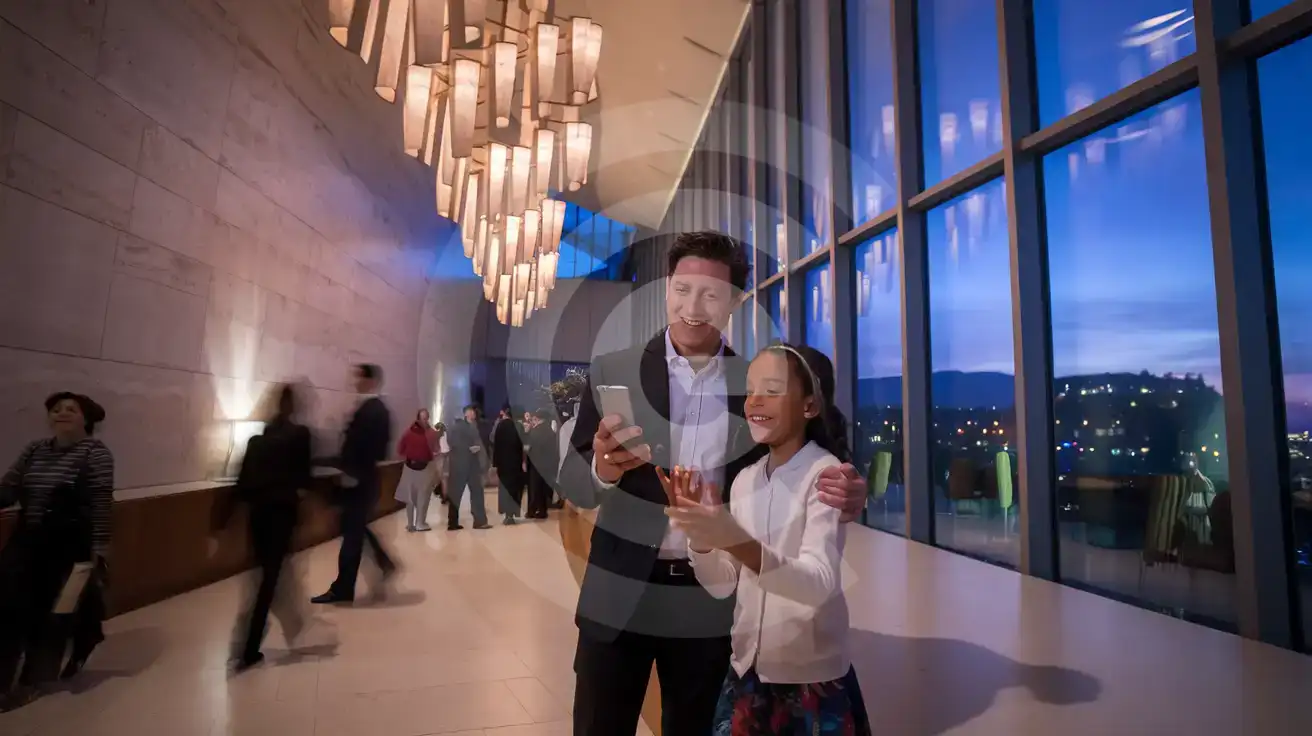
Family sharing a moment in the Dorothy Chandler Pavilion lobby at The Music Center before a performance
Activate your eSIM before the performance so e-tickets and post-show plans load instantly at The Music Center.

Compare eSIM Options at The Music Center

Recommended
Local SIM / Operator
Roaming
Setup timeStore kit, needs activationAuto
No local ID neededNo SSN; passport at carrier storesUse home account
SpeedOne carrier onlyPartner-dependent
Travel supportEnglish-language serviceHome carrier hours
Keep home numberReplaces itSame number
Cost predictabilityAdvertised price needs Auto PayBill-shock risk
5GB / 30 daysLight traveler
15GB / 30 days
₺2170.69
First month without Auto Pay; 35 USD after enrolling. Taxes and fees are extra.
$12-18 / day
₺723.56
Typical daily roaming rate; varies by home carrier
10GB / 30 daysStandard travelerMost popular
20GB / 30 daysHeavy traveler

Frequently Asked Questions (FAQs)

Install the eSIM profile at home over WiFi before your flight, then activate after landing at LAX. By the time you're boarding the FlyAway bus to Union Station or riding the Metro B Line toward Civic Center/Grand Park, your phone is already pulling e-ticket barcodes and real-time transit updates.
Lobby WiFi exists, but 2,000+ patrons connecting during intermission creates slowdowns. Cellular data on your eSIMno plan bypasses the congestion — your QR ticket scan and interval plans load without the spinning wheel.
The FlyAway bus runs every 30 minutes to Union Station (around $10, 45-60 minutes depending on traffic). From Union Station, the Metro B Line reaches Civic Center/Grand Park in 8 minutes — a 2-block walk to the plaza. Rideshare runs $35-$75 depending on surge; checking both Lyft and Uber at baggage claim with live data helps you pick the better deal.
The plan covers the entire United States on AT&T and Verizon networks. Whether you extend to San Francisco, catch a Vegas show, or fly out through JFK, the same eSIM keeps working — no SIM swaps, no roaming surprises across state lines.
The eSIMno plan is data-only. Keep your home SIM active for incoming calls — it rings normally because your phone runs both lines in dual-SIM mode. For outgoing calls, use WhatsApp, FaceTime, or Google Meet over your eSIM data to avoid roaming charges on your home line.
The Music Center garage on Grand Avenue offers validated event parking — confirm the current rate on the venue's site before you arrive. Street meters end enforcement at 8:00 PM, but spaces fill fast on performance nights. Having Google Maps or SpotHero on cellular helps you find available lots in the Bunker Hill area if the garage is full.
GET A FULL20%OFFon your first order
Use code: FIRSTWELCOME20

Stay connected,
wherever you go

Seamless global eSIM coverage

Get Started
The Music Center sits at the heart of Downtown LA's cultural corridor, and your phone handles everything from the moment you step off the Red Line at Civic Center/Grand Park station. E-tickets for the Dorothy Chandler Pavilion, the Ahmanson Theatre, or the Mark Taper Forum live on your screen — no printouts, no will-call queue. Rideshare pickup coordinates after the final curtain, restaurant reservations on OpenTable for the Arts District, real-time Metro alerts if the last train timing shifts — all of it runs on cellular data. An eSIMno plan activates the moment you switch off airplane mode after landing at LAX. The 45-minute FlyAway bus ride to Union Station or the Metro C Line to Downtown gives you time to confirm your evening's logistics while the city rolls past. By the time you're walking Grand Avenue toward the plaza fountains, your phone is already pulling directions, surge-pricing updates, and curtain-time reminders. The same data plan that covers your Music Center evening keeps working if you extend to San Francisco for a Golden Gate weekend, catch a show in Las Vegas, or fly out through JFK. One purchase, nationwide coverage on AT&T and Verizon infrastructure — no SIM swaps, no kiosk hunting, no roaming surprises across state lines.
Back to United States
No more SIM kiosks

No more SIM kiosks

Skip the airport queues. Install your eSIM at home, activate when you land.

no roaming charges

No roaming surprises

Forget the $200 phone bill three weeks after your trip. Plain pricing, no hidden fees.

keep your physical sim

Keep your home number

Dual-SIM means your physical SIM stays active for calls and texts. eSIM handles only data.

easy installation

Setup in 2 minutes

Scan QR code, follow on-screen steps, you're connected. Works on any eSIM-compatible phone.

Pay SafelyVisa CardMaster CardGoogle PayPayPalApple Pay

How does eSIMNo Works?

Experience seamless global connectivity with our personal eSIM service. Enjoy faster speeds, wider coverage, and the convenience of online purchasing.

Buy a Data Plan

Buy a Data Plan

Search for your destination and pick any data plan

Step 1

Install your eSIM

Install your eSIM

Easy installation via qr code

Step 2

Activate Your eSIM

Activate Your eSIM

Only active when you are ready to use data

Step 3

Advantages

24/7 Customer Support

Reach our team via WhatsApp and email during business hours. Quick answers to common questions available anytime through our automated assistant.

Immediate delivery

Your eSIM arrives by email within minutes. Install it before you board your flight.

Worldwide Coverage

One eSIM, 160+ countries. Land anywhere and connect instantly — no SIM swapping, no roaming charges.

Check Compatibility

Check Compatibility

Before buying and installing an eSim, check if your phone supports one

Check if your phone is eSIM compatible

As you feel the need to use eSIM on your phone, the first question that arises is: does your mobile support eSIMs? And do eSIM-compatible devices work in all regions worldwide?

Some phones that support eSIM technology

  • IPhone XS and Later
  • Samsung Galaxy S20 and Later
  • Pixel 4 and Later
  • Xiaomi 12T Pro and Later
All eSIM-Compatible Phones

Frequently Asked Questions (FAQs)

Find helpful information to answer your questions

Can I use the eSIM for my smartwatch?
Some smartwatches (Apple Watch Cellular, Samsung Galaxy Watch LTE) support eSIM, but they typically require a plan from your home carrier rather than a travel eSIM. eSIMno plans are designed for phones and tablets - check device compatibility before purchase if you intend to use a wearable.
Can I install multiple eSIMs on the same phone?
Yes. Modern iPhones and Android devices support multiple eSIM profiles - typically 5 to 8 stored profiles, with 1 or 2 active simultaneously. You can install eSIMs for different countries and switch between them in settings without removing any.
How do I set up the eSIM on my device?
The fastest way is straight from your order confirmation email, which now contains - for each eSIM - the QR code, a one-tap install link, and the SM-DP+ / activation codes. On the phone you'll use, tap the one-tap install link; or, to use the QR, show it on another screen or a printout and scan it with that same phone (not another phone); or enter the codes manually. The email also has an "Install eSIM" button that opens your eSIM's detail page and launches the install pop-up (sign in if prompted), and you can reach the same pop-up anytime via Profile > My eSIMs > find your plan (shown as "Ready to install") > Install. After installing, turn Data Roaming ON for your eSIMno line (iPhone: Settings > Cellular; Android: Settings > Connections/Network) - without it the eSIM installs but shows no internet. Full guide in Help & Support.
Does the eSIM work on cruise ships or airplanes?
eSIMs use ground-based cellular networks, so they don't work in flight or at sea outside coastal coverage. They activate as soon as you connect to a partner network on land. For in-flight or maritime data, you'll need the airline or ship's onboard Wi-Fi.
What smartphones support eSIM?
Most modern devices support eSIM, including iPhone XS and later, Samsung Galaxy S20 through S25 series, Google Pixel 4 and later, Huawei P40 and later, and many recent iPads. Check our full compatibility list before purchasing to confirm your device is supported.
How do I activate the United-states eSIM?
Your eSIMno order confirmation email contains your QR code, your SM-DP+ address and activation code, a one-tap install link, and an "Install eSIM" button - so you can install right from the email. The same options are also on the website: sign in at esimno.com and go to Profile > My eSIMs > your plan > Install. To install, use any ONE of these methods: (1) on the phone you are setting up, tap the one-tap install link/button (iPhone on iOS 17.4+ or Android 9+); (2) use the QR code - because a phone cannot scan its own screen, show this QR on another screen (computer/tablet) or a printout and scan it WITH the phone you are setting up (never with someone else's phone, or the eSIM would install on that phone); or (3) enter the SM-DP+ address and activation code manually. Your United-states eSIM activates automatically when you connect to a local network at your destination.
What happens when my data plan runs out?
When you use up your data allowance, your connection stops until you top up or purchase a new plan. You can top up directly from the eSIMno Center while connected to Wi-Fi, or buy a new plan if your validity period has expired.
How can I check my data usage?
Log in to the eSIMno Center on our website or mobile app to see your remaining data balance and usage history. You can also check usage in your phone's cellular data settings - most devices show data consumed per line.
Can I buy an eSIM for someone else as a gift?
Yes. Purchase the eSIM with your own details, then forward your order confirmation email - or share the "Install eSIM" link from it - with the recipient so they can install it on their own phone (the email contains the QR code and the manual SM-DP+ / activation codes). Make sure their device is eSIM-compatible first - installation usually cannot be reversed once completed.
Will I get notifications when my data is running low?
Yes. eSIMno sends email and push notifications when you've used 50%, 80%, and 100% of your data allowance. You can also check usage anytime in the eSIMno Center or in your phone's cellular settings to track consumption in real time.
What happens if I pause my trip and return home?
Your eSIM keeps its validity period running whether you're using it or not - pausing your trip doesn't pause the timer. If you return home, the eSIM stays dormant on your device until you travel again or it expires. You can disable it in cellular settings to avoid accidental usage.
Is the eSIM connection secure?
eSIM connections are as secure as standard cellular connections - encrypted by the carrier network. For added security on public networks (cafes, airports), use a VPN. The eSIM profile itself is digitally signed and can't be cloned like a physical SIM.

Use Your Free Credit

You can earn up to 15% commission from your friends' purchases with your Reference code. Plus, your friends will get $2 off their first purchase when they use your code!

FIND OUT HOW
Refer a friend

Refer

A FRIEND

Step into the world of E-SIM, bring your friends and benefit together!