Review Your Cart

Your cart is empty.

You haven't added any eSIM packages yet. Start exploring our plans to get connected!

Browse our eSIM Packages
🎉 Welcome offer: 20% off with promo code FIRSTWELCOME20

United States United States   / Bradbury Building

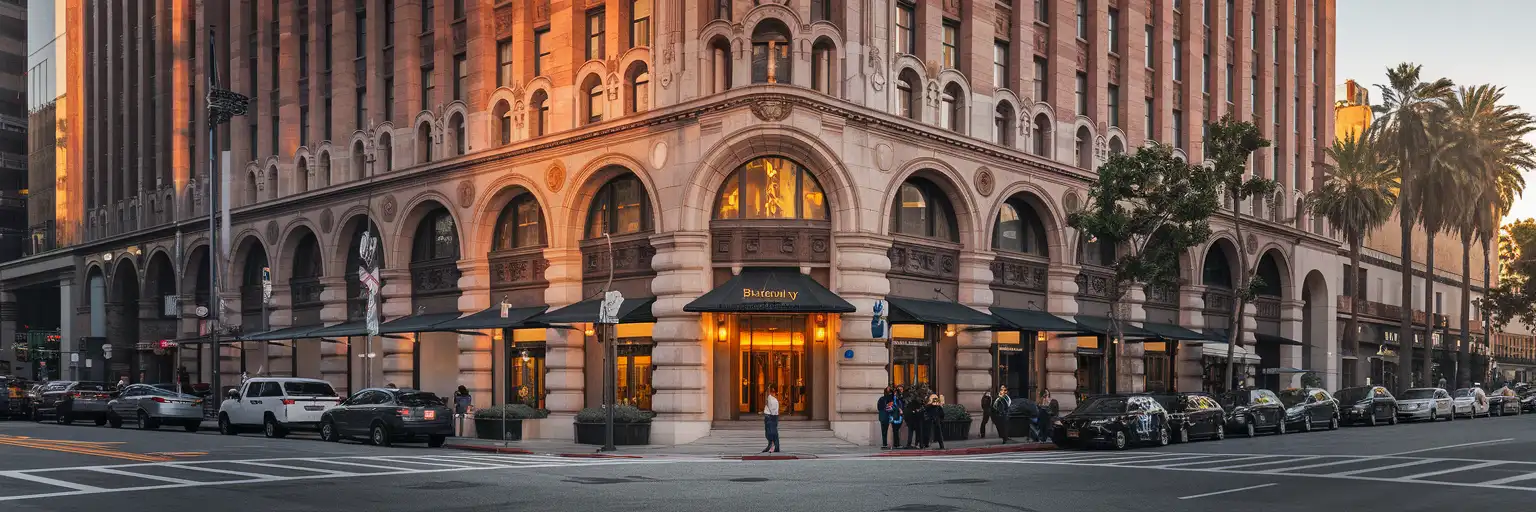
Exterior view of the Bradbury Building in Downtown Los Angeles at golden hour

Bradbury Building eSIM: Los Angeles Data That Works Across the US

You're outside the Bradbury Building with a ticket email, Downtown directions, and your next stop already shifting between Grand Central Market and Los Angeles, California. eSIMno gives you data-only USA coverage without a physical SIM, so you can install in advance and switch it on after landing instead of sorting connectivity on Broadway.
View Plans
GET A FULL20%OFFon your first order
Use code: FIRSTWELCOME20

Stay connected,
wherever you go

Seamless global eSIM coverage

Explore our plans below

Plan Your Trip

Tell us what you'll do and how long you'll be away — we'll highlight the right plan.

7 days
1102030

What will you do?

Tap an activity above to see which plan fits your trip

Already a customer?

EARN UP TOON EVERY FRIEND'S PURCHASE
NETWORK: AT&T & T-Mobile & Verizon Wireless Depending on the plan you choose, you'll connect to one or more of these networks.

Quick Facts

Language
English
Currency
US Dollar (USD, $)
Time Zone
Pacific Time (UTC-8 / UTC-7)
Dialing Code
+1
Power Plug
Type A, B (flat 2-pin, common across North America)
Emergency
911 (police, fire, ambulance)
eSIMno Networks
AT&T, Verizon Wireless

How to Get Your eSIM

  1. Pick Your USA Plan Before You Fly
    Choose the data amount that fits your Los Angeles stay and the rest of your US trip. If Bradbury Building is one stop on a wider route through Hollywood, Santa Monica, or Las Vegas, buy the plan that covers all of it in one go.
  2. Install It Over Home WiFi
    Set up the eSIM on your phone before departure while you have stable WiFi and time to save the QR details. That way you are not handling setup on the sidewalk outside the Bradbury Building or after a long arrival at LAX.
  3. Activate After Landing
    Once your flight has landed and phone use is allowed, switch on the eSIMno line and mobile data. Your plan starts when the phone connects to a local network, so this is the clean timing for a Los Angeles arrival.
  4. Use It On The Way Into Downtown
    From the airport or from Union Station, you will want live directions for the route into Downtown Los Angeles, rideshare pickup, Metro planning, and any confirmation emails tied to your day around Broadway.
  5. Keep Your Home SIM For Voice
    eSIMno is data-only. Your home SIM can stay active for incoming voice calls with no extra setup, while WhatsApp, FaceTime, Telegram, and other internet-based apps run over your eSIM data for messaging and internet calls.

Traveler Tips

  • The Bradbury Building is at 304 Broadway in Downtown Los Angeles, about a 5-minute walk from Pershing Square station on the B and D Lines. Having data ready helps if you reroute on foot between Broadway, Hill Street, and the Central Market side of Downtown.
  • Go earlier in the day if this is a photo stop. Midday light through the famous atrium is strong, and live data helps you check access notes before you make the detour from other Downtown stops.
  • Screenshot any reservation, filming-location notes, or parking details before you enter. The visit itself can be quick, so you do not want to spend 10 minutes searching old emails on the sidewalk.
  • If you are using dual-SIM, leave your home SIM on for incoming calls and use your eSIMno data for maps, rides, and messaging apps. That keeps your regular number reachable while you avoid native roaming voice charges.
  • Downtown Los Angeles changes fast after 5 PM around event nights at Crypto.com Arena and the Music Center. Real-time rideshare pricing and Metro times are worth checking before you leave the Bradbury Building area.

Why Data Matters at Bradbury Building

The Bradbury Building is not a place where you need hours of sightseeing prep. It is a short, specific stop in the middle of a dense part of Downtown Los Angeles, and that is exactly why working data matters. You are balancing street navigation on Broadway, access details for the building, and your next move toward Grand Central Market, The Broad, or the B and D Lines at Pershing Square. In one short visit you may need Google Maps for the exact entrance, Gmail or Apple Mail for a booking confirmation, and Uber or Lyft if the next leg of your day jumps from historic Downtown to another part of the city. eSIMno plans for Bradbury Building, Los Angeles, California, United States make that easy because you can arrive with data already set and skip the hunt for a store or a building WiFi login.

That matters even more in Los Angeles because this stop rarely stands alone. Travelers pair Bradbury Building with Grand Central Market for lunch, Angels Flight for a quick photo, Union Station for rail connections, or a rideshare into Hollywood and Koreatown. Each move depends on live information: restaurant wait times, Metro service updates, pickup location changes, and map routing that reacts to traffic. If you are meeting friends, sharing location in WhatsApp or iMessage is faster than trying to describe a corner along Broadway. If you are shooting photos, cloud backup and instant sharing are also part of the visit. This is a compact landmark visit with several digital tasks packed into 30 to 90 minutes, so having your own mobile data beats losing momentum every time you need the next screen to load.

Visiting Bradbury Building

The Bradbury Building works best as a short Downtown Los Angeles stop rather than a half-day attraction. Plan for roughly 15 to 30 minutes on site, then pair it with nearby blocks in the Historic Core. Before heading over, confirm same-day access rules on the official property or tourism source, because interior viewing conditions can change with building operations and filming activity. That quick pre-check is useful when your schedule is tight.

If you are arriving by car, parking decisions are easier when handled on the move with a live phone connection because Downtown garages fill and rates shift by block and by hour. If you are arriving on foot, wear shoes with grip; sidewalks and crossings around Broadway can get crowded during lunch hours and after office release. Photography is a big reason people come, so keep enough battery for camera use, navigation, and your ride back out. The venue is also fully wrapped into a larger Downtown day, so it helps to keep one plan that still works when you continue onward to other Los Angeles neighborhoods or another city later in the trip.

Inside The Bradbury Building

Senior couple inside the Bradbury Building atrium in Los Angeles looking up at the ironwork and skylight
At Bradbury Building, Los Angeles, California, United States, having data ready helps with Downtown directions and your next stop.

Compare eSIM Options at Bradbury Building

Recommended
Local SIM / Operator
Roaming
Setup timeStore kit, needs activationAuto
No local ID neededNo SSN; passport at carrier storesUse home account
SpeedOne carrier onlyPartner-dependent
Travel supportEnglish-language serviceHome carrier hours
Keep home numberReplaces itSame number
Cost predictabilityAdvertised price needs Auto PayBill-shock risk
5GB / 30 daysLight traveler
15GB / 30 days
₺2170.69
First month without Auto Pay; 35 USD after enrolling. Taxes and fees are extra.
$12-18 / day
₺723.56
Typical daily roaming rate; varies by home carrier
10GB / 30 daysStandard travelerMost popular
20GB / 30 daysHeavy traveler

Frequently Asked Questions (FAQs)

Activate it after landing, once phone use is allowed. That timing gives you working data by the time you are heading from LAX or walking out of Pershing Square toward the Bradbury Building, so maps and booking emails are already live.
For a quick 1-day Downtown Los Angeles visit built around the Bradbury Building, 1 GB to 3 GB is enough for Google Maps, rideshare apps, messaging, and photo uploads. If this stop is part of a longer California or US trip, buy more so the same plan keeps working after Downtown.
Yes. eSIMno is data-only, so your home SIM can stay active for incoming voice calls while you use mobile data around the Bradbury Building, Broadway, and nearby Grand Central Market. For outgoing calls, use WhatsApp, FaceTime, Telegram, or another internet-based calling app over your data connection.
If you arrive through Los Angeles International Airport, the fastest plan for many travelers is a rideshare straight into Downtown. If you are already near Union Station, the Bradbury Building is a short trip by Metro or a quick car ride, and eSIMno helps you load the live route instead of guessing the best transfer.
Earlier daytime hours are the cleanest choice if the Bradbury Building is on a photo-focused Downtown itinerary. You get better natural light in the atrium area and more flexibility to connect it with lunch or transit before evening traffic patterns build across central Los Angeles.
GET A FULL20%OFFon your first order
Use code: FIRSTWELCOME20

Stay connected,
wherever you go

Seamless global eSIM coverage

Get Started
The Bradbury Building is one of those Los Angeles stops where your phone matters before you even step inside. You may be pulling up opening-hour details, confirming whether interior access is limited, or checking the walk from the Historic Broadway stretch to Grand Central Market, Angel's Flight, or the Civic Center side of Downtown. That is exactly why a Bradbury Building eSIM works better than relying on scattered public WiFi. Install your plan before your trip, then activate it after landing so directions, messages, and booking emails load the moment you need them. This part of Downtown Los Angeles moves in short hops that look simple on a static map but change fast once you are on foot. A 10-minute walk can turn into a rideshare pickup, a Metro B or D Line plan from Pershing Square, or a last-minute reservation nearby. Live data keeps Google Maps, Uber, Lyft, restaurant booking apps, and your photo backup working while you move between historic buildings and transit stops. If your visit starts after arriving through Los Angeles International Airport or after a train into Union Station, having data already active saves time right away. The bigger win is that your plan does not stop at the Bradbury Building. Buy once for this Downtown Los Angeles visit and keep using the same eSIM through Santa Monica, Hollywood, Anaheim, San Diego, Las Vegas, or any other US stop on the same trip. That makes this page useful for travelers searching for data at Bradbury Building now and nationwide coverage for the rest of the itinerary after that first Broadway photo.
Back to United States
No more SIM kiosks

No more SIM kiosks

Skip the airport queues. Install your eSIM at home, activate when you land.

no roaming charges

No roaming surprises

Forget the $200 phone bill three weeks after your trip. Plain pricing, no hidden fees.

keep your physical sim

Keep your home number

Dual-SIM means your physical SIM stays active for calls and texts. eSIM handles only data.

easy installation

Setup in 2 minutes

Scan QR code, follow on-screen steps, you're connected. Works on any eSIM-compatible phone.

Pay SafelyVisa CardMaster CardGoogle PayPayPalApple Pay

How does eSIMNo Works?

Experience seamless global connectivity with our personal eSIM service. Enjoy faster speeds, wider coverage, and the convenience of online purchasing.

Buy a Data Plan

Buy a Data Plan

Search for your destination and pick any data plan

Step 1

Install your eSIM

Install your eSIM

Easy installation via qr code

Step 2

Activate Your eSIM

Activate Your eSIM

Only active when you are ready to use data

Step 3

Advantages

24/7 Customer Support

Reach our team via WhatsApp and email during business hours. Quick answers to common questions available anytime through our automated assistant.

Immediate delivery

Your eSIM arrives by email within minutes. Install it before you board your flight.

Worldwide Coverage

One eSIM, 160+ countries. Land anywhere and connect instantly — no SIM swapping, no roaming charges.

Check Compatibility

Check Compatibility

Before buying and installing an eSim, check if your phone supports one

Check if your phone is eSIM compatible

As you feel the need to use eSIM on your phone, the first question that arises is: does your mobile support eSIMs? And do eSIM-compatible devices work in all regions worldwide?

Some phones that support eSIM technology

  • IPhone XS and Later
  • Samsung Galaxy S20 and Later
  • Pixel 4 and Later
  • Xiaomi 12T Pro and Later
All eSIM-Compatible Phones

Frequently Asked Questions (FAQs)

Find helpful information to answer your questions

Can I buy an eSIM for someone else as a gift?
Yes. Purchase the eSIM with your own details, then forward your order confirmation email - or share the "Install eSIM" link from it - with the recipient so they can install it on their own phone (the email contains the QR code and the manual SM-DP+ / activation codes). Make sure their device is eSIM-compatible first - installation usually cannot be reversed once completed.
How can I verify if my eSIM is activated?
There are two clear indicators: (1) your phone's status bar shows the local carrier name once you arrive at your destination, and (2) the data icon (4G, LTE, or 5G) appears next to the eSIMno line in your cellular settings. If neither shows up, toggle airplane mode off and on, or restart your phone.
How do I set up the eSIM on my device?
The fastest way is straight from your order confirmation email, which now contains - for each eSIM - the QR code, a one-tap install link, and the SM-DP+ / activation codes. On the phone you'll use, tap the one-tap install link; or, to use the QR, show it on another screen or a printout and scan it with that same phone (not another phone); or enter the codes manually. The email also has an "Install eSIM" button that opens your eSIM's detail page and launches the install pop-up (sign in if prompted), and you can reach the same pop-up anytime via Profile > My eSIMs > find your plan (shown as "Ready to install") > Install. After installing, turn Data Roaming ON for your eSIMno line (iPhone: Settings > Cellular; Android: Settings > Connections/Network) - without it the eSIM installs but shows no internet. Full guide in Help & Support.
How long is the validity of the United-states eSIM plans?
The validity of eSIM plans varies from 7 days to 90 days depending on the plan you choose. Lifetime options are also available for travelers who don't want their data to expire after a fixed period.
What happens when my data plan runs out?
When you use up your data allowance, your connection stops until you top up or purchase a new plan. You can top up directly from the eSIMno Center while connected to Wi-Fi, or buy a new plan if your validity period has expired.
Can I tether or use Personal Hotspot with my eSIM?
Yes. Your eSIMno plan supports tethering and Personal Hotspot at no extra charge. Activate the Personal Hotspot feature in your device settings and connect other devices as you would with any cellular plan. Data used while tethering counts toward your plan allowance.
When should I set up my eSIM?
A Wi-Fi connection is required to install your eSIM, so we recommend setting it up before you leave home. Activation can happen later, either right before departure or after you land at your destination - but the initial QR scan needs Wi-Fi.
Can I use the eSIM to make video calls?
Yes - apps like FaceTime, WhatsApp, Zoom, Google Meet, and Microsoft Teams all work over your eSIM data. Video calls use about 200-400 MB per hour depending on quality, so factor that into your plan choice if you make long calls regularly.
Do I need to remove my eSIM after my trip?
You don't have to remove it. Once your data plan expires, the eSIM simply stops providing data. You can leave the dormant profile on your phone and reuse it next time by purchasing a new plan, or delete it from cellular settings to free up an eSIM slot.
Can I use the eSIM for my smartwatch?
Some smartwatches (Apple Watch Cellular, Samsung Galaxy Watch LTE) support eSIM, but they typically require a plan from your home carrier rather than a travel eSIM. eSIMno plans are designed for phones and tablets - check device compatibility before purchase if you intend to use a wearable.
How can I check my data usage?
Log in to the eSIMno Center on our website or mobile app to see your remaining data balance and usage history. You can also check usage in your phone's cellular data settings - most devices show data consumed per line.
Can I use my SIM card and eSIM at the same time?
Yes. On dual-SIM devices (most modern iPhones and Android phones), you can run your physical SIM and the eSIM simultaneously. Use your home SIM for calls and SMS, and the eSIM for mobile data. Keep in mind that leaving your home SIM active may trigger roaming charges if you use it for calls or texts abroad.

Use Your Free Credit

You can earn up to 15% commission from your friends' purchases with your Reference code. Plus, your friends will get $2 off their first purchase when they use your code!

FIND OUT HOW
Refer a friend

Refer

A FRIEND

Step into the world of E-SIM, bring your friends and benefit together!