Review Your Cart

Your cart is empty.

You haven't added any eSIM packages yet. Start exploring our plans to get connected!

Browse our eSIM Packages
🎉 Welcome offer: 20% off with promo code FIRSTWELCOME20

United States United States   / Boston Harbor

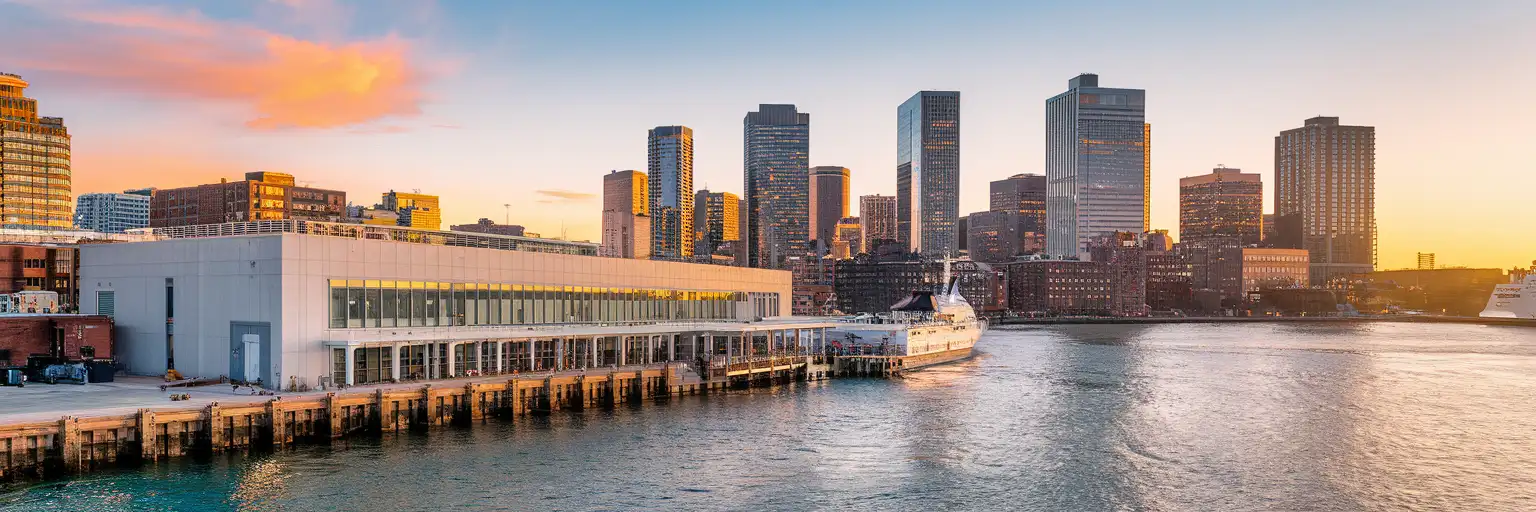
Exterior view of Flynn Cruiseport Boston on Boston Harbor at golden hour with the harborfront and Boston skyline beyond

Boston Harbor eSIM: Boston Cruise Port Data Across the USA

Your cruise day at Boston Harbor starts fast: terminal instructions, passport emails, rideshare pickup, and downtown directions all hit your phone before you've even cleared the drop-off lane from Boston Logan International Airport. With eSIMno, you can install in advance, skip hunting for a SIM at the port, and activate after you land so your data works at Boston Harbor and across the entire United States.
View Plans
GET A FULL20%OFFon your first order
Use code: FIRSTWELCOME20

Stay connected,
wherever you go

Seamless global eSIM coverage

Explore our plans below

Plan Your Trip

Tell us what you'll do and how long you'll be away — we'll highlight the right plan.

7 days
1102030

What will you do?

Tap an activity above to see which plan fits your trip

Already a customer?

EARN UP TOON EVERY FRIEND'S PURCHASE
NETWORK: AT&T & Verizon Wireless The speed may vary depending on the location.

Quick Facts

Language
English
Currency
US Dollar (USD, $)
Time Zone
Eastern Time (UTC-5 / UTC-4)
Dialing Code
+1
Power Plug
Type A, B (flat 2-pin, common across North America)
Emergency
911 (police, fire, ambulance)
eSIMno Networks
AT&T, Verizon Wireless

How to Get Your eSIM

  1. Choose Your USA Plan Before Cruise Day
    Buy your eSIM before you fly or before you head to Flynn Cruiseport Boston. That gives you time to install calmly at home instead of trying to sort mobile data from the terminal curb with bags in hand.
  2. Install While You Still Have Reliable WiFi
    Set up the eSIM on stable WiFi at home, in your hotel, or at the airport before departure. Keep it ready, but wait to turn data on until after you land in Boston so activation starts at the right time.
  3. Activate After Landing
    Once your plane reaches the gate at Boston Logan International Airport or once you arrive in Boston and switch off airplane mode, turn on the eSIM for data. By the time you open your cruise line email, maps, or rideshare app, your connection is already live.
  4. Use It For The Port Transfer
    From Logan to Boston Harbor, you'll want data for Uber or Lyft pickup, live traffic across the harbor tunnels, and directions to Flynn Cruiseport Boston in the Seaport District. If you're coming from South Station, data helps with the final taxi or rideshare leg of roughly 10-15 minutes.
  5. Keep Your Home SIM For Voice
    eSIMno is data-only. Your home SIM can stay active for incoming calls on your regular number with no extra setup, while your Boston Harbor eSIM handles maps, boarding emails, WhatsApp, FaceTime, and every other internet task. For outgoing calls, use data-based calling apps to avoid home-network roaming charges.

Traveler Tips

  • Flynn Cruiseport Boston sits in the Seaport District about 3 miles from Downtown Crossing, so keep data ready for the final curbside leg by Uber, Lyft, or taxi instead of relying on hotel WiFi before checkout.
  • If you're sailing the same day you land at Boston Logan International Airport, activate after landing and keep your cruise line app, passport photo, and luggage-tag PDF downloaded before you enter the terminal queue.
  • South Station is the key rail anchor for Boston Harbor transfers; from there, the port is a short rideshare ride of roughly 10-15 minutes, and live traffic on your phone matters more than a static route screenshot.
  • For dual-SIM use, leave your home SIM on for incoming voice calls and use your eSIMno data for WhatsApp, FaceTime, Telegram, and maps. Native outgoing calls through your home SIM can trigger roaming charges.
  • If you're disembarking and heading into Quincy Market or the North End, book your ride only after you're outside with your luggage. Pickup pins around cruise terminals can shift, and live app updates save time.
  • Boarding windows cluster around late morning to early afternoon, so screenshots alone are risky. Keep live data for terminal notices, schedule changes, and luggage instructions while you're still approaching Boston Harbor.

Why Data Matters at Boston Harbor

Boston Harbor is not a place where you want to be improvising your connection. At Flynn Cruiseport Boston, the important tasks happen in short bursts: finding the right curb, refreshing a cruise line check-in page, pulling up a passport scan, confirming a luggage-tag attachment, then lining up a ride toward your hotel or the airport. In the Seaport District, those decisions happen across a compact area, but every one of them depends on live data. Google Maps, Uber, Lyft, and your cruise line's own check-in flow all work better when your phone is already connected before you reach the terminal doors.

The same applies after you step off the ship. A disembarkation morning can mean luggage claim, a transfer toward South Station, and a same-day flight from Boston Logan International Airport within a 2 to 4 hour window. You'll want live traffic for the Ted Williams Tunnel, terminal updates from your airline, and mobile hotel check-in if you're staying overnight near the waterfront or heading toward Seaport Hotel Boston. This is exactly where eSIMno plans for Boston Harbor, Boston, Massachusetts, United States earn their keep: instant setup, no physical SIM swap, and one plan that keeps working beyond the harbor if your trip continues elsewhere in the U.S.

Boston Harbor also sits right beside places travelers actually go after port formalities end. The walkable waterfront around the Institute of Contemporary Art, the route toward the New England Aquarium, and rides into the Financial District or North End all rely on the same phone session you started at the cruise terminal. A good port eSIM is not just for boarding. It's for the 20 minutes before boarding, the hour after disembarkation, and the rest of your Boston stay after the harbor stop is done.

Visiting Boston Harbor

For cruise travelers, Boston Harbor means one main passenger gateway: Flynn Cruiseport Boston on the South Boston waterfront. The practical rule is simple: arrive with your documents already easy to reach on your phone. Cruise lines may request check-in confirmation pages, digital luggage tags, passport details, health or boarding forms, and last-minute schedule notices, all of which are easier to handle on mobile data than in a busy terminal queue.

If you're reaching the port from a hotel, allow extra time during weekday mornings when Seaport traffic builds around convention activity and local commuter flow. If you're coming after a flight, the airport-to-port transfer is short in distance but still sensitive to tunnel traffic and pickup-zone changes. If you're leaving the harbor after your cruise, decide early whether you're heading to Logan, South Station, or a downtown hotel so you can book the right car and avoid dragging luggage between curbs.

Boston weather also matters at the harbor edge. Wind off the water can make curbside waiting less comfortable in spring, late fall, and winter, so having your ride booked and your directions loaded before you step outside saves standing time. Keep a charger in your day bag and make sure your connection is ready before terminal formalities start.

Boston Harbor Arrival Scene

Mixed couple walking along the Boston Harbor waterfront promenade in the Seaport District with luggage and smartphone
At Boston Harbor, Boston, Massachusetts, United States, have your eSIM ready before arrival so port transfers and boarding details load instantly.

Compare eSIM Options at Boston Harbor

Recommended
Local SIM / Operator
Roaming
Setup timeStore visit + paperworkAuto
No local ID neededSSN/Credit checkUse home account
SpeedCarrier-gradePartner-dependent
Travel supportEnglish onlyHome carrier hours
Keep home numberReplaces itSame number
Cost predictabilityBills can spikeBill-shock risk
5GB / 30 daysLight traveler
15GB / 30 days
$45.00
~$45.00/mo + taxes & fees.
$12-18 / day
$15.00
Typical day-pass tariff varies by home carrier
10GB / 30 daysStandard travelerMost popular
20GB / 30 daysHeavy traveler

Frequently Asked Questions (FAQs)

Activate it after you land in Boston and switch off airplane mode. That timing works well if you're heading straight from Boston Logan International Airport to Flynn Cruiseport Boston, because your data is already live for rideshare pickup, cruise emails, and Seaport navigation.

Yes. A short plan works well for embarkation day at Boston Harbor if you only need data for terminal check-in, luggage documents, and the ride between Logan, your hotel, or South Station. If you're staying in Boston before or after the cruise, a larger plan gives you more room for maps, messaging, and waterfront bookings.

The fastest option is usually a taxi or rideshare from Boston Logan International Airport to Flynn Cruiseport Boston, with the route crossing the harbor tunnels in roughly 15 to 25 minutes depending on traffic. Live data matters here because pickup zones, toll routes, and tunnel congestion can all change while you're ordering the car.

Yes — your home SIM can stay active for incoming voice calls while you're in the Seaport District or waiting at Boston Harbor, and no extra call-routing setup is needed. The eSIMno plan is data-only, so use its data for WhatsApp, FaceTime, Telegram, maps, and cruise messages, and avoid placing native outgoing calls through your home SIM abroad.

That's exactly why a nationwide plan makes sense. After Boston Harbor, you might spend two nights in Boston, connect through another U.S. airport, or continue to places like New York City, New York on the same trip, and your eSIMno data plan keeps working without changing SIMs.

GET A FULL20%OFFon your first order
Use code: FIRSTWELCOME20

Stay connected,
wherever you go

Seamless global eSIM coverage

Get Started
Boston Harbor is a purchase-intent stop. You're not here to read a long waterfront guide; you're here because you need working data at the cruise terminal. Flynn Cruiseport Boston sits in the Seaport area, and your phone does real work the second travel starts: cruise line check-in emails, luggage-tag PDFs, passport copies, rideshare pickup, and live directions toward downtown Boston. Port WiFi can add friction when several thousand passengers are trying to upload documents or refresh boarding details at once. A USA eSIM removes that bottleneck. Install before your trip on home WiFi, then activate after landing so your phone connects as you head for the terminal. The key route after Boston Harbor is simple but data-heavy. If you're going into town, you'll likely open Google Maps for the Seaport District, the Financial District, the North End, or a transfer toward South Station. If you're arriving by air, the trip from Boston Logan International Airport to the cruise terminal is only a short harbor crossing, but that short distance still depends on live traffic, rideshare pricing, terminal messages, and updated pickup pins. If you're boarding a ship, you'll want data for check-in timing, digital baggage instructions, and last-minute changes from the cruise line. If you're disembarking, you'll need the same connection for train tickets, hotel check-in, and airport transfers. A Boston Harbor eSIM should also keep working after the port stop. Plenty of cruise travelers spend 1 to 3 nights in Boston, then continue to New York, Miami, Chicago, or the West Coast on the same trip. That's why nationwide coverage matters more than a venue-only solution. Buy once, keep the same plan active across the rest of your U.S. itinerary, and avoid swapping physical SIM cards between port day, city stay, and onward domestic flights.
Back to United States
No more SIM kiosks

No more SIM kiosks

Skip the airport queues. Install your eSIM at home, activate when you land.

no roaming charges

No roaming surprises

Forget the $200 phone bill three weeks after your trip. Plain pricing, no hidden fees.

keep your physical sim

Keep your home number

Dual-SIM means your physical SIM stays active for calls and texts. eSIM handles only data.

easy installation

Setup in 2 minutes

Scan QR code, follow on-screen steps, you're connected. Works on any eSIM-compatible phone.

Pay SafelyVisa CardMaster CardGoogle PayPayPalApple Pay

How does eSIMNo Works?

Experience seamless global connectivity with our personal eSIM service. Enjoy faster speeds, wider coverage, and the convenience of online purchasing.

Buy a Data Plan

Buy a Data Plan

Search for your destination and pick any data plan

Step 1

Install your eSIM

Install your eSIM

Easy installation via qr code

Step 2

Activate Your eSIM

Activate Your eSIM

Only active when you are ready to use data

Step 3

Advantages

24/7 Customer Support

Reach our team via WhatsApp and email during business hours. Quick answers to common questions available anytime through our automated assistant.

Immediate delivery

Your eSIM arrives by email within minutes. Install it before you board your flight.

Worldwide Coverage

One eSIM, 160+ countries. Land anywhere and connect instantly — no SIM swapping, no roaming charges.

Check Compatibility

Check Compatibility

Before buying and installing an eSim, check if your phone supports one

Check if your phone is eSIM compatible

As you feel the need to use eSIM on your phone, the first question that arises is: does your mobile support eSIMs? And do eSIM-compatible devices work in all regions worldwide?

Some phones that support eSIM technology

  • IPhone XS and Later
  • Samsung Galaxy S20 and Later
  • Pixel 4 and Later
  • Xiaomi 12T Pro and Later
All eSIM-Compatible Phones

Frequently Asked Questions (FAQs)

Find helpful information to answer your questions

What happens if I pause my trip and return home?
Your eSIM keeps its validity period running whether you're using it or not - pausing your trip doesn't pause the timer. If you return home, the eSIM stays dormant on your device until you travel again or it expires. You can disable it in cellular settings to avoid accidental usage.
Can I use the eSIM to make video calls?
Yes - apps like FaceTime, WhatsApp, Zoom, Google Meet, and Microsoft Teams all work over your eSIM data. Video calls use about 200-400 MB per hour depending on quality, so factor that into your plan choice if you make long calls regularly.
Will my home phone number receive calls while I use the eSIM?
Yes - if your home SIM stays installed and active, calls and SMS to your home number arrive normally. The eSIM only handles data; voice service stays on your home line. Just remember that incoming calls and texts to your home number while abroad may trigger roaming charges from your home carrier.
Is unlimited data really unlimited?
Unlimited plans provide unlimited data at high speed (4G/5G) up to a fair-use threshold defined per plan. Beyond that threshold, speeds may be reduced to 128 Kbps for the remainder of the validity period - still usable for messaging and basic browsing, but slower for streaming and video calls.
When should I set up my eSIM?
A Wi-Fi connection is required to install your eSIM, so we recommend setting it up before you leave home. Activation can happen later, either right before departure or after you land at your destination - but the initial QR scan needs Wi-Fi.
Will the eSIM affect my phone's battery life?
Running two SIM lines (physical + eSIM) uses slightly more battery than one, since the phone monitors both networks. The difference is usually 5-10% over a full day. To minimize impact, disable the line you're not actively using or turn off cellular data on the inactive line.
Can I get a refund after purchase?
Refunds are not available once an eSIM has been installed or activated - install codes are one-time-use, so an installed eSIM is considered used even if no data has been consumed. If you have not installed your eSIM yet and want a refund, contact support within the refund window stated at checkout. We recommend reviewing plan details carefully before purchase to avoid any issues.
What payment methods does eSIMno accept?
eSIMno accepts major credit and debit cards (Visa, Mastercard, American Express), PayPal, Apple Pay, and Google Pay. All transactions are processed through secure encrypted gateways, and we don't store full card details on our servers.
Are there any hidden fees or extra charges?
No. The price you see at checkout is the total price - no activation fees, no hidden taxes, no roaming surcharges. Your data plan is fixed-price, and you'll never receive a surprise bill from your home carrier as long as you keep cellular data off on your home SIM.
Do I need to remove my eSIM after my trip?
You don't have to remove it. Once your data plan expires, the eSIM simply stops providing data. You can leave the dormant profile on your phone and reuse it next time by purchasing a new plan, or delete it from cellular settings to free up an eSIM slot.
What should I do if I see a 'No network' message after activating my eSIM?
If you see a 'No network' message after activation, try these steps in order: (1) Toggle airplane mode on for 10 seconds, then off. (2) Confirm data roaming is enabled for the eSIM line. (3) Manually select a network in cellular settings. (4) Restart your phone. If the issue continues, contact eSIMno support via WhatsApp or email.
Can I use my SIM card and eSIM at the same time?
Yes. On dual-SIM devices (most modern iPhones and Android phones), you can run your physical SIM and the eSIM simultaneously. Use your home SIM for calls and SMS, and the eSIM for mobile data. Keep in mind that leaving your home SIM active may trigger roaming charges if you use it for calls or texts abroad.

Use Your Free Credit

You can earn up to 15% commission from your friends' purchases with your Reference code. Plus, your friends will get $2 off their first purchase when they use your code!

FIND OUT HOW
Refer a friend

Refer

A FRIEND

Step into the world of E-SIM, bring your friends and benefit together!