Review Your Cart

Your cart is empty.

You haven't added any eSIM packages yet. Start exploring our plans to get connected!

Browse our eSIM Packages
🎉 Welcome offer: 20% off with promo code FIRSTWELCOME20

United States United States   / Las Vegas Convention Center

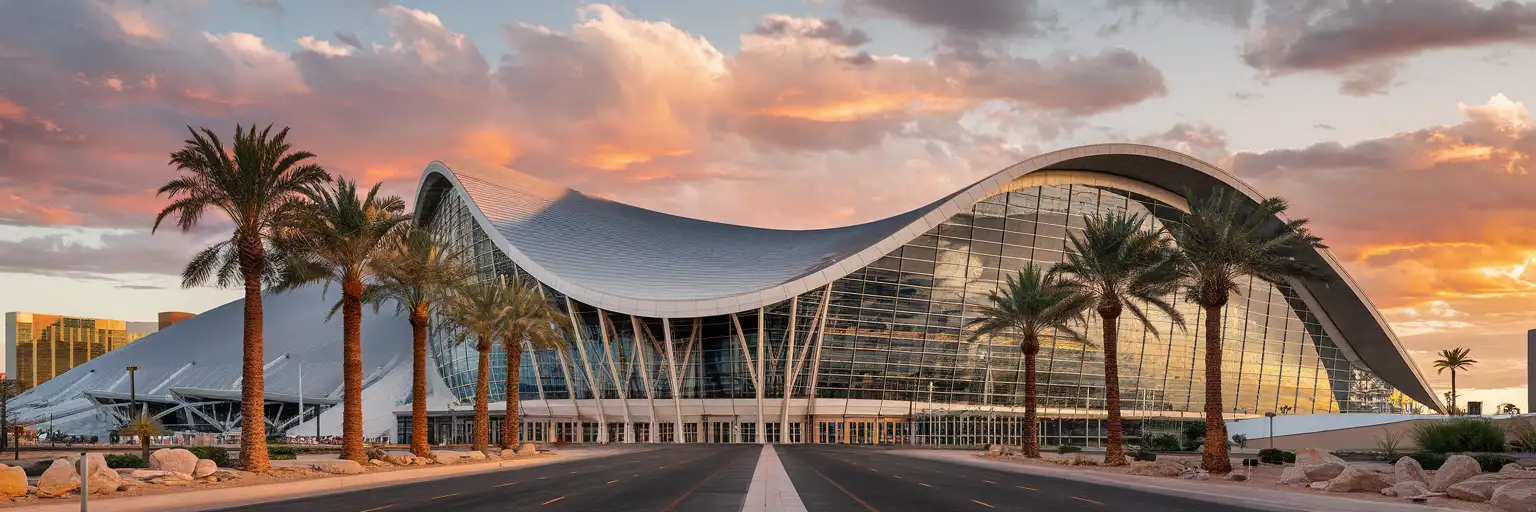
Las Vegas Convention Center exterior with its distinctive curved silver roof and modernist glass facade at golden hour

Las Vegas Convention Center eSIM: Nevada Data That Works Nationwide

You're arriving at the Las Vegas Convention Center with badge pickup details to check, meeting coordinates to confirm, and the rideshare situation on Paradise Road already loading on your phone. With eSIMno, you buy your USA eSIM before departure and activate on AT&T or Verizon the moment your plane reaches the gate at Harry Reid International Airport.
View Plans
GET A FULL20%OFFon your first order
Use code: FIRSTWELCOME20

Stay connected,
wherever you go

Seamless global eSIM coverage

Explore our plans below

Plan Your Trip

Tell us what you'll do and how long you'll be away — we'll highlight the right plan.

7 days
1102030

What will you do?

Tap an activity above to see which plan fits your trip

Already a customer?

EARN UP TOON EVERY FRIEND'S PURCHASE
NETWORK: AT&T & T-Mobile & Verizon Wireless Depending on the plan you choose, you'll connect to one or more of these networks.

Quick Facts

Time Zone
Pacific Time (UTC-8 / UTC-7 DST)
Dialing Code
+1
Currency
US Dollar (USD, $)
Power Plug
Type A, B (flat 2-pin, common across North America)
Language
English
Emergency
911 (police, fire, ambulance)
eSIMno Networks
AT&T, Verizon Wireless

How to Get Your eSIM

  1. Pick Your USA Data Plan
    Select a plan sized for your convention stay — a 3-day trade show with heavy video uploads needs more than a quick 1-day visit. Plans start at 1GB and scale to unlimited.
  2. Install at Home Before Your Flight
    Scan the QR code over your home WiFi the night before departure. The profile sits dormant until you activate it — no data charges until you're on US soil.
  3. Activate After Landing at Harry Reid International
    Once your plane reaches the gate, switch off airplane mode. Your eSIM connects to AT&T or Verizon within seconds — no SIM-kiosk queue, no passport handover, no registration form.
  4. Navigate to the Convention Center
    Pull up Lyft or Uber for rideshare pickup, check the Las Vegas Monorail schedule for the Convention Center station, or confirm your hotel shuttle timing — all on live data before you leave the terminal.
  5. Work the Show Floor With Reliable Data
    Badge scans, session schedules, exhibitor booth lookups, group WhatsApp threads, and quick LinkedIn profile checks all run on your eSIM data. Convention WiFi becomes the backup, not the bottleneck.

Traveler Tips

  • The Las Vegas Monorail stops at the Convention Center's rear entrance — fare is $5 single ride or $13 unlimited day pass, payable via app or contactless at the station.
  • South Hall to North Hall is a 12-15 minute walk through the Central Hall connector; coordinate meeting points via group chat rather than relying on overhead signage.
  • Rideshare surge pricing spikes at 5:30 PM show-close — check the app 20 minutes early and walk to the designated pickup zone on Paradise Road before the rush.
  • Keep your home SIM active for incoming calls from international colleagues; outgoing calls route through WhatsApp or FaceTime over your eSIM data to avoid roaming charges.
  • Download the official show app before arriving — session schedules, exhibitor maps, and badge barcode all load faster on cellular than on congested convention WiFi.

Why Data Matters at the Las Vegas Convention Center

The Las Vegas Convention Center hosts some of the world's largest trade shows — CES brings 130,000+ attendees in January, NAB Show draws 65,000+ in April, and World of Concrete fills the halls with heavy-equipment displays every winter. When 50,000 phones compete for the same convention WiFi, your eSIM running on AT&T or Verizon becomes the difference between a meeting confirmed and a meeting missed.

Show-Floor Coordination

Booth assignments span the North, Central, South, and West halls — a 15-minute walk corner to corner. Group WhatsApp threads keep your team synced as you split up to cover different exhibitor sections. Real-time schedule changes from the official show app (CES app, NAB Show app, CONEXPO-CON/AGG app depending on the event) push notifications that load instantly on cellular. QR badge scans at session entrances require a live connection; the scanner won't wait for convention WiFi to catch up.

Getting There and Getting Out

Harry Reid International Airport sits 3 miles south — a 10-15 minute Uber/Lyft ride outside rush hour, closer to 25-30 minutes during CES week traffic. The Las Vegas Monorail's Convention Center station connects to hotels along the Strip ($5 single ride, $13 day pass). Surge pricing on rideshare apps peaks at 5:30 PM daily close and again at 8:00 PM after evening receptions — real-time fare alerts help you time your exit or switch to the Monorail.

Beyond the Convention

Client dinners on Fremont Street, after-hours meetings at Strip hotels, and weekend side trips to Red Rock Canyon or Hoover Dam all use the same eSIMno plan. One purchase covers the entire US — your Las Vegas Convention Center coverage extends to any follow-up meetings in Los Angeles, San Francisco, or New York without swapping plans.

Visiting the Las Vegas Convention Center

The LVCC campus spans four main halls — North, Central, South, and West — plus the newer West Hall expansion opened in 2021 with 1.4 million square feet of exhibit space. Badge pickup typically opens at 7:00 AM on day one of major shows, with the main floor opening at 9:00 or 10:00 AM depending on the event. Pre-registering online and downloading your badge barcode to Apple Wallet or Google Pay saves 20+ minutes versus the on-site kiosk queue.

Dress code is business casual for most trade shows; comfortable shoes are essential given the walking distances. Photography policies vary by event — some exhibitors prohibit booth photos without permission. Food courts operate inside the Central and South halls with grab-and-go options ($12-18 range for sandwiches and coffee), though lines stretch past 30 minutes at midday peaks. The Convention Center Loop — Elon Musk's underground Tesla shuttle — connects the West Hall to the South Hall in under 2 minutes, free for badge holders.

Inside the Convention Center

Interior of Las Vegas Convention Center during an active trade show with attendees and exhibit booths
Activate your eSIM before landing so booth coordinates and meeting updates load instantly on the show floor.

Compare eSIM Options at Las Vegas Convention Center

Recommended
Local SIM / Operator
Roaming
Setup timeStore kit, needs activationAuto
No local ID neededNo SSN; passport at carrier storesUse home account
SpeedOne carrier onlyPartner-dependent
Travel supportEnglish-language serviceHome carrier hours
Keep home numberReplaces itSame number
Cost predictabilityAdvertised price needs Auto PayBill-shock risk
5GB / 30 daysLight traveler
15GB / 30 days
₺2170.69
First month without Auto Pay; 35 USD after enrolling. Taxes and fees are extra.
$12-18 / day
₺723.56
Typical daily roaming rate; varies by home carrier
10GB / 30 daysStandard travelerMost popular
20GB / 30 daysHeavy traveler

Frequently Asked Questions (FAQs)

Activate after your plane lands at Harry Reid International and reaches the gate. By the time you're walking through the terminal toward the Monorail or rideshare pickup, your phone is already pulling directions and checking surge pricing on Paradise Road.
Yes — your home SIM stays active for incoming calls while your eSIMno data handles everything internet-related. For outgoing calls to colleagues or clients, use WhatsApp, FaceTime, or Google Meet over your eSIM data to avoid roaming charges on your home line.
A typical 3-day trade show with moderate use — maps, messaging, email, show-app updates, and occasional video uploads — runs 2-4GB. If you're livestreaming booth demos or running heavy video calls, consider 5GB or unlimited. Plans scale easily; pick the tier that matches your workflow.
Absolutely. The same AT&T or Verizon coverage that works inside the Convention Center covers the Monorail stations, every Strip hotel, Fremont Street, and anywhere else in Nevada or the US. One plan, no geographic limits.
Yes — the plan covers the entire United States. Whether you connect through Los Angeles, Phoenix, Denver, or New York on the way home, your data keeps working. No need to buy a separate plan for layovers or follow-up meetings in other cities.
Rideshare runs 10-15 minutes outside peak hours, $15-25 depending on demand. During major shows like CES, expect 25-35 minutes and higher surge pricing. The Las Vegas Monorail connects the airport area hotels to the Convention Center station — check the schedule on your eSIM data before deciding which option fits your timing.
GET A FULL20%OFFon your first order
Use code: FIRSTWELCOME20

Stay connected,
wherever you go

Seamless global eSIM coverage

Get Started
The Las Vegas Convention Center spans over 2.5 million square feet across multiple halls, and the moment you badge in, your phone becomes the primary coordination tool. Exhibitor booth numbers, session schedules, meeting point changes, and the constant group-chat pings from colleagues scattered across the North, Central, and South halls all depend on reliable data. Convention center WiFi handles tens of thousands of simultaneous connections during major shows — your eSIM running on AT&T or Verizon keeps you on a separate, less-congested pipe. Activate the eSIM after landing at Harry Reid International and you're connected by the time you're walking through the terminal toward ground transportation. The Monorail station sits at the Convention Center's rear entrance — real-time schedule checks and fare payment happen on your phone. Rideshare pickup zones fill fast during show hours, and surge pricing notifications help you time the walk from South Hall to the designated lot. The same plan that covers the convention floor keeps working when you head to dinner on the Strip, take a client meeting at a Fremont Street restaurant, or catch a flight out of a different US city entirely. One purchase, nationwide coverage, no SIM-kiosk queue at the airport.
Back to United States
No more SIM kiosks

No more SIM kiosks

Skip the airport queues. Install your eSIM at home, activate when you land.

no roaming charges

No roaming surprises

Forget the $200 phone bill three weeks after your trip. Plain pricing, no hidden fees.

keep your physical sim

Keep your home number

Dual-SIM means your physical SIM stays active for calls and texts. eSIM handles only data.

easy installation

Setup in 2 minutes

Scan QR code, follow on-screen steps, you're connected. Works on any eSIM-compatible phone.

Pay SafelyVisa CardMaster CardGoogle PayPayPalApple Pay

How does eSIMNo Works?

Experience seamless global connectivity with our personal eSIM service. Enjoy faster speeds, wider coverage, and the convenience of online purchasing.

Buy a Data Plan

Buy a Data Plan

Search for your destination and pick any data plan

Step 1

Install your eSIM

Install your eSIM

Easy installation via qr code

Step 2

Activate Your eSIM

Activate Your eSIM

Only active when you are ready to use data

Step 3

Advantages

24/7 Customer Support

Reach our team via WhatsApp and email during business hours. Quick answers to common questions available anytime through our automated assistant.

Immediate delivery

Your eSIM arrives by email within minutes. Install it before you board your flight.

Worldwide Coverage

One eSIM, 160+ countries. Land anywhere and connect instantly — no SIM swapping, no roaming charges.

Check Compatibility

Check Compatibility

Before buying and installing an eSim, check if your phone supports one

Check if your phone is eSIM compatible

As you feel the need to use eSIM on your phone, the first question that arises is: does your mobile support eSIMs? And do eSIM-compatible devices work in all regions worldwide?

Some phones that support eSIM technology

  • IPhone XS and Later
  • Samsung Galaxy S20 and Later
  • Pixel 4 and Later
  • Xiaomi 12T Pro and Later
All eSIM-Compatible Phones

Frequently Asked Questions (FAQs)

Find helpful information to answer your questions

What network speeds can I expect?
Most eSIMno plans connect at 4G/LTE or 5G speeds depending on local network availability and your device's capabilities. Speed varies by location, network congestion, and signal strength. In major cities and tourist areas, expect speeds comparable to local mobile carriers.
Which eSIM is best for travelling to United-states?
eSIMno is an excellent option for travelers heading to United-states. We offer a diverse range of eSIM plans - including regional, local, and lifetime options - with reliable coverage on local networks.
What happens when my data plan runs out?
When you use up your data allowance, your connection stops until you top up or purchase a new plan. You can top up directly from the eSIMno Center while connected to Wi-Fi, or buy a new plan if your validity period has expired.
Can I tether or use Personal Hotspot with my eSIM?
Yes. Your eSIMno plan supports tethering and Personal Hotspot at no extra charge. Activate the Personal Hotspot feature in your device settings and connect other devices as you would with any cellular plan. Data used while tethering counts toward your plan allowance.
Are there any hidden fees or extra charges?
No. The price you see at checkout is the total price - no activation fees, no hidden taxes, no roaming surcharges. Your data plan is fixed-price, and you'll never receive a surprise bill from your home carrier as long as you keep cellular data off on your home SIM.
What happens if I pause my trip and return home?
Your eSIM keeps its validity period running whether you're using it or not - pausing your trip doesn't pause the timer. If you return home, the eSIM stays dormant on your device until you travel again or it expires. You can disable it in cellular settings to avoid accidental usage.
Does the eSIM work on cruise ships or airplanes?
eSIMs use ground-based cellular networks, so they don't work in flight or at sea outside coastal coverage. They activate as soon as you connect to a partner network on land. For in-flight or maritime data, you'll need the airline or ship's onboard Wi-Fi.
How do I set up the eSIM on my device?
The fastest way is straight from your order confirmation email, which now contains - for each eSIM - the QR code, a one-tap install link, and the SM-DP+ / activation codes. On the phone you'll use, tap the one-tap install link; or, to use the QR, show it on another screen or a printout and scan it with that same phone (not another phone); or enter the codes manually. The email also has an "Install eSIM" button that opens your eSIM's detail page and launches the install pop-up (sign in if prompted), and you can reach the same pop-up anytime via Profile > My eSIMs > find your plan (shown as "Ready to install") > Install. After installing, turn Data Roaming ON for your eSIMno line (iPhone: Settings > Cellular; Android: Settings > Connections/Network) - without it the eSIM installs but shows no internet. Full guide in Help & Support.
What makes eSIMno different from other eSIM services?
eSIMno partners directly with local operators in over 200 countries, eliminating intermediaries. This direct relationship lets us offer competitive pricing, extensive coverage, and faster activation than resellers who route data through third parties.
What should I do if I lose my activation QR code?
You can't really lose it - your QR code is in your order confirmation email, and also in the install pop-up on the website. To reopen it any time before activation, tap "Install eSIM" in your order email, or sign in at esimno.com and go to Profile > My eSIMs > Install. Both show the QR code together with the one-tap install link and the manual SM-DP+ / activation code. Note the install codes are one-time-use: once the eSIM is installed on a device they can't be reused - reopen the installer (My eSIMs > Install) to display a fresh QR if you need one.
What is the price range for the United-states eSIM plans?
Prices commence at $4.90 and vary according to data allowance and plan duration. Larger data plans and longer durations cost more, but the per-GB rate decreases with bigger packages.
Can I install my eSIM before traveling?
Yes - setting it up before your trip is the easiest approach. Your confirmation email contains the QR code, a one-tap install link and the manual SM-DP+ / activation codes (the same options are also available via sign in > Profile > My eSIMs > Install). While on Wi-Fi at home, install it with the one-tap link on your phone, or - to use the QR - show it on another screen or a printout and scan it with the phone you are setting up (not another phone). Installing does not start your plan: the validity countdown only begins when the eSIM connects to a mobile network inside your plan's coverage area. Keep the eSIM line and its Data Roaming off until you are ready to start - if your plan covers the country you are in right now, turning the line on connects and starts the countdown immediately, even if you do not browse anything. Please note: once installed, an eSIM is considered used and is no longer eligible for a refund.

Use Your Free Credit

You can earn up to 15% commission from your friends' purchases with your Reference code. Plus, your friends will get $2 off their first purchase when they use your code!

FIND OUT HOW
Refer a friend

Refer

A FRIEND

Step into the world of E-SIM, bring your friends and benefit together!