


Review Your Cart

Your cart is empty.

You haven't added any eSIM packages yet. Start exploring our plans to get connected!

Browse our eSIM Packages
🎉 Welcome offer: 20% off with promo code FIRSTWELCOME20

United Kingdom United Kingdom   / London Eye

The London Eye observation wheel at golden hour with the River Thames and Westminster in the background

London Eye eSIM: South Bank Data That Works Across All UK

You're stepping into a London Eye capsule with timed-entry tickets on your phone, photos of Big Ben across the Thames ready to upload, and a rideshare pickup to coordinate back to Heathrow Airport afterward. With eSIMno, your UK data activates instantly after landing — no SIM kiosk queue at arrivals, no unreliable airport WiFi, just reliable coverage from the moment you switch off airplane mode.
View Plans
GET A FULL20%OFFon your first order
Use code: FIRSTWELCOME20

Stay connected,
wherever you go

Seamless global eSIM coverage

Explore our plans below

Plan Your Trip

Tell us what you'll do and how long you'll be away — we'll highlight the right plan.

7 days
1102030

What will you do?

Tap an activity above to see which plan fits your trip

Already a customer?

EARN UP TOON EVERY FRIEND'S PURCHASE
NETWORK: Everything Everywhere & O2 & Three The speed may vary depending on the location.

Quick Facts

Time Zone
Greenwich Mean Time (GMT) / British Summer Time (BST, UTC+1)
Dialing Code
+44
Currency
British Pound (GBP, £)
Power Plug
Type G (3-pin rectangular, common in UK and several Asian markets)
Language
English
Emergency
999 (general); 112 also works
eSIMno Networks
Everything Everywhere, O2, Three

How to Get Your eSIM

  1. Pick Your UK Data Plan
    Choose from flexible options based on your trip length and data needs. A 3-5 day plan covers most London visits; longer trips to Edinburgh or Oxford work on the same plan.
  2. Install Before Your Flight
    Download the eSIM profile at home over WiFi — takes under 2 minutes. Your phone stores the profile until you're ready to activate.
  3. Activate After Landing at Heathrow
    Once your plane reaches the gate and you switch off airplane mode, your eSIM connects automatically. You'll have data before you reach the immigration queue.
  4. Keep Your Home SIM for Calls
    Your UK eSIM handles all data — Maps, rideshare, tickets, uploads. Your home SIM stays active for incoming calls and texts. No forwarding setup needed.
  5. Navigate to the South Bank
    Heathrow Express runs to Paddington (15 minutes), then the Bakerloo line south to Waterloo (12 minutes). Real-time Citymapper directions load instantly with your data ready.

Traveler Tips

  • Book your London Eye timed-entry slot online at least 2 days ahead for weekends — QR confirmation emails need data to load at the boarding ramp.
  • Sunset capsule slots (around 18:00-20:00 in summer) are the most competitive; your phone confirms the booking faster than the venue WiFi ever will.
  • The 4D Cinema pre-flight film is included with standard tickets — presentation lasts 4 minutes and runs continuously, no separate booking needed.
  • Waterloo station is a 5-minute walk; Westminster station across the bridge is 7 minutes. Both have contactless OMNY-style tap payment at turnstiles.
  • Champagne Experience capsules board from a separate fast-track lane — your premium ticket QR code gets you past the standard queue entirely.
  • Thames Clippers river bus to Greenwich (for the Cutty Sark and Royal Observatory) takes 35 minutes from London Eye Pier; mobile tickets work onboard.

Why Data Matters at the London Eye

The London Eye rotation lasts around 30 minutes, and every second of it is a photo opportunity. Big Ben and the Houses of Parliament sit directly across the Thames. The Shard rises to the east. St Paul's Cathedral dome catches the light beyond Waterloo Bridge. Without data, those photos sit in your camera roll until you hunt down WiFi at a South Bank café — with an eSIMno plan for the London Eye, they upload in real time while you're still at the top of the wheel.

Your timed-entry ticket arrives as a QR code in your email confirmation. The boarding ramp scanner needs that code visible on your phone screen — venue WiFi at the County Hall ticket hall is patchy when the queue stretches past 50 people. Having your own data means you pull the confirmation instantly, scan through, and board without the WiFi scramble.

After the Capsule

The South Bank promenade stretches east toward the Southbank Centre, BFI Southbank, and Tate Modern (25-minute walk). Citymapper's live walking directions keep you on the riverside path instead of accidentally routing through the backstreets. Uber and Bolt pickups coordinate from the York Road drop zone — surge pricing notifications hit your phone before you commit to the fare.

Transit Connections

Waterloo station (Bakerloo, Jubilee, Northern, Waterloo & City lines) sits 350 meters from the Eye — under 5 minutes on foot. The Jubilee line runs directly to Westminster (2 minutes eastbound) for Parliament and the Abbey, or to Canary Wharf (15 minutes) for the financial district. Contactless payment at the turnstile means no Oyster card queue; your phone's Apple Pay or Google Pay taps straight through. Thames Clippers at London Eye Pier run every 20 minutes toward Greenwich (£8.50-£10.50 single, mobile ticketing via the app), and your data keeps the live departure board updating as you walk to the dock.

Visiting the London Eye

The wheel operates daily, with hours shifting seasonally — 11:00-18:00 in winter months, extending to 20:30 or 21:00 during peak summer. Annual maintenance closes the attraction for one to two weeks each January, and it shuts on 25 December. Standard adult tickets run £29-£36 online (walk-up prices add £5-£10), with Fast Track around £45-£55 and Champagne Experience £55-£65. Children ages 3-15 pay reduced rates; under-3s ride free.

The first morning slot and final hour before closing draw the smallest crowds. Weekday visits outside school holidays beat weekends significantly. Clear days after rainfall offer the best long-distance visibility — up to 40 kilometers on ideal afternoons, reaching Windsor Castle to the west.

Personal photography is permitted throughout, including inside the capsules. Tripods, selfie sticks, and professional equipment are restricted. There's no dress code, and the capsules are fully enclosed and air-conditioned regardless of weather.

Inside the Capsule

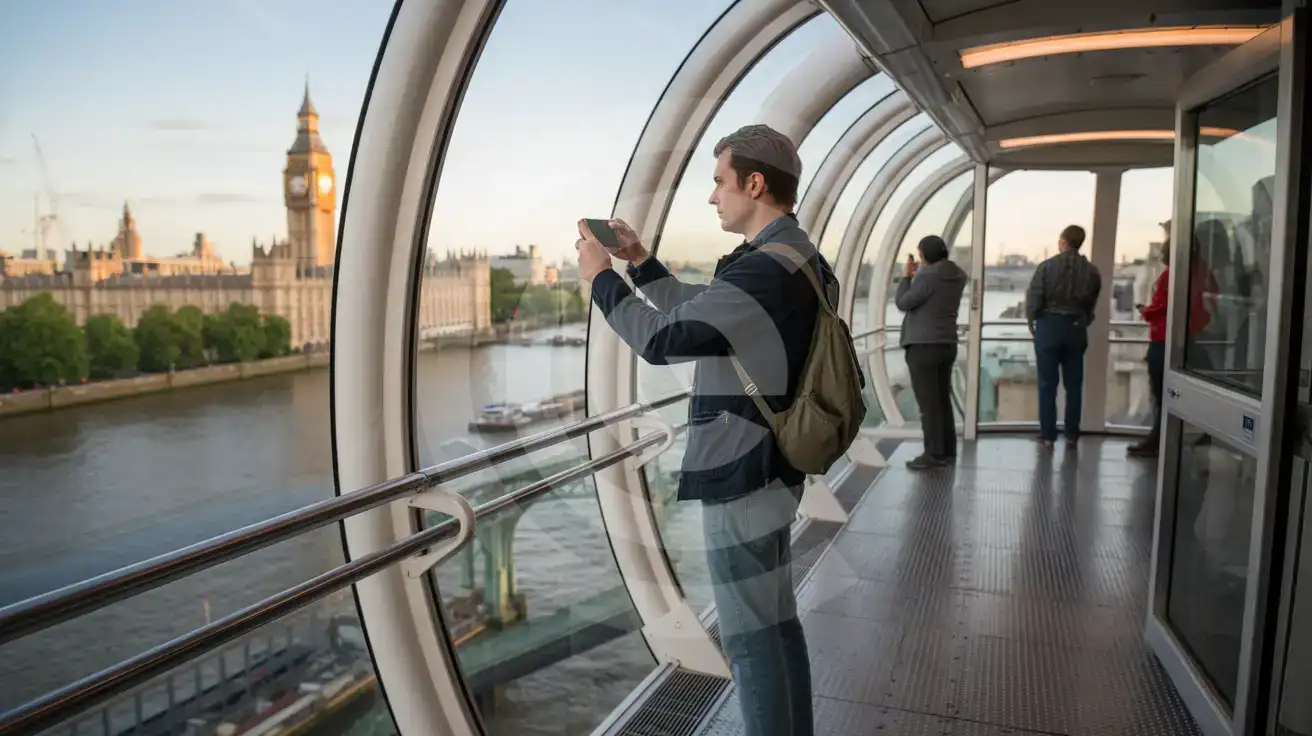
Solo male traveler photographing the Thames and Parliament from inside a London Eye capsule
Inside the capsule with data ready — your London Eye photos upload while you're still at the top of the rotation.

Compare eSIM Options at London Eye

Recommended
Local SIM / Operator
Roaming
Setup timeStore visit + paperworkAuto
No local ID neededLocal ID requiredUse home account
SpeedCarrier-gradePartner-dependent
Travel supportEnglish onlyHome carrier hours
Keep home numberReplaces itSame number
Cost predictabilityBills can spikeBill-shock risk
Typical pricing
$12-18 / day
Typical day-pass tariff varies by home carrier

PRICING — PICK YOUR ESIMNO PLAN

Light traveler
5GB / 30d
$9.90
20% off with code FIRSTWELCOME20on your first order
≈ $7.92 USD with code
Buy now
Heavy traveler
20GB / 30d
$24.90
20% off with code FIRSTWELCOME20on your first order
≈ $19.92 USD with code
Buy now

Frequently Asked Questions (FAQs)

Install the eSIM profile at home over WiFi before your flight. Once your plane lands at Heathrow and you switch off airplane mode, the connection activates automatically. By the time you're walking through arrivals toward the Heathrow Express platform, your phone is already pulling Citymapper directions to Waterloo station.

Yes — the capsules are glass-walled with excellent signal penetration. Coverage on Everything Everywhere, O2, and Three networks stays strong throughout the 30-minute rotation. You can upload photos, stream video calls, or share your view live without signal drops at any point on the wheel.

The fastest route runs Heathrow Express to Paddington (15 minutes, £25 single / £12.50 off-peak advance), then Bakerloo line southbound to Waterloo (12 minutes). From Waterloo station, the Eye is a 5-minute walk along the South Bank promenade. Total door-to-capsule time runs around 50-60 minutes with good connections.

Absolutely. Your eSIMno plan covers the entire UK, not just London. Visit the Tower of London the next morning, take a train to Oxford or Cambridge for a day trip, or head north to Edinburgh — the same data keeps working nationwide without any plan changes.

Your timed-entry ticket arrives as a QR code via email. The boarding ramp scanner reads it directly from your phone screen. The venue WiFi at County Hall can lag when queues build past 50 people — having your own data means you pull the confirmation instantly and scan through without waiting for a connection.

Thames Clippers depart from London Eye Pier every 20 minutes toward Greenwich, Westminster, and Canary Wharf. Mobile ticketing through their app lets you buy and board without queuing at the dock kiosk. The journey to Greenwich takes around 35 minutes — your data keeps the live departure board updating as you walk to the pier.

GET A FULL20%OFFon your first order
Use code: FIRSTWELCOME20

Stay connected,
wherever you go

Seamless global eSIM coverage

Get Started
The London Eye rotation takes around 30 minutes, and most visitors spend that entire time with phones raised — photographing the Houses of Parliament, filming the Thames bend toward the City, sharing live capsule views with friends back home. Without reliable data, those moments sit in your camera roll until you find WiFi. An eSIM changes the equation entirely: buy your plan before departure, install over home WiFi, and activate the moment your flight taxis to the Heathrow gate. The South Bank promenade around the Eye connects to Waterloo station (Bakerloo, Jubilee, Northern lines) and Westminster station (Jubilee, Circle, District lines) — both under 7 minutes on foot. Real-time transit apps like Citymapper pull live departure boards so you're not guessing platform times after your rotation ends. The Thames Clippers river bus stops directly at London Eye Pier, and mobile ticketing means no queue at the dock kiosk. Your eSIMno plan covers the entire UK, not just the South Bank. Head to the Tower of London the next morning, take a day trip to Oxford or Cambridge, catch a match at Wembley — the same data keeps working. One purchase, one install, nationwide coverage from Heathrow arrivals through your final photo at the departure gate.
Back to United Kingdom
No more SIM kiosks

No more SIM kiosks

Skip the airport queues. Install your eSIM at home, activate when you land.

no roaming charges

No roaming surprises

Forget the $200 phone bill three weeks after your trip. Plain pricing, no hidden fees.

keep your physical sim

Keep your home number

Dual-SIM means your physical SIM stays active for calls and texts. eSIM handles only data.

easy installation

Setup in 2 minutes

Scan QR code, follow on-screen steps, you're connected. Works on any eSIM-compatible phone.

Pay SafelyVisa CardMaster CardGoogle PayPayPalApple Pay

How does eSIMNo Works?

Experience seamless global connectivity with our personal eSIM service. Enjoy faster speeds, wider coverage, and the convenience of online purchasing.

Buy a Data Plan

Buy a Data Plan

Search for your destination and pick any data plan

Step 1

Install your eSIM

Install your eSIM

Easy installation via qr code

Step 2

Activate Your eSIM

Activate Your eSIM

Only active when you are ready to use data

Step 3

Advantages

24/7 Customer Support

Reach our team via WhatsApp and email during business hours. Quick answers to common questions available anytime through our automated assistant.

Immediate delivery

Your eSIM arrives by email within minutes. Install it before you board your flight.

Worldwide Coverage

One eSIM, 160+ countries. Land anywhere and connect instantly — no SIM swapping, no roaming charges.

Check Compatibility

Check Compatibility

Before buying and installing an eSim, check if your phone supports one

Check if your phone is eSIM compatible

As you feel the need to use eSIM on your phone, the first question that arises is: does your mobile support eSIMs? And do eSIM-compatible devices work in all regions worldwide?

Some phones that support eSIM technology

  • IPhone XS and Later
  • Samsung Galaxy S20 and Later
  • Pixel 4 and Later
  • Xiaomi 12T Pro and Later
All eSIM-Compatible Phones

Frequently Asked Questions (FAQs)

Find helpful information to answer your questions

Is unlimited data really unlimited?
Unlimited plans provide unlimited data at high speed (4G/5G) up to a fair-use threshold defined per plan. Beyond that threshold, speeds may be reduced to 128 Kbps for the remainder of the validity period - still usable for messaging and basic browsing, but slower for streaming and video calls.
Can I get a refund after purchase?
Refunds are not available once an eSIM has been installed or activated - install codes are one-time-use, so an installed eSIM is considered used even if no data has been consumed. If you have not installed your eSIM yet and want a refund, contact support within the refund window stated at checkout. We recommend reviewing plan details carefully before purchase to avoid any issues.
Should I enable data roaming for the eSIM?
Yes - you must enable data roaming for the eSIM line, even though there are no roaming charges. The eSIM connects to a local partner network and your phone treats this as roaming. Enable it: iPhone > Settings > Cellular > eSIMno line > Data Roaming ON; Android > Settings > Network > SIMs > eSIMno > Roaming ON. This setting only affects the eSIM, not your home SIM.
What network speeds can I expect?
Most eSIMno plans connect at 4G/LTE or 5G speeds depending on local network availability and your device's capabilities. Speed varies by location, network congestion, and signal strength. In major cities and tourist areas, expect speeds comparable to local mobile carriers.
How can I verify if my eSIM is activated?
There are two clear indicators: (1) your phone's status bar shows the local carrier name once you arrive at your destination, and (2) the data icon (4G, LTE, or 5G) appears next to the eSIMno line in your cellular settings. If neither shows up, toggle airplane mode off and on, or restart your phone.
What payment methods does eSIMno accept?
eSIMno accepts major credit and debit cards (Visa, Mastercard, American Express), PayPal, Apple Pay, and Google Pay. All transactions are processed through secure encrypted gateways, and we don't store full card details on our servers.
Do I need to remove my eSIM after my trip?
You don't have to remove it. Once your data plan expires, the eSIM simply stops providing data. You can leave the dormant profile on your phone and reuse it next time by purchasing a new plan, or delete it from cellular settings to free up an eSIM slot.
Can I install my eSIM before traveling?
Yes - setting it up before your trip is the easiest approach. Your confirmation email contains the QR code, a one-tap install link and the manual SM-DP+ / activation codes (the same options are also available via sign in > Profile > My eSIMs > Install). While on Wi-Fi at home, install it with the one-tap link on your phone, or - to use the QR - show it on another screen or a printout and scan it with the phone you are setting up (not another phone). Installing does not start your plan: the validity countdown only begins when the eSIM connects to a mobile network inside your plan's coverage area. Keep the eSIM line and its Data Roaming off until you are ready to start - if your plan covers the country you are in right now, turning the line on connects and starts the countdown immediately, even if you do not browse anything. Please note: once installed, an eSIM is considered used and is no longer eligible for a refund.
Can I share data from my eSIM with someone else's phone?
Yes, through Personal Hotspot. Activate hotspot on your phone, share the password, and the other device connects to your data. Data used by connected devices counts toward your eSIM plan, so monitor usage to avoid running out faster than expected.
Will the eSIM work on my iPad?
Yes, if your iPad model supports eSIM. iPad Pro (3rd generation and later), iPad Air (3rd generation and later), iPad mini (5th generation and later), and standard iPad (7th generation and later with cellular) all support eSIM. Installation works the same way as on iPhone.
What should I do if I lose my activation QR code?
You can't really lose it - your QR code is in your order confirmation email, and also in the install pop-up on the website. To reopen it any time before activation, tap "Install eSIM" in your order email, or sign in at esimno.com and go to Profile > My eSIMs > Install. Both show the QR code together with the one-tap install link and the manual SM-DP+ / activation code. Note the install codes are one-time-use: once the eSIM is installed on a device they can't be reused - reopen the installer (My eSIMs > Install) to display a fresh QR if you need one.
Does the eSIM work in rural areas and small towns?
Coverage depends on the partner network's reach in United-kingdom. Major cities, tourist areas, and highways typically have strong 4G/5G coverage. Remote rural areas may have weaker signal or fall back to 3G. Download offline maps before heading off the beaten path.

Use Your Free Credit

You can earn up to 15% commission from your friends' purchases with your Reference code. Plus, your friends will get $2 off their first purchase when they use your code!

FIND OUT HOW
Refer a friend

Refer

A FRIEND

Step into the world of E-SIM, bring your friends and benefit together!