Review Your Cart

Your cart is empty.

You haven't added any eSIM packages yet. Start exploring our plans to get connected!

Browse our eSIM Packages
🎉 Welcome offer: 20% off with promo code FIRSTWELCOME20

Panama Panama  

Panama Canal at Miraflores Locks with container ships transiting through the lock system at golden hour

Panama eSIM: Canal Zone to Caribbean Coast Data That Works Nationwide

Your Copa flight is descending into Tocumen International and you're already pulling up your Casco Viejo walking directions, checking tomorrow's Panama Canal tour confirmation, and confirming tonight's dinner reservation on Calle Uruguay. With an eSIMno plan activated before takeoff, your phone connects to local data the moment you switch off airplane mode at the gate — no SIM kiosk queue, no passport handover, no missing that first Uber to your hotel.
View Plans
GET A FULL20%OFFon your first order
Use code: FIRSTWELCOME20

Stay connected,
wherever you go

Seamless global eSIM coverage

Explore our plans below

Plan Your Trip

Tell us what you'll do and how long you'll be away — we'll highlight the right plan.

7 days
1102030

What will you do?

Tap an activity above to see which plan fits your trip

Already a customer?

EARN UP TOON EVERY FRIEND'S PURCHASE
NETWORK: Cable & Wireless & Claro Depending on the plan you choose, you'll connect to one or more of these networks.

Quick Facts

Capital
Panama City
Language
Spanish (Español)
Currency
US Dollar (USD, $)
Time Zone
Eastern Standard Time (UTC-5)
Dialing Code
+507
Power Plug
Type C, E, F (round 2-pin, common across most of Europe)
Emergency
911 (general)
eSIMno Networks
Cable & Wireless, Claro

How to Get Your eSIM

  1. Pick Your Panama Data Plan
    Choose from eSIMno's range of Panama plans based on your trip length — a week-long Canal tour needs different data than a quick Panama City business trip.
  2. Install at Home Over WiFi
    Scan the QR code from your confirmation email while still on your home network. The profile downloads in under a minute and sits dormant until you activate.
  3. Board Your Flight to Tocumen
    Your phone carries the eSIM profile alongside your existing home SIM. Keep airplane mode on during the flight as normal.
  4. Activate After Landing
    Once the aircraft reaches the gate at Tocumen International, switch off airplane mode. Your phone connects to Cable & Wireless or Claro within seconds.
  5. Start Navigating Immediately
    Pull up Uber or taxi directions to your Panama City hotel while other passengers queue at the SIM kiosk. Your data is already working.

Traveler Tips

  • Panama uses the US Dollar, so currency conversion apps are unnecessary — but data helps you find ATMs that dispense smaller bills for taxis and markets.
  • Tocumen International sits 24 km from Casco Viejo; real-time traffic apps save 20-40 minutes by routing around the Corredor Sur congestion.
  • The Panama Canal Miraflores Visitor Center accepts mobile tickets — screenshot your QR before arrival since indoor signal can dip near the exhibition halls.
  • Bocas del Toro and San Blas require internal flights or long drives; download offline maps for archipelago areas where coverage thins between islands.
  • Spanish dominates outside tourist zones — Google Translate's conversation mode works smoothly on eSIMno data for market haggling and restaurant orders.

Why Data Matters Across Panama

Panama City spreads across a metropolitan area where ride-hailing apps beat taxi negotiation every time. Uber and DiDi both operate here, and requesting a car from your Casco Viejo restaurant to the Amador Causeway takes 30 seconds on eSIMno data — versus explaining the route to a driver who may not know the specific pier number you need. The Metro de Panamá runs two lines (Line 1 from Albrook to San Isidro, Line 2 from San Miguelito to Nuevo Tocumen), and real-time arrival boards sync with the official Mi Metro app so you know exactly when the next train arrives at Iglesia del Carmen or Via Argentina stations.

Beyond the capital, eSIMno plans for Panama keep working in highland Boquete (coffee tours need pickup confirmations via WhatsApp), Caribbean Bocas del Toro (water taxi schedules change daily and only appear on local operator Facebook pages), and the Canal Zone itself. The Miraflores Locks Visitor Center sits 15 km from downtown; Google Maps routes you through the Balboa entrance while Waze flags the tourist bus congestion that clogs the main approach. Without data, you're relying on printed schedules that may have shifted since your guidebook went to press.

Group travel coordination depends on cellular signal. Tour operators for the San Blas Islands send last-minute boat departure updates via WhatsApp voice notes — miss the message and you miss the 6:30 AM jeep transfer from Panama City. Internal flights to David (gateway to Boquete) arrive at Enrique Malek Airport where Uber coverage is patchy; having data lets you confirm your lodge's shuttle pickup or book a local taxi through the airport's authorized app before you land.

About Panama & What Travelers Come For

Gateway City

Panama City anchors nearly every itinerary. The capital's skyline rises dramatically along the Pacific waterfront, with the historic Casco Viejo neighborhood (a UNESCO World Heritage Site) sitting at the peninsula's tip. Tocumen International Airport handles the vast majority of international arrivals, connecting Panama to hub cities across the Americas and Europe via Copa Airlines' extensive network.

What Travelers Come For

The Panama Canal remains the country's signature draw — watching a Panamax vessel squeeze through Miraflores Locks never gets old, and the expanded Agua Clara Locks on the Atlantic side handle the even larger Neopanamax ships. Beyond the Canal, travelers scatter toward the Caribbean archipelagos of Bocas del Toro and San Blas (Guna Yala), where clear waters and indigenous Guna communities offer a pace utterly different from the capital. The western highlands around Boquete attract hikers, birdwatchers chasing the resplendent quetzal, and coffee enthusiasts touring shade-grown plantations at 1,200+ meters elevation.

When to Visit

Dry season runs December through April, aligning with North American and European winter escapes. The rainy season (May through November) brings afternoon downpours that rarely last more than a few hours — and significantly thinner crowds at the Canal visitor centers and Boquete trails.

Getting Around Panama

Airport Transfers

Tocumen International sits 24 km northeast of Panama City's hotel zones. The Corredor Sur toll highway connects the airport to Costa del Este and Casco Viejo in 25-45 minutes depending on traffic; taxis charge a flat zone-based fare displayed at the official taxi stand outside arrivals. Uber and DiDi pickups happen at the designated rideshare area one level down — having the app ready beats the queue.

Metro & City Buses

Metro de Panamá operates two lines covering the core metropolitan area. Line 1 runs from Albrook (the domestic bus terminal) through the banking district to San Isidro; Line 2 extends eastward toward Tocumen. A third line is under construction. Fares require a rechargeable Metro card available at station kiosks. City buses (Metrobus) cover routes the Metro doesn't reach, but route maps live entirely in Spanish-language apps and Google Maps transit mode.

Domestic Flights & Long-Distance Buses

Internal flights connect Panama City (Albrook's Marcos A. Gelabert domestic airport) to David, Bocas del Toro, and the Darién. Flight time to David is under an hour versus a 6-hour bus ride on the Pan-American Highway. The Albrook Bus Terminal handles intercity coach services to every major town; tickets sell at the terminal or through operator apps.

Casco Viejo Colonial Quarter

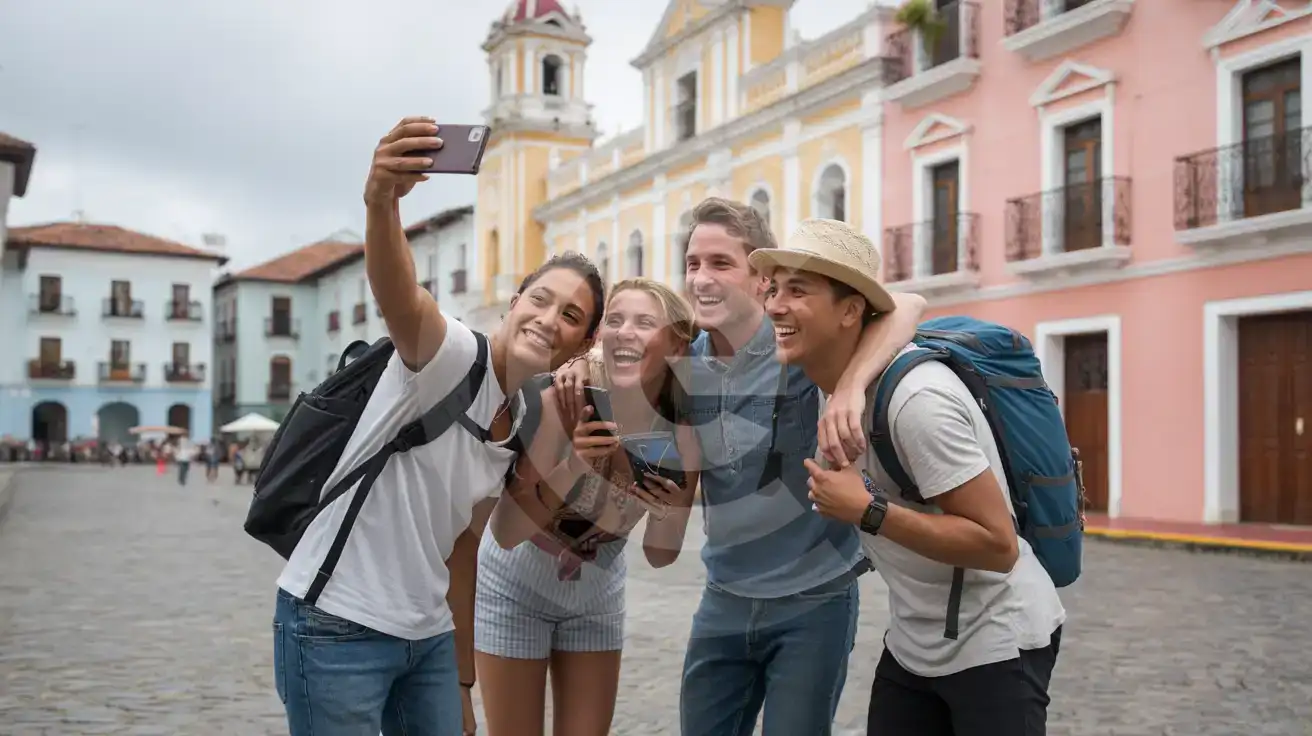
Group of friends taking a selfie in front of colonial buildings in Casco Viejo, Panama City
Exploring Panama's Casco Viejo district — activate your eSIM before departure so directions and dinner reservations load the moment you land.

Compare eSIM Providers for Panama

Recommended
Local SIM / Operator
Roaming
Setup timeStore visit + paperworkAuto
No local ID neededLocal ID requiredUse home account
SpeedCarrier-gradePartner-dependent
Travel supportOperator shops and call centreHome carrier hours
Keep home numberReplaces itSame number
Cost predictabilityBills can spikeBill-shock risk
Typical pricing
$12-18 / day
Typical daily roaming rate; varies by home carrier

PRICING — PICK YOUR ESIMNO PLAN

Light traveler
5GB / 30d
₺2099.00
20% off with code FIRSTWELCOME20on your first order
≈ ₺1,679.20 TRY with code
Buy now
Heavy traveler
20GB / 30d
₺5599.00
20% off with code FIRSTWELCOME20on your first order
≈ ₺4,479.20 TRY with code
Buy now

Frequently Asked Questions (FAQs)

Install the eSIM profile at home over WiFi before your flight. Once your plane lands at Tocumen International and reaches the gate, switch off airplane mode — by the time you're walking through the arrivals corridor toward immigration, your phone is already connected to local data and pulling up Uber pickup zones.
Most iPhones from XS onward, Samsung Galaxy S20 and newer, and Google Pixel devices support eSIM. Check your phone's settings for 'Add Cellular Plan' or 'Add eSIM' — if the option appears, you're good. Your device stays unlocked and dual-SIM capable throughout your Panama trip.
Absolutely. Your home SIM stays active for incoming calls and texts while eSIMno handles all data — maps, Uber requests, WhatsApp messages, and browsing. For outgoing calls, use WhatsApp or FaceTime Audio over your eSIMno data to avoid roaming charges from your home carrier.
Yes — coverage extends nationwide through the local network infrastructure. You'll have signal in Boquete's highland coffee region, along the Caribbean coast in Bocas del Toro, and throughout the Canal Zone. Remote archipelagos like San Blas may have patchy coverage between islands, so download offline maps before island-hopping.
A typical week covering Panama City, the Canal visitor centers, and a day trip to Casco Viejo uses 3-5 GB with regular maps, ride-hailing, photo uploads, and messaging. Add another 1-2 GB if you're streaming video at your hotel or making video calls. Heavy uploaders sharing daily content should consider a larger plan.
Your Panama eSIM covers the entire country for the plan duration. If you're crossing into Costa Rica or Colombia, you'll need a separate plan for those countries — eSIMno offers regional and multi-country options if your itinerary spans borders. Purchase before crossing so activation is seamless at the next border.
GET A FULL20%OFFon your first order
Use code: FIRSTWELCOME20

Stay connected,
wherever you go

Seamless global eSIM coverage

Get Started
Panama bridges two oceans and two continents, making reliable mobile data essential from the moment you clear customs at Tocumen. An eSIMno plan activates before you board, so your phone connects through Cable & Wireless or Claro the instant you taxi to the gate. Skip the SIM vendor queue in arrivals and step straight into your Uber or taxi with GPS navigation already tracking your route to Panama City. Whether you're watching container ships transit the Miraflores Locks, exploring the colonial streets of Casco Viejo, or booking a day trip to Bocas del Toro, cellular data keeps your plans on track. Real-time translation helps at markets where Spanish dominates, ride-hailing apps bypass taxi negotiation entirely, and restaurant reservation confirmations load instantly when you arrive at waterfront venues along the Amador Causeway. Your Panama eSIM works nationwide — from the metropolitan buzz of Panama City to the Caribbean beaches of San Blas and the highland trails around Boquete. One plan, one activation before departure, zero roaming surprises. Install over home WiFi, land with coverage ready, and spend your first hour exploring instead of sorting out connectivity.
No more SIM kiosks

No more SIM kiosks

Skip the airport queues. Install your eSIM at home, activate when you land.

no roaming charges

No roaming surprises

Forget the $200 phone bill three weeks after your trip. Plain pricing, no hidden fees.

keep your physical sim

Keep your home number

Dual-SIM means your physical SIM stays active for calls and texts. eSIM handles only data.

easy installation

Setup in 2 minutes

Scan QR code, follow on-screen steps, you're connected. Works on any eSIM-compatible phone.

Pay SafelyVisa CardMaster CardGoogle PayPayPalApple Pay

How does eSIMNo Works?

Experience seamless global connectivity with our personal eSIM service. Enjoy faster speeds, wider coverage, and the convenience of online purchasing.

Buy a Data Plan

Buy a Data Plan

Search for your destination and pick any data plan

Step 1

Install your eSIM

Install your eSIM

Easy installation via qr code

Step 2

Activate Your eSIM

Activate Your eSIM

Only active when you are ready to use data

Step 3

Advantages

24/7 Customer Support

Reach our team via WhatsApp and email during business hours. Quick answers to common questions available anytime through our automated assistant.

Immediate delivery

Your eSIM arrives by email within minutes. Install it before you board your flight.

Worldwide Coverage

One eSIM, 160+ countries. Land anywhere and connect instantly — no SIM swapping, no roaming charges.

Check Compatibility

Check Compatibility

Before buying and installing an eSim, check if your phone supports one

Check if your phone is eSIM compatible

As you feel the need to use eSIM on your phone, the first question that arises is: does your mobile support eSIMs? And do eSIM-compatible devices work in all regions worldwide?

Some phones that support eSIM technology

  • IPhone XS and Later
  • Samsung Galaxy S20 and Later
  • Pixel 4 and Later
  • Xiaomi 12T Pro and Later
All eSIM-Compatible Phones

Frequently Asked Questions (FAQs)

Find helpful information to answer your questions

What makes eSIMno different from other eSIM services?
eSIMno partners directly with local operators in over 200 countries, eliminating intermediaries. This direct relationship lets us offer competitive pricing, extensive coverage, and faster activation than resellers who route data through third parties.
How can I verify if my eSIM is activated?
There are two clear indicators: (1) your phone's status bar shows the local carrier name once you arrive at your destination, and (2) the data icon (4G, LTE, or 5G) appears next to the eSIMno line in your cellular settings. If neither shows up, toggle airplane mode off and on, or restart your phone.
What customer support is available if I have issues?
eSIMno offers 24/7 support via WhatsApp and email. Our human support team - not bots - handles installation help, troubleshooting, billing questions, and refund inquiries. Most issues are resolved within minutes during business hours and within a few hours overnight.
How do I top up my Panama eSIM?
To top up your Panama eSIM data, log in to the 'My eSIMs' section in the eSIMno Center on our website or mobile app. Select the eSIM you want to top up and follow the on-screen instructions to add more data without losing your current connection.
How do I set up the eSIM on my device?
The fastest way is straight from your order confirmation email, which now contains - for each eSIM - the QR code, a one-tap install link, and the SM-DP+ / activation codes. On the phone you'll use, tap the one-tap install link; or, to use the QR, show it on another screen or a printout and scan it with that same phone (not another phone); or enter the codes manually. The email also has an "Install eSIM" button that opens your eSIM's detail page and launches the install pop-up (sign in if prompted), and you can reach the same pop-up anytime via Profile > My eSIMs > find your plan (shown as "Ready to install") > Install. After installing, turn Data Roaming ON for your eSIMno line (iPhone: Settings > Cellular; Android: Settings > Connections/Network) - without it the eSIM installs but shows no internet. Full guide in Help & Support.
How long is the validity of the Panama eSIM plans?
The validity of eSIM plans varies from 7 days to 90 days depending on the plan you choose. Lifetime options are also available for travelers who don't want their data to expire after a fixed period.
How do I activate the Panama eSIM?
Your eSIMno order confirmation email contains your QR code, your SM-DP+ address and activation code, a one-tap install link, and an "Install eSIM" button - so you can install right from the email. The same options are also on the website: sign in at esimno.com and go to Profile > My eSIMs > your plan > Install. To install, use any ONE of these methods: (1) on the phone you are setting up, tap the one-tap install link/button (iPhone on iOS 17.4+ or Android 9+); (2) use the QR code - because a phone cannot scan its own screen, show this QR on another screen (computer/tablet) or a printout and scan it WITH the phone you are setting up (never with someone else's phone, or the eSIM would install on that phone); or (3) enter the SM-DP+ address and activation code manually. Your Panama eSIM activates automatically when you connect to a local network at your destination.
Can I make phone calls or send SMS?
eSIMno is a data-only service, so you can't make traditional voice calls or send SMS through the eSIM line. However, you can use messaging and calling apps over data - WhatsApp, iMessage, FaceTime, Telegram, Signal, and Google Meet all work normally.
How can I check my data usage?
Log in to the eSIMno Center on our website or mobile app to see your remaining data balance and usage history. You can also check usage in your phone's cellular data settings - most devices show data consumed per line.
Can I switch the eSIM to a different phone after activation?
Generally no. Once an eSIM is activated on a device, it's tied to that device. If you switch phones, you'll need to install a new eSIM. Some carriers offer eSIM transfer features, but eSIMno plans don't currently support transfer between devices.
What smartphones support eSIM?
Most modern devices support eSIM, including iPhone XS and later, Samsung Galaxy S20 through S25 series, Google Pixel 4 and later, Huawei P40 and later, and many recent iPads. Check our full compatibility list before purchasing to confirm your device is supported.
Can I use the eSIM on more than one device?
Each eSIM profile is tied to a single device once activated. If you need data on multiple devices (e.g., phone and tablet), you can either purchase separate eSIMs for each device or use the Personal Hotspot feature on your phone to share data with other devices.

Use Your Free Credit

You can earn up to 15% commission from your friends' purchases with your Reference code. Plus, your friends will get $2 off their first purchase when they use your code!

FIND OUT HOW
Refer a friend

Refer

A FRIEND

Step into the world of E-SIM, bring your friends and benefit together!