


Review Your Cart

Your cart is empty.

You haven't added any eSIM packages yet. Start exploring our plans to get connected!

Browse our eSIM Packages
🎉 Welcome offer: 20% off with promo code FIRSTWELCOME20

Mexico Mexico   / Zócalo

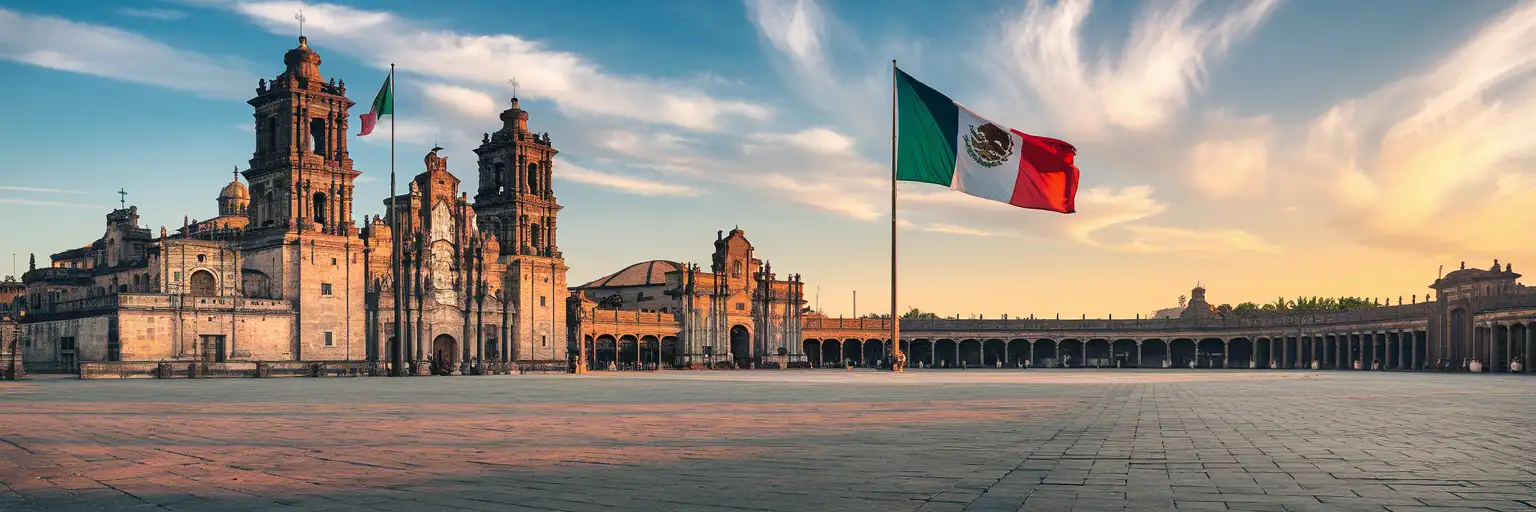
Wide view of the Zócalo plaza in Mexico City at golden hour with the Metropolitan Cathedral and massive Mexican flag visible

Zócalo eSIM: Mexico Data That Works Nationwide

You're walking into the Zócalo with the Diego Rivera murals queued on your phone, the Metro Line 2 route back to your hotel, and a message from your group at the cathedral steps all competing for signal. eSIMno gets your Mexico data sorted before departure so you skip the airport SIM kiosk and land with connectivity ready.
View Plans
GET A FULL20%OFFon your first order
Use code: FIRSTWELCOME20

Stay connected,
wherever you go

Seamless global eSIM coverage

Explore our plans below

Plan Your Trip

Tell us what you'll do and how long you'll be away — we'll highlight the right plan.

7 days
1102030

What will you do?

Tap an activity above to see which plan fits your trip

Already a customer?

EARN UP TOON EVERY FRIEND'S PURCHASE
NETWORK: Movistar The speed may vary depending on the location.

Quick Facts

Language
Spanish (Español)
Currency
Mexican Peso (MXN, $)
Time Zone
Central Time (UTC-6, UTC-5 DST)
Dialing Code
+52
Power Plug
Type A, B (flat 2-pin, common across North America)
Emergency
911 (general)
eSIMno Networks
Movistar

How to Get Your eSIM

  1. Pick your Mexico data plan
    Choose from 1GB to 20GB options based on your trip length. A 3-5 day Zócalo visit with museum bookings, rideshare, and photo uploads runs comfortably on 5GB.
  2. Install over home WiFi before departure
    Scan the QR code from your confirmation email while still at home. The profile downloads in under a minute and sits dormant until you activate it.
  3. Activate after landing at Mexico City International
    Once your flight taxis to the gate at Mexico City International Airport, switch off airplane mode. Your eSIM connects to Movistar within seconds — no kiosk queue, no passport handover.
  4. Navigate the Historic Center immediately
    By the time you clear customs and step into the arrivals hall, Maps already shows the Metro Línea 1 transfer to Zócalo station (4 stops, 12 minutes) or the Uber pickup zone at Door 4.
  5. Keep data working across all of Mexico
    The same plan covers Teotihuacan pyramids, Coyoacán cafés, Xochimilco trajineras, and any extension to Oaxaca or the coast. One eSIM, nationwide reach.

Traveler Tips

  • Arrive at the Zócalo before 8:30 AM to watch the military flag-raising ceremony — your phone captures the best video angles from the northwest corner near the cathedral steps.
  • The Palacio Nacional Diego Rivera murals require free timed-entry tickets booked online; your confirmation QR must load on-screen at the security checkpoint.
  • Metro Línea 2 runs directly under the plaza — Zócalo station exits place you 50 meters from the cathedral facade, so save Maps for the above-ground navigation.
  • Templo Mayor museum admission runs around 90 MXN and accepts cash or card; the ticket counter has no WiFi, so pull up your digital payment app before you queue.
  • Dual-SIM setup keeps your home number active for incoming calls while eSIMno handles all data — use WhatsApp or FaceTime for outgoing calls to avoid roaming charges.
  • Download offline maps for Centro Histórico before you leave your hotel; the stone arcades and underground metro transfers block signal briefly.

Why Data Matters at the Zócalo

The Zócalo puts five data-hungry tasks on your phone within the first hour. The Palacio Nacional security line checks your timed-entry QR before you reach the Diego Rivera murals — no WiFi at the checkpoint, no backup printer. The Templo Mayor museum ticket counter sits 200 meters northeast, and the admission confirmation needs to load on-screen before the attendant waves you through. Walking from the cathedral steps to the Gran Hotel rooftop terrace for sunset photos means crossing Calle Madero, where café WiFi drops the moment you step onto the cobblestones.

Transit decisions stack up fast. Metro Línea 2 runs directly under the plaza at Zócalo station, but the closest Metrobús stop (Línea 4) sits three blocks south at Museo de la Ciudad. Uber and DiDi pickups cluster along Calle 5 de Mayo near the Portal de Mercaderes arcade — surge pricing spikes after 6 PM on weekends, and checking the app before you commit saves 30-50 MXN per ride. Google Maps live traffic shows whether the Eje Central route or the Paseo de la Reforma corridor moves faster toward Chapultepec.

Group coordination across the 240-meter plaza relies on WhatsApp location pins. The cathedral steps, the flagpole, and the Templo Mayor entrance gate each sit far enough apart that voice descriptions fail — your group chat needs to show the pin in real time. Translation apps help at the Mercado de la Merced food stalls 800 meters east, where vendors speak rapid Chilango Spanish and menus list regional dishes by local names. eSIMno plans for Zócalo, Mexico City, Mexico keep all of this working on Movistar's network from the moment you land.

Visiting the Zócalo

The plaza itself stays open 24 hours with no admission fee. Surrounding monuments run their own schedules: the Metropolitan Cathedral opens daily from around 8 AM to 8 PM (restricted during Mass); Templo Mayor museum operates Tuesday through Sunday, roughly 9 AM to 5 PM, closed Mondays; Palacio Nacional opens Tuesday through Sunday, 10 AM to 5 PM, and requires a government-issued ID at the entrance — bring your passport.

Dress modestly for cathedral entry (covered shoulders, no very short shorts). Photography is permitted inside the cathedral without flash and inside Palacio Nacional's Rivera mural corridors. Templo Mayor allows non-flash photography; tripods need a permit. The Zócalo hosts rotating installations — Day of the Dead altars in late October, Independence decorations in September, a Christmas ice rink in December — so check the Mexico City tourism calendar before your visit to time your arrival.

Exploring the Zócalo

Tour group photographing Diego Rivera murals inside Palacio Nacional at the Zócalo in Mexico City
Activate your eSIM before visiting the Zócalo so your timed-entry QR loads instantly at the Palacio Nacional checkpoint.

Compare eSIM Options at Zócalo

Recommended
Local SIM / Operator
Roaming
Setup timeStore visit + paperworkAuto
No local ID neededLocal ID requiredUse home account
SpeedCarrier-gradePartner-dependent
Travel supportSpanish onlyHome carrier hours
Keep home numberReplaces itSame number
Cost predictabilityBills can spikeBill-shock risk
Typical pricing
$12-18 / day
Typical day-pass tariff varies by home carrier

PRICING — PICK YOUR ESIMNO PLAN

Light traveler
5GB / 30d
$30.90
20% off with code FIRSTWELCOME20on your first order
≈ $24.72 USD with code
Buy now
Heavy traveler
20GB / 30d
$89.90
20% off with code FIRSTWELCOME20on your first order
≈ $71.92 USD with code
Buy now

Frequently Asked Questions (FAQs)

Activate after your flight lands at Mexico City International. By the time you clear customs and reach the arrivals hall, your phone already connects to Movistar — Maps shows the Metro Línea 2 route to Zócalo station (4 stops, 12 minutes) and Uber loads the pickup zone at Door 4.

The Movistar signal holds strong across the Zócalo plaza and inside the Metropolitan Cathedral nave. The Templo Mayor museum has thicker stone walls that can slow speeds briefly in the lower excavation levels, but your ticket confirmation and translation apps load without issue at the entrance and main galleries.

Metro Línea 1 runs from Terminal 1 to Pino Suárez station, where you transfer to Línea 2 for one stop to Zócalo — total journey around 45 minutes. Uber and DiDi pickups at Door 4 arrivals run 150-250 MXN depending on traffic. Your eSIMno data lets you compare both options in real time before you commit.

Dual-SIM setup keeps your home number receiving calls and texts while eSIMno handles all data. For outgoing calls, use WhatsApp, FaceTime, or Google Meet over your eSIM data — placing native voice calls through your home SIM triggers roaming charges.

The same eSIMno plan covers all of Mexico on the Movistar network. Data works at the Pyramid of the Sun ticket gates, along the Xochimilco trajinera canals, and at Frida Kahlo Museum in Coyoacán — no plan change needed for trips outside the Historic Center.

Café WiFi along Calle Madero and the Portal de Mercaderes arcade requires sign-up and drops the moment you step onto the plaza. The Zócalo spans 240 meters with no public hotspots at center — your eSIM data keeps Maps, rideshare, and group chat working across the entire square without hunting for a signal.

GET A FULL20%OFFon your first order
Use code: FIRSTWELCOME20

Stay connected,
wherever you go

Seamless global eSIM coverage

Get Started
The Zócalo sits at the ceremonial heart of Mexico City, and your phone works harder here than almost anywhere else in the country. Timed-entry confirmations for the Palacio Nacional murals, Metro directions through the Línea 2 Zócalo station, rideshare pickups along the Calle Madero pedestrian corridor, and real-time translation at the Templo Mayor museum all demand data the moment you step onto the plaza. An eSIMno plan activates after your flight lands at Mexico City International, so your first steps out of baggage claim already have Maps, Uber, and WhatsApp working. The plaza itself sprawls 240 meters on each side, and the surrounding Historic Center adds another dozen blocks of colonial arcades, rooftop terraces, and underground metro transfers. Free WiFi exists at scattered cafés and hotel lobbies, but coverage drops the moment you cross the street toward the cathedral or duck into the Templo Mayor ticket queue. Data on your own line means the confirmation QR loads whether you're under the baroque archways or standing in the morning flag-raising crowd. eSIMno plans run on the Movistar network and cover all of Mexico, so the same data that works at the Zócalo keeps working if you day-trip to Teotihuacan, catch a Liga MX match at Estadio Azteca, or extend your trip to the Riviera Maya. Buy before departure, install over home WiFi, activate after touchdown — your phone is already pulling directions by the time you clear customs.
Back to Mexico
No more SIM kiosks

No more SIM kiosks

Skip the airport queues. Install your eSIM at home, activate when you land.

no roaming charges

No roaming surprises

Forget the $200 phone bill three weeks after your trip. Plain pricing, no hidden fees.

keep your physical sim

Keep your home number

Dual-SIM means your physical SIM stays active for calls and texts. eSIM handles only data.

easy installation

Setup in 2 minutes

Scan QR code, follow on-screen steps, you're connected. Works on any eSIM-compatible phone.

Pay SafelyVisa CardMaster CardGoogle PayPayPalApple Pay

How does eSIMNo Works?

Experience seamless global connectivity with our personal eSIM service. Enjoy faster speeds, wider coverage, and the convenience of online purchasing.

Buy a Data Plan

Buy a Data Plan

Search for your destination and pick any data plan

Step 1

Install your eSIM

Install your eSIM

Easy installation via qr code

Step 2

Activate Your eSIM

Activate Your eSIM

Only active when you are ready to use data

Step 3

Advantages

24/7 Customer Support

Reach our team via WhatsApp and email during business hours. Quick answers to common questions available anytime through our automated assistant.

Immediate delivery

Your eSIM arrives by email within minutes. Install it before you board your flight.

Worldwide Coverage

One eSIM, 160+ countries. Land anywhere and connect instantly — no SIM swapping, no roaming charges.

Check Compatibility

Check Compatibility

Before buying and installing an eSim, check if your phone supports one

Check if your phone is eSIM compatible

As you feel the need to use eSIM on your phone, the first question that arises is: does your mobile support eSIMs? And do eSIM-compatible devices work in all regions worldwide?

Some phones that support eSIM technology

  • IPhone XS and Later
  • Samsung Galaxy S20 and Later
  • Pixel 4 and Later
  • Xiaomi 12T Pro and Later
All eSIM-Compatible Phones

Frequently Asked Questions (FAQs)

Find helpful information to answer your questions

Will the eSIM affect my phone's battery life?
Running two SIM lines (physical + eSIM) uses slightly more battery than one, since the phone monitors both networks. The difference is usually 5-10% over a full day. To minimize impact, disable the line you're not actively using or turn off cellular data on the inactive line.
Does the eSIM work in rural areas and small towns?
Coverage depends on the partner network's reach in Mexico. Major cities, tourist areas, and highways typically have strong 4G/5G coverage. Remote rural areas may have weaker signal or fall back to 3G. Download offline maps before heading off the beaten path.
Are there any hidden fees or extra charges?
No. The price you see at checkout is the total price - no activation fees, no hidden taxes, no roaming surcharges. Your data plan is fixed-price, and you'll never receive a surprise bill from your home carrier as long as you keep cellular data off on your home SIM.
Do I need to remove my eSIM after my trip?
You don't have to remove it. Once your data plan expires, the eSIM simply stops providing data. You can leave the dormant profile on your phone and reuse it next time by purchasing a new plan, or delete it from cellular settings to free up an eSIM slot.
Can I share data from my eSIM with someone else's phone?
Yes, through Personal Hotspot. Activate hotspot on your phone, share the password, and the other device connects to your data. Data used by connected devices counts toward your eSIM plan, so monitor usage to avoid running out faster than expected.
What happens if I pause my trip and return home?
Your eSIM keeps its validity period running whether you're using it or not - pausing your trip doesn't pause the timer. If you return home, the eSIM stays dormant on your device until you travel again or it expires. You can disable it in cellular settings to avoid accidental usage.
How fast does the eSIM activate after I switch off airplane mode?
Activation typically takes 10-30 seconds after airplane mode is switched off, depending on local network availability. In some cases it's nearly instant; in remote areas it may take a minute or two. If it doesn't connect within 5 minutes, restart your phone or check that data roaming is enabled.
What is the price range for the Mexico eSIM plans?
Prices commence at $10.90 and vary according to data allowance and plan duration. Larger data plans and longer durations cost more, but the per-GB rate decreases with bigger packages.
What happens when my data plan runs out?
When you use up your data allowance, your connection stops until you top up or purchase a new plan. You can top up directly from the eSIMno Center while connected to Wi-Fi, or buy a new plan if your validity period has expired.
Is unlimited data really unlimited?
Unlimited plans provide unlimited data at high speed (4G/5G) up to a fair-use threshold defined per plan. Beyond that threshold, speeds may be reduced to 128 Kbps for the remainder of the validity period - still usable for messaging and basic browsing, but slower for streaming and video calls.
Is the eSIM connection secure?
eSIM connections are as secure as standard cellular connections - encrypted by the carrier network. For added security on public networks (cafes, airports), use a VPN. The eSIM profile itself is digitally signed and can't be cloned like a physical SIM.
Which eSIM is best for travelling to Mexico?
eSIMno is an excellent option for travelers heading to Mexico. We offer a diverse range of eSIM plans - including regional, local, and lifetime options - with reliable coverage on local networks.

Use Your Free Credit

You can earn up to 15% commission from your friends' purchases with your Reference code. Plus, your friends will get $2 off their first purchase when they use your code!

FIND OUT HOW
Refer a friend

Refer

A FRIEND

Step into the world of E-SIM, bring your friends and benefit together!