


Review Your Cart

Your cart is empty.

You haven't added any eSIM packages yet. Start exploring our plans to get connected!

Browse our eSIM Packages
🎉 Welcome offer: 20% off with promo code FIRSTWELCOME20

Mexico Mexico   / Cabo San Lucas Visitor Center

Exterior view of Cabo San Lucas Visitor Center near the waterfront in Cabo San Lucas at golden hour

Cabo San Lucas Visitor Center eSIM: Mexico Data That Works Nationwide

You’re heading for Cabo San Lucas Visitor Center with marina directions to check, tour pickup messages coming in, and the route from Los Cabos International Airport still sitting on your phone. With eSIMno, you can buy before your trip, install in minutes, and switch on your data after landing so you skip hunting for a physical SIM in Cabo.
View Plans
GET A FULL20%OFFon your first order
Use code: FIRSTWELCOME20

Stay connected,
wherever you go

Seamless global eSIM coverage

Explore our plans below

Plan Your Trip

Tell us what you'll do and how long you'll be away — we'll highlight the right plan.

7 days
1102030

What will you do?

Tap an activity above to see which plan fits your trip

Already a customer?

EARN UP TOON EVERY FRIEND'S PURCHASE
NETWORK: AT&T & Telcel Depending on the plan you choose, you'll connect to one or more of these networks.

Quick Facts

Language
Spanish (Español)
Currency
Mexican Peso (MXN, $)
Time Zone
Mountain Standard Time (UTC-7)
Dialing Code
+52
Power Plug
Type A, B (flat 2-pin, common across North America)
Emergency
911 (general)
eSIMno Networks
Movistar

How to Get Your eSIM

  1. Choose Your Mexico Plan Before You Fly
    Pick your eSIM before departure so you’re not dealing with SIM counters after arriving in Los Cabos. If Cabo San Lucas Visitor Center is your first stop, buying in advance saves time on day one when you need directions, bookings, and ride details immediately.
  2. Install Over Home WiFi
    Scan the QR code and install the eSIM while you’re still at home or at your departure hotel. That way your phone is ready before the flight, and the only thing left to do in Mexico is turn the line on after landing.
  3. Keep Your Home SIM For Voice
    eSIMno is data-only, so your home SIM can stay active for incoming calls with no extra setup. For outgoing calls around Cabo San Lucas Visitor Center, use WhatsApp, FaceTime, Telegram, or another internet-based calling app over your data plan.
  4. Activate After Landing
    Once the aircraft reaches the gate at Los Cabos International Airport and phone use is allowed, switch on the eSIM and disable airplane mode. By the time you’re in the taxi line or shuttle pickup area, your maps, messages, and confirmation emails can already be live.
  5. Use It On The Way To The Marina
    The drive from the airport to Cabo San Lucas takes around 35 to 50 minutes depending on traffic. That stretch is when travelers pull up hotel pins, visitor-center info, tour meeting points, and marina directions, so having data before you reach Cabo San Lucas Visitor Center makes the whole arrival smoother.

Traveler Tips

  • If Cabo San Lucas Visitor Center is your first stop, arrive with Google Maps, WhatsApp, and Uber already logged in; the airport-to-marina transfer takes around 35 to 50 minutes, and drivers often message during that window.
  • Boat tours toward El Arco and the marina frequently confirm meeting points by message the same morning, so keep data live before you start walking the waterfront near Cabo San Lucas Visitor Center.
  • Cabo San Lucas Visitor Center works best as a quick planning stop early in the day, around 8 AM to 10 AM, when it’s easier to sort directions, beach access, and marina options before midday heat builds.
  • Keep your home SIM active for incoming calls and use data apps for outgoing calls; that setup is useful if your hotel, driver, or tour operator reaches your regular number while you’re already in Cabo.
  • Save offline screenshots of your booking confirmations, but don’t rely on screenshots alone; live data helps if a pickup point changes from the marina side to Medano Beach access or a driver shares a new pin.

Why Data Matters at Cabo San Lucas Visitor Center

Cabo San Lucas Visitor Center sits in a very practical part of town: close to the marina, close to waterfront walking routes, and close to the point where travelers start making real-time decisions. You’re not standing there to read a brochure for 20 minutes. You’re checking Google Maps for the next stop, opening WhatsApp for a tour message, comparing pickup points near Marina Cabo San Lucas, and pulling up the route toward Cabo San Lucas Beach or Medano Beach. That is exactly where a prepaid Mexico eSIM helps. eSIMno plans for Cabo San Lucas Visitor Center, Cabo San Lucas, Mexico give you data the moment you need it, without stopping at a SIM shop or waiting to reach resort WiFi.

There’s also a strong transit-and-booking angle here. A lot of visitors move from the airport to Cabo San Lucas Visitor Center, then on to marina check-ins, beach clubs, or boat departures for El Arco within the same 2 to 3 hours. During that window, your phone is handling at least three jobs at once: live navigation, booking confirmation, and group coordination. Uber or driver messages matter for curbside pickup, browser search matters for tour timing, and translation helps when a quick Spanish exchange comes up at a desk or dock. If you’re meeting friends, a shared pin near the marina promenade is faster than describing landmarks by memory.

The bigger win is that your plan doesn’t stop at this one location. Cabo San Lucas Visitor Center may be your first orientation point, but your data keeps working when you continue toward the waterfront, your resort, or another part of Mexico later in the trip. That means one setup before departure, one activation after landing, and no physical SIM swap when you still have airport transfer details, restaurant reservations, and day-trip logistics to manage on the same phone.

Visiting Cabo San Lucas Visitor Center

Cabo San Lucas Visitor Center is best treated as a quick logistics stop rather than a long attraction. The useful part is what it helps you do next: confirm where the marina walk begins, ask about beach access, sort transport, and get oriented before moving on. That makes live mobile data more valuable than depending on a lobby connection somewhere else, because plans change while you’re already outside. A driver may send an updated pickup pin, a boat operator may ask you to arrive 15 minutes earlier, or you may decide to reroute on foot toward the waterfront after seeing the heat and traffic conditions in real time.

It also works well for travelers who need a final check before committing to the day’s route. If you’re deciding between a marina boat trip, a beach stop, or heading straight to your hotel, your phone becomes the decision tool: current opening info, map distance, review checks, and messaging in one place. That is why the smartest setup is simple: install your eSIM before the trip, activate it after landing, and arrive at Cabo San Lucas Visitor Center with working data instead of treating the visitor center itself as your backup internet plan.

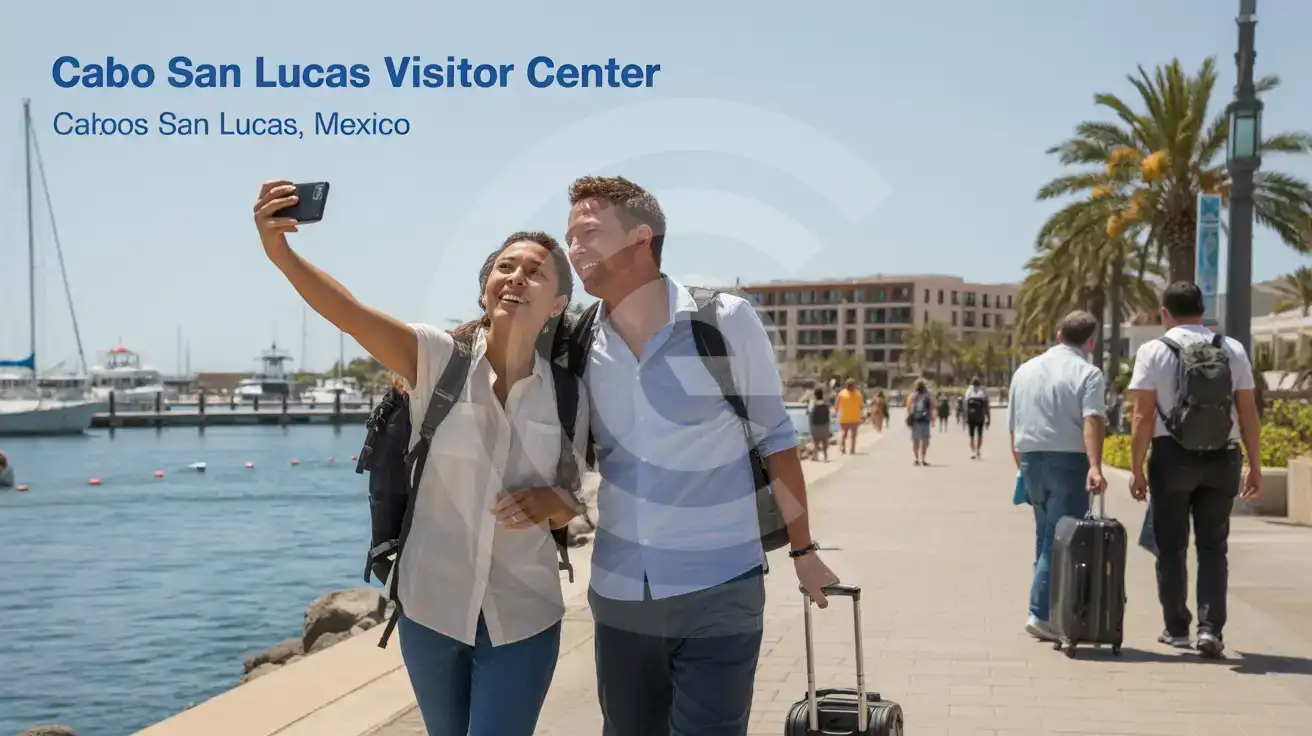
Arrival Around The Marina

A couple walking near the marina promenade by Cabo San Lucas Visitor Center in Cabo San Lucas
Near Cabo San Lucas Visitor Center, Cabo San Lucas, Mexico, having data ready helps with marina pickups and live directions.

Compare eSIM Options at Cabo San Lucas Visitor Center

Recommended
Local SIM / Operator
Roaming
Setup timeDoes not work until registration is completeAuto
No local ID neededPassport plus a live face checkUse home account
SpeedOne network onlyPartner-dependent
Travel supportSpanish-language serviceHome carrier hours
Keep home numberReplaces itSame number
Cost predictabilityPrepaid, no bill shockBill-shock risk
Typical pricing
Telcel requires the SIM to be registered with an official ID, and the online route allows only three attempts before you have to visit a store in person.
Prepaid package on the Telcel network only.
$12-18 / day
Typical daily roaming rate; varies by home carrier

PRICING — PICK YOUR ESIMNO PLAN

Light traveler
5GB / 30d
₺1399.00
20% off with code FIRSTWELCOME20on your first order
≈ ₺1,119.20 TRY with code
Buy now
Heavy traveler
20GB / 30d
₺3099.00
20% off with code FIRSTWELCOME20on your first order
≈ ₺2,479.20 TRY with code
Buy now

Frequently Asked Questions (FAQs)

Activate it after landing at Los Cabos International Airport, once the plane reaches the gate and phone use is allowed. That way your data is ready during the 35 to 50 minute ride into Cabo San Lucas, so maps and messages already work by the time you reach Cabo San Lucas Visitor Center.
Yes — your home SIM can stay active for incoming calls while the eSIM handles data around Cabo San Lucas Visitor Center and the marina. For outgoing calls, use WhatsApp, FaceTime, Telegram, or another internet-calling app so you don’t trigger voice roaming on your home line.
Yes, because even a short stop there stacks multiple phone tasks into one hour: checking marina directions, confirming a tour time, messaging a driver, and comparing routes toward Medano Beach or El Arco. eSIMno works well for that kind of fast arrival flow because you can install before the trip and use data the moment you need it in Cabo San Lucas.
The straightforward route is by airport transfer, taxi, or rideshare-style booking into Cabo San Lucas, with the trip taking around 35 to 50 minutes depending on traffic. Having data live helps because drivers and hotels can share updated pins near the marina promenade instead of relying on verbal directions once you arrive.
Google Maps and WhatsApp are the two big ones around Cabo San Lucas Visitor Center, especially if you’re moving between the visitor center, the marina, and beach access points. Add Uber and your email app, and you’ve covered the main tasks: live directions, pickup messages, booking confirmations, and reservation checks.
GET A FULL20%OFFon your first order
Use code: FIRSTWELCOME20

Stay connected,
wherever you go

Seamless global eSIM coverage

Get Started
Cabo San Lucas Visitor Center is one of those first-stop places where mobile data immediately matters. Travelers use it to confirm marina tours, pull up walking directions around the waterfront, translate quick questions in Spanish, and message hotels or drivers before heading deeper into town. If you arrive through Los Cabos International Airport and go straight toward the marina, having your plan already installed means you can activate after landing and start using Maps, WhatsApp, Uber, and browser search without waiting for hotel check-in or asking staff for a WiFi password. The area around Cabo San Lucas Visitor Center moves fast because it connects sightseeing, waterfront pickups, and onward trips toward Medano Beach, the marina, and boat departures for. That means your phone is handling live navigation, booking confirmations, digital receipts, and group chat coordination all in the same hour. A Mexico eSIM is the cleaner option here because it works before you reach your resort, it doesn’t require swapping your home SIM, and it keeps your trip moving when you step away from indoor WiFi and back onto the promenade. This page is built for travelers ready to buy, not readers looking for a full Cabo guide. If Cabo San Lucas Visitor Center is just the first stop, your plan still keeps working across and the rest of Mexico, whether you continue to the marina, beach clubs, or another city on the same trip. Buy once, install once, and keep your data ready for the full journey instead of solving connectivity stop by stop.
Back to Mexico
No more SIM kiosks

No more SIM kiosks

Skip the airport queues. Install your eSIM at home, activate when you land.

no roaming charges

No roaming surprises

Forget the $200 phone bill three weeks after your trip. Plain pricing, no hidden fees.

keep your physical sim

Keep your home number

Dual-SIM means your physical SIM stays active for calls and texts. eSIM handles only data.

easy installation

Setup in 2 minutes

Scan QR code, follow on-screen steps, you're connected. Works on any eSIM-compatible phone.

Pay SafelyVisa CardMaster CardGoogle PayPayPalApple Pay

How does eSIMNo Works?

Experience seamless global connectivity with our personal eSIM service. Enjoy faster speeds, wider coverage, and the convenience of online purchasing.

Buy a Data Plan

Buy a Data Plan

Search for your destination and pick any data plan

Step 1

Install your eSIM

Install your eSIM

Easy installation via qr code

Step 2

Activate Your eSIM

Activate Your eSIM

Only active when you are ready to use data

Step 3

Advantages

24/7 Customer Support

Reach our team via WhatsApp and email during business hours. Quick answers to common questions available anytime through our automated assistant.

Immediate delivery

Your eSIM arrives by email within minutes. Install it before you board your flight.

Worldwide Coverage

One eSIM, 160+ countries. Land anywhere and connect instantly — no SIM swapping, no roaming charges.

Check Compatibility

Check Compatibility

Before buying and installing an eSim, check if your phone supports one

Check if your phone is eSIM compatible

As you feel the need to use eSIM on your phone, the first question that arises is: does your mobile support eSIMs? And do eSIM-compatible devices work in all regions worldwide?

Some phones that support eSIM technology

  • IPhone XS and Later
  • Samsung Galaxy S20 and Later
  • Pixel 4 and Later
  • Xiaomi 12T Pro and Later
All eSIM-Compatible Phones

Frequently Asked Questions (FAQs)

Find helpful information to answer your questions

Is the eSIM connection secure?
eSIM connections are as secure as standard cellular connections - encrypted by the carrier network. For added security on public networks (cafes, airports), use a VPN. The eSIM profile itself is digitally signed and can't be cloned like a physical SIM.
How long is the validity of the Mexico eSIM plans?
The validity of eSIM plans varies from 7 days to 90 days depending on the plan you choose. Lifetime options are also available for travelers who don't want their data to expire after a fixed period.
Can I make phone calls or send SMS?
eSIMno is a data-only service, so you can't make traditional voice calls or send SMS through the eSIM line. However, you can use messaging and calling apps over data - WhatsApp, iMessage, FaceTime, Telegram, Signal, and Google Meet all work normally.
Will the eSIM affect my phone's battery life?
Running two SIM lines (physical + eSIM) uses slightly more battery than one, since the phone monitors both networks. The difference is usually 5-10% over a full day. To minimize impact, disable the line you're not actively using or turn off cellular data on the inactive line.
Does the eSIM work in rural areas and small towns?
Coverage depends on the partner network's reach in Mexico. Major cities, tourist areas, and highways typically have strong 4G/5G coverage. Remote rural areas may have weaker signal or fall back to 3G. Download offline maps before heading off the beaten path.
Can I share data from my eSIM with someone else's phone?
Yes, through Personal Hotspot. Activate hotspot on your phone, share the password, and the other device connects to your data. Data used by connected devices counts toward your eSIM plan, so monitor usage to avoid running out faster than expected.
How do I set up the eSIM on my device?
The fastest way is straight from your order confirmation email, which now contains - for each eSIM - the QR code, a one-tap install link, and the SM-DP+ / activation codes. On the phone you'll use, tap the one-tap install link; or, to use the QR, show it on another screen or a printout and scan it with that same phone (not another phone); or enter the codes manually. The email also has an "Install eSIM" button that opens your eSIM's detail page and launches the install pop-up (sign in if prompted), and you can reach the same pop-up anytime via Profile > My eSIMs > find your plan (shown as "Ready to install") > Install. After installing, turn Data Roaming ON for your eSIMno line (iPhone: Settings > Cellular; Android: Settings > Connections/Network) - without it the eSIM installs but shows no internet. Full guide in Help & Support.
How do I delete an eSIM I no longer need?
On iPhone: Settings > Cellular > tap the eSIM line > Remove eSIM. On Android: Settings > Network & Internet > SIMs > tap the eSIM > Erase. Deleting the eSIM frees up a profile slot. Make sure you don't need it anymore - once deleted, you can't reinstall the same profile.
How fast does the eSIM activate after I switch off airplane mode?
Activation typically takes 10-30 seconds after airplane mode is switched off, depending on local network availability. In some cases it's nearly instant; in remote areas it may take a minute or two. If it doesn't connect within 5 minutes, restart your phone or check that data roaming is enabled.
Can I install my eSIM before traveling?
Yes - setting it up before your trip is the easiest approach. Your confirmation email contains the QR code, a one-tap install link and the manual SM-DP+ / activation codes (the same options are also available via sign in > Profile > My eSIMs > Install). While on Wi-Fi at home, install it with the one-tap link on your phone, or - to use the QR - show it on another screen or a printout and scan it with the phone you are setting up (not another phone). Installing does not start your plan: the validity countdown only begins when the eSIM connects to a mobile network inside your plan's coverage area. Keep the eSIM line and its Data Roaming off until you are ready to start - if your plan covers the country you are in right now, turning the line on connects and starts the countdown immediately, even if you do not browse anything. Please note: once installed, an eSIM is considered used and is no longer eligible for a refund.
What is the price range for the Mexico eSIM plans?
Prices commence at ₺399.00 and vary according to data allowance and plan duration. Larger data plans and longer durations cost more, but the per-GB rate decreases with bigger packages.
How do I top up my Mexico eSIM?
To top up your Mexico eSIM data, log in to the 'My eSIMs' section in the eSIMno Center on our website or mobile app. Select the eSIM you want to top up and follow the on-screen instructions to add more data without losing your current connection.

Use Your Free Credit

You can earn up to 15% commission from your friends' purchases with your Reference code. Plus, your friends will get $2 off their first purchase when they use your code!

FIND OUT HOW
Refer a friend

Refer

A FRIEND

Step into the world of E-SIM, bring your friends and benefit together!