


Review Your Cart

Your cart is empty.

You haven't added any eSIM packages yet. Start exploring our plans to get connected!

Browse our eSIM Packages
🎉 Welcome offer: 20% off with promo code FIRSTWELCOME20

Italy Italy   / Port of Venice

Wide exterior view of Port of Venice cruise terminal area at sunset in Venice, Italy

Port of Venice eSIM: Local Data That Works Across Italy

Your cruise day at Port of Venice starts fast: terminal updates, transfer messages, passport-ready emails, and the ride toward Saint Mark's Square can all hit your phone within the same hour. With eSIMno, you can buy before your trip, install in minutes, and switch it on after landing so your data is ready at the port and keeps working across the rest of Italy.
View Plans
GET A FULL20%OFFon your first order
Use code: FIRSTWELCOME20

Stay connected,
wherever you go

Seamless global eSIM coverage

Explore our plans below

Plan Your Trip

Tell us what you'll do and how long you'll be away — we'll highlight the right plan.

7 days
1102030

What will you do?

Tap an activity above to see which plan fits your trip

Already a customer?

EARN UP TOON EVERY FRIEND'S PURCHASE
NETWORK: Vodafone & Wind Tre Depending on the plan you choose, you'll connect to one or more of these networks.

Quick Facts

Language
Italian (Italiano)
Currency
Euro (EUR, €)
Time Zone
Central European Standard Time (UTC+1)
Dialing Code
+39
Power Plug
Type C, E, F (round 2-pin, common across most of Europe)
Emergency
112
eSIMno Networks
Vodafone, Wind Tre

How to Get Your eSIM

  1. Choose Your Italy Plan Before Travel
    Pick your Italy eSIM before you leave home so embarkation day at Port of Venice stays simple. If you are flying into Venice Marco Polo Airport or connecting by train into Venezia Santa Lucia, you do not need to spend arrival time looking for a SIM counter.
  2. Install It Over Stable WiFi
    Install the eSIM QR profile at home or at your hotel before cruise day. That gives you time to save your boarding email, passport copy, transfer booking, and terminal address on the same phone you will use at Port of Venice.
  3. Keep It Off Until You Land
    Leave the eSIM installed but inactive while you travel. Turn it on after landing in Italy or once you arrive and switch off airplane mode, so the plan starts when you are ready to head toward the port.
  4. Use Data For The Port Transfer
    As you move from the airport, Mestre, or Piazzale Roma toward Port of Venice, use your data for Google Maps, driver chat, cruise line emails, and People Mover or vaporetto planning. That is the point where port WiFi is least helpful and timing matters most.
  5. Keep It Running For The Rest Of Italy
    Your eSIM is not just for the pier. After embarkation or after you disembark, keep using it for trains, hotels, restaurant bookings, and onward travel across Venice, Rome, Florence, Milan, and the rest of Italy.

Traveler Tips

  • If you are boarding at Port of Venice on the same day you land, activate your eSIM after landing and before you start the 20-30 minute transfer from Venice Marco Polo Airport so maps and driver messages work immediately.
  • From the city side, many cruise travelers pass through Piazzale Roma and then continue by People Mover or port transfer. Keep your confirmation email and terminal directions loaded before you start moving with luggage.
  • Port of Venice days involve a lot of short app checks in a tight window: passport copy, boarding documents, taxi chat, and Google Maps. A small plan can disappear fast if you start uploading video from the pier, so choose data with some margin.
  • If your home SIM stays active for voice, incoming calls to your regular number still reach you with no extra setup. For outbound calls around Venice, use WhatsApp, FaceTime, Telegram, or another internet calling app over your eSIM data.
  • Venice routes can shift between road transfer, People Mover, vaporetto, and walking segments. Live navigation matters more here than in a standard cruise port because one wrong turn with luggage can cost 15-20 minutes.

Why Data Matters at Port of Venice

Port of Venice is not a walk-off-and-forget-it cruise stop. The real challenge is the handoff between airport, rail, city transport, and cruise terminal, all inside a place where water routes and pedestrian links change the way you move. If you arrive through Venice Marco Polo Airport, you will likely check transfer details before you even leave arrivals. If you come in through Venezia Santa Lucia, you may need to coordinate the last stretch from the station side of Venice. If you are already overnighting near Grand Canal, your phone becomes the tool for live navigation, not just static directions. That is why travelers buy eSIMno plans for Port of Venice, Venice, Italy before the trip instead of depending on terminal WiFi or hotel WiFi once they are already in motion.

Data helps in three concrete ways right away. First, it keeps your embarkation documents accessible: booking emails, boarding windows, passport scans, and transfer confirmations. Second, it keeps your route flexible. Google Maps, ACTV schedules, and driver messaging matter when you are moving between Piazzale Roma, the cruise area, and the lagoon-side transport links with luggage. Third, it keeps your group in sync. Cruise days create a lot of split movement: one person grabbing coffee, another handling bags, another checking in with the cruise line. A working data connection keeps WhatsApp, iMessage, and internet calls alive while everyone converges on the same ship.

The benefit does not end once you clear the port. Venice visitors still need data for restaurant reservations, museum bookings, ticket emails, and onward trains deeper into Italy. If your sailing finishes in Venice and you continue to Rome or Florence the same day, nothing changes on your phone: maps, messages, and booking apps keep working without a physical SIM swap. That is the simplest reason to sort connectivity before the trip starts.

Visiting Port of Venice

Port of Venice works best when you treat embarkation as a timed logistics window, not a casual arrival. Give yourself room for luggage handoff, identity checks, and terminal finding, especially if you are reaching the port after a same-day flight or train. Venice adds one extra layer compared with a standard road-only cruise port: your route may combine taxi, pedestrian sections, and water-connected city transport depending on where you are staying. That makes screenshot backups of your booking, ship details, and transfer instructions worth having before you leave your hotel.

If you are spending a few hours in Venice before boarding, stay close to practical transit points rather than trying to cover the whole historic center with bags. Portable documents matter here more than sightseeing notes: your passport image, cruise confirmation, hotel checkout receipt, and transport booking should all be easy to reach on your phone. Travelers with a short Venice stop also use their connection for translation, payment verification, and last-minute bookings before they lose city time to terminal routines. The cleaner your digital setup is before you reach Port of Venice, the calmer the whole day feels.

Arrival Flow at the Port

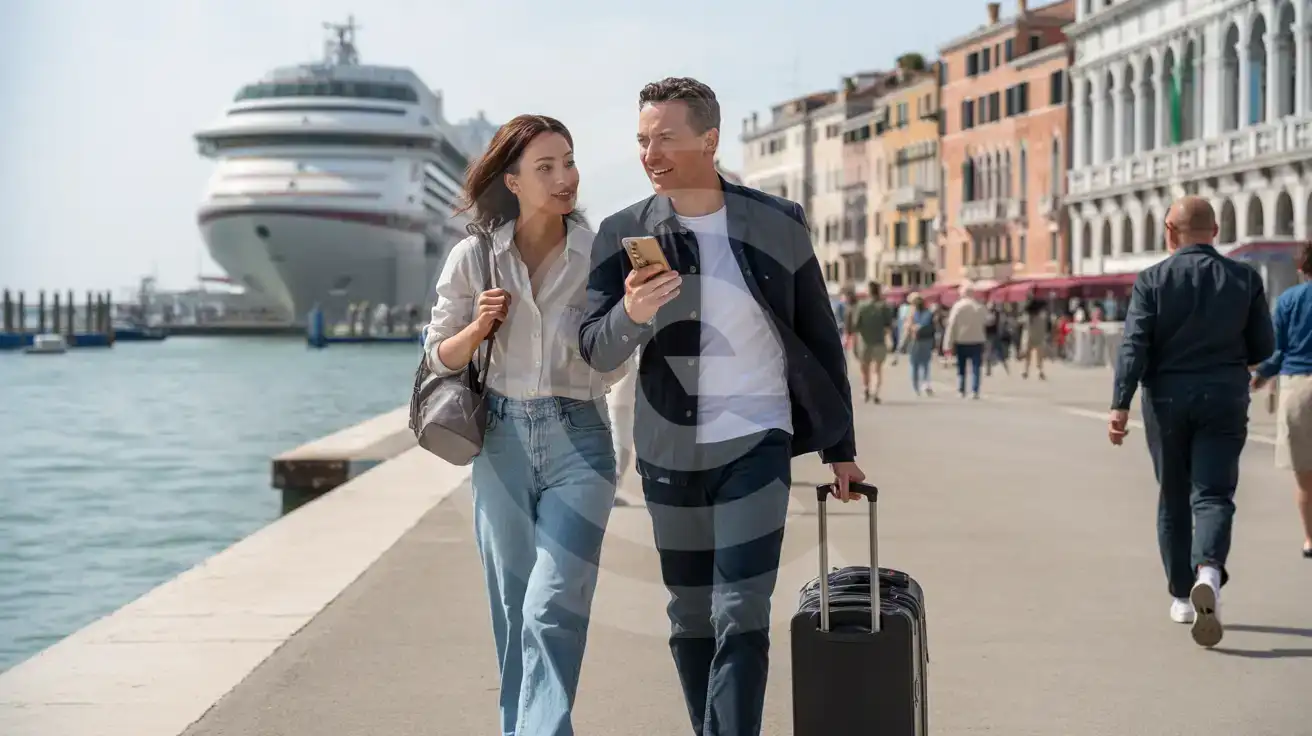
Mixed couple walking with luggage near the embarkation area at Port of Venice in Venice, Italy
At Port of Venice, Venice, Italy, activate your eSIM after landing so transfers and boarding details load on the way in.

Compare eSIM Options at Port of Venice

Recommended
Local SIM / Operator
Roaming
Setup timeStore registration, about ten minutesAuto
No local ID neededPassport is required by law; some also ask for a tax codeUse home account
SpeedOne network onlyPartner-dependent
Travel supportItalian-language serviceHome carrier hours
Keep home numberReplaces itSame number
Cost predictabilityPrepaid, no bill shockBill-shock risk
5GB / 30 daysLight travelerMost popular
200GB / 1 month
₺1396.96
Tourist offer for visitors without an Italian tax code, on the WindTre network only.
A typical traveler uses about 1–2 GB a day.
$12-18 / day
₺723.56
Typical daily roaming rate; varies by home carrier
10GB / 30 daysStandard traveler
20GB / 30 daysHeavy traveler

Frequently Asked Questions (FAQs)

Install it before you travel, then switch it on after landing in Italy or once you are on the ground heading toward Port of Venice. That timing is ideal if you need Google Maps, driver messages, or cruise emails between Venice Marco Polo Airport, Piazzale Roma, and the terminal.
Use it far beyond Port of Venice. If your trip continues from Venice to Rome, Florence, or Milan after disembarkation, the same eSIMno plan keeps your data working without changing SIMs or buying another plan.
The simplest route is a taxi or pre-booked transfer, which takes around 20-30 minutes depending on traffic and your exact drop-off point near the port. If you are piecing the trip together through Venice city transport, live data helps with each handoff between airport arrival, Piazzale Roma, and the final port approach.
Yes. If your phone supports dual SIM, your home SIM can stay active for voice while your Port of Venice eSIM handles data for maps, WhatsApp, email, and internet calls. For outgoing calls during your Venice stay, use a data-based app instead of placing native roaming calls through your home line.
It helps a lot. At Port of Venice, travelers regularly need booking emails, terminal directions, passport copies, and transfer chats open within the same check-in window, especially if they came in through Venezia Santa Lucia or Venice Marco Polo Airport that morning.
GET A FULL20%OFFon your first order
Use code: FIRSTWELCOME20

Stay connected,
wherever you go

Seamless global eSIM coverage

Get Started
Port of Venice is one of those places where data matters before you even see the ship. You may be landing at Venice Marco Polo Airport, heading in from Mestre, or arriving by train to Piazzale Roma before continuing toward the cruise terminal. In each case, your phone handles the real trip details: transfer timing, booking emails, check-in instructions, and live navigation through Venice's layered transport network. Buying your eSIM before departure removes one more task from embarkation day, and activating it after landing means your data is ready before you start moving toward the port. Once you're near Port of Venice, the practical jobs come quickly. You may need to open Google Maps for the terminal approach, message your hotel or driver, pull up a boarding confirmation, or check vaporetto and People Mover connections if you're entering Venice through the city side. Cruise travelers also use data for luggage coordination, last-minute restaurant reservations, currency checks in Euro, and internet calls back home through apps. A data-only eSIM is a cleaner fit than hunting for a local SIM shop when you've already got bags, documents, and a sailing time to manage. The big advantage is that your plan does not stop at the pier. A Port of Venice eSIM is really an Italy travel tool: it keeps working if your trip continues to Florence, Rome, Milan, Verona, or anywhere else on the same itinerary. Buy once, install once, and use your phone for the whole trip instead of solving connectivity city by city. That matters if your cruise ends in Venice and the next leg of your holiday starts the same afternoon.
Back to Italy
No more SIM kiosks

No more SIM kiosks

Skip the airport queues. Install your eSIM at home, activate when you land.

no roaming charges

No roaming surprises

Forget the $200 phone bill three weeks after your trip. Plain pricing, no hidden fees.

keep your physical sim

Keep your home number

Dual-SIM means your physical SIM stays active for calls and texts. eSIM handles only data.

easy installation

Setup in 2 minutes

Scan QR code, follow on-screen steps, you're connected. Works on any eSIM-compatible phone.

Pay SafelyVisa CardMaster CardGoogle PayPayPalApple Pay

How does eSIMNo Works?

Experience seamless global connectivity with our personal eSIM service. Enjoy faster speeds, wider coverage, and the convenience of online purchasing.

Buy a Data Plan

Buy a Data Plan

Search for your destination and pick any data plan

Step 1

Install your eSIM

Install your eSIM

Easy installation via qr code

Step 2

Activate Your eSIM

Activate Your eSIM

Only active when you are ready to use data

Step 3

Advantages

24/7 Customer Support

Reach our team via WhatsApp and email during business hours. Quick answers to common questions available anytime through our automated assistant.

Immediate delivery

Your eSIM arrives by email within minutes. Install it before you board your flight.

Worldwide Coverage

One eSIM, 160+ countries. Land anywhere and connect instantly — no SIM swapping, no roaming charges.

Check Compatibility

Check Compatibility

Before buying and installing an eSim, check if your phone supports one

Check if your phone is eSIM compatible

As you feel the need to use eSIM on your phone, the first question that arises is: does your mobile support eSIMs? And do eSIM-compatible devices work in all regions worldwide?

Some phones that support eSIM technology

  • IPhone XS and Later
  • Samsung Galaxy S20 and Later
  • Pixel 4 and Later
  • Xiaomi 12T Pro and Later
All eSIM-Compatible Phones

Frequently Asked Questions (FAQs)

Find helpful information to answer your questions

How do I activate the Italy eSIM?
Your eSIMno order confirmation email contains your QR code, your SM-DP+ address and activation code, a one-tap install link, and an "Install eSIM" button - so you can install right from the email. The same options are also on the website: sign in at esimno.com and go to Profile > My eSIMs > your plan > Install. To install, use any ONE of these methods: (1) on the phone you are setting up, tap the one-tap install link/button (iPhone on iOS 17.4+ or Android 9+); (2) use the QR code - because a phone cannot scan its own screen, show this QR on another screen (computer/tablet) or a printout and scan it WITH the phone you are setting up (never with someone else's phone, or the eSIM would install on that phone); or (3) enter the SM-DP+ address and activation code manually. Your Italy eSIM activates automatically when you connect to a local network at your destination.
Can I buy an eSIM for someone else as a gift?
Yes. Purchase the eSIM with your own details, then forward your order confirmation email - or share the "Install eSIM" link from it - with the recipient so they can install it on their own phone (the email contains the QR code and the manual SM-DP+ / activation codes). Make sure their device is eSIM-compatible first - installation usually cannot be reversed once completed.
Can I install multiple eSIMs on the same phone?
Yes. Modern iPhones and Android devices support multiple eSIM profiles - typically 5 to 8 stored profiles, with 1 or 2 active simultaneously. You can install eSIMs for different countries and switch between them in settings without removing any.
Will the eSIM work on my iPad?
Yes, if your iPad model supports eSIM. iPad Pro (3rd generation and later), iPad Air (3rd generation and later), iPad mini (5th generation and later), and standard iPad (7th generation and later with cellular) all support eSIM. Installation works the same way as on iPhone.
Can I share data from my eSIM with someone else's phone?
Yes, through Personal Hotspot. Activate hotspot on your phone, share the password, and the other device connects to your data. Data used by connected devices counts toward your eSIM plan, so monitor usage to avoid running out faster than expected.
Does the eSIM work on cruise ships or airplanes?
eSIMs use ground-based cellular networks, so they don't work in flight or at sea outside coastal coverage. They activate as soon as you connect to a partner network on land. For in-flight or maritime data, you'll need the airline or ship's onboard Wi-Fi.
Will the eSIM affect my phone's battery life?
Running two SIM lines (physical + eSIM) uses slightly more battery than one, since the phone monitors both networks. The difference is usually 5-10% over a full day. To minimize impact, disable the line you're not actively using or turn off cellular data on the inactive line.
What smartphones support eSIM?
Most modern devices support eSIM, including iPhone XS and later, Samsung Galaxy S20 through S25 series, Google Pixel 4 and later, Huawei P40 and later, and many recent iPads. Check our full compatibility list before purchasing to confirm your device is supported.
Will my eSIM work in airports immediately after landing?
Yes - eSIMs typically connect within seconds of switching off airplane mode at the gate. Major airports have strong cellular coverage from local partner networks, so you'll have data before reaching baggage claim. No setup needed at arrival.
Can I get a refund after purchase?
Refunds are not available once an eSIM has been installed or activated - install codes are one-time-use, so an installed eSIM is considered used even if no data has been consumed. If you have not installed your eSIM yet and want a refund, contact support within the refund window stated at checkout. We recommend reviewing plan details carefully before purchase to avoid any issues.
What data plans are available for the Italy eSIM?
eSIMno provides various data plans ranging from 1 GB to unlimited data, with options from 7 days to 90 days of service. Plans also include regional and lifetime options for travelers who want flexibility across multiple destinations.
What should I do if I see a 'No network' message after activating my eSIM?
If you see a 'No network' message after activation, try these steps in order: (1) Toggle airplane mode on for 10 seconds, then off. (2) Confirm data roaming is enabled for the eSIM line. (3) Manually select a network in cellular settings. (4) Restart your phone. If the issue continues, contact eSIMno support via WhatsApp or email.

Use Your Free Credit

You can earn up to 15% commission from your friends' purchases with your Reference code. Plus, your friends will get $2 off their first purchase when they use your code!

FIND OUT HOW
Refer a friend

Refer

A FRIEND

Step into the world of E-SIM, bring your friends and benefit together!