


Review Your Cart

Your cart is empty.

You haven't added any eSIM packages yet. Start exploring our plans to get connected!

Browse our eSIM Packages
🎉 Welcome offer: 20% off with promo code FIRSTWELCOME20

Greece Greece   / Roman Forum of Thessaloniki

Wide exterior view of the Roman Forum of Thessaloniki archaeological site at golden hour in central Thessaloniki

Roman Forum of Thessaloniki eSIM: Data Across All Greece

You are stepping down toward the Roman Forum of Thessaloniki with the site entrance to find, opening hours to confirm, and your next stop in Aristotelous Square still to map out on foot. With eSIMno, you can buy your Greece eSIM in minutes, install it before your trip, and switch it on after landing so your data is ready not just here, but across the rest of Greece too.
View Plans
GET A FULL20%OFFon your first order
Use code: FIRSTWELCOME20

Stay connected,
wherever you go

Seamless global eSIM coverage

Explore our plans below

Plan Your Trip

Tell us what you'll do and how long you'll be away — we'll highlight the right plan.

7 days
1102030

What will you do?

Tap an activity above to see which plan fits your trip

Already a customer?

EARN UP TOON EVERY FRIEND'S PURCHASE
NETWORK: Cosmote & Vodafone & Wind The speed may vary depending on the location.

Quick Facts

Language
Greek (Ελληνικά)
Currency
Euro (EUR, €)
Time Zone
E. Europe Standard Time (UTC+2)
Dialing Code
+30
Power Plug
Type C, E, F (round 2-pin, common across most of Europe)
Emergency
112
eSIMno Networks
Cosmote, Vodafone, Wind

How to Get Your eSIM

  1. Choose Your Greece Plan Before You Fly
    Pick the data amount you want for Thessaloniki and the rest of Greece before departure. If the Roman Forum of Thessaloniki is one stop on a wider trip that includes the seafront, museums, Athens, or an island connection, buying once before travel is simpler than looking for a SIM shop after arrival.
  2. Install It Over Home WiFi
    Set up the eSIM QR at home or at your hotel before heading out for the day. That way, when you arrive via Thessaloniki Airport Makedonia or walk over from a central hotel near Egnatia, the profile is already on your phone and you are not trying to do setup on the street outside the ruins.
  3. Keep It Ready Until You Land
    Leave the eSIM installed and turn it on after landing in Greece. Once you switch off airplane mode, your phone can connect right away for directions into the city, bus or taxi booking, and the walk from central Thessaloniki toward the forum entrance.
  4. Use Data for the Walk, Entry Details, and Your Next Stop
    At the Roman Forum of Thessaloniki, travelers use data for Maps navigation, translation, photo backup, messaging, and checking whether they will continue to Aristotelous Square, the Rotunda, or the White Tower next. This is where instant local data beats waiting to find WiFi around the site.
  5. Leave Your Home SIM Active for Voice
    eSIMno is data-only. Your home SIM can stay active for incoming calls with no extra setup needed, while your eSIMno plan handles maps, WhatsApp, FaceTime, Telegram, browsing, and internet calls. For outgoing calls, use data-based apps and avoid placing native roaming calls through your home line.

Traveler Tips

  • Go early in the day or in the last 90 minutes before closing. The Roman Forum of Thessaloniki is an open-air site with exposed stone and limited shade, so your phone is far easier to use for photos, navigation, and translation before the midday heat peaks.
  • If you are walking in from Egnatia Street, download or open your live route before you turn into the smaller streets around the excavation. The forum sits inside dense central Thessaloniki blocks, and real-time map positioning saves backtracking by 5-10 minutes.
  • Keep your ticket confirmation email, screenshot, or booking page cached before you reach the entrance. Even when you have strong mobile data, opening the proof of entry in advance makes the gate flow faster.
  • Use your eSIM data for the trip after the ruins too. From the Roman Forum of Thessaloniki, travelers often continue on foot to Rotunda of Galerius, Church of Panagia Acheiropoietos, or the waterfront, and live directions matter more once you leave the site and re-enter the city grid.
  • If you want to keep your home number reachable, just leave your home SIM on for voice and let the eSIM handle internet tasks. For messages, maps, and app-based calls around the Roman Forum of Thessaloniki, data is what matters.

Why Data Matters at Roman Forum of Thessaloniki

The Roman Forum of Thessaloniki is not an isolated ruin outside town; it sits right inside the working center of Thessaloniki, between busy streets, short uphill lanes, and other stops travelers combine in the same half-day. That changes the data equation. You are not just loading a map once and putting your phone away. You are checking the forum entrance, confirming the day’s hours, pulling up Greek-to-English translation, sending photos, and deciding whether to continue to the Rotunda, Aristotelous Square, or back toward your hotel. Live Google Maps matters here because central Thessaloniki blocks can look straightforward until a one-way street, staircase, or detour shifts your route by 8-12 minutes. Data also matters for ride apps and standard taxi coordination when your legs are done after walking the stone terraces.

Inside and around the site, travelers use phones for three practical jobs again and again: access, orientation, and onward movement. Access means opening booking emails, screenshots, or confirmation pages without hunting for a café connection. Orientation means checking where you are relative to the upper city streets, the nearby metro area, and landmarks like Aristotelous Square and White Tower of Thessaloniki. Onward movement means booking the next table, messaging the person you are meeting, or pulling train and bus details before you leave the archaeological zone. If your day continues toward Thessaloniki museums, the seafront, or a later intercity leg, your connection cannot stop at the venue gate.

That is why eSIMno plans for Roman Forum of Thessaloniki, Thessaloniki, Greece make sense before the trip starts. Install at home, activate after landing, and your phone is already ready when you head from Thessaloniki Airport Makedonia into the center. No plastic SIM, no kiosk stop, no losing time on a short city break. You land with data, navigate straight to the Roman Forum of Thessaloniki, and keep the same plan working across Greece after this visit is done.

Visiting Roman Forum of Thessaloniki

The Roman Forum of Thessaloniki is an open-air archaeological site in the center of the city, so the practical part of your visit is straightforward: wear solid shoes for uneven stone, bring water, and expect bright sun in warmer months. Opening hours shift by season, and entry policy can change, so it is worth checking the official listing on the day you go instead of relying on an old screenshot. That quick check on your phone is exactly why having mobile data before you leave the hotel is useful.

This visit pairs easily with nearby central stops because the forum is within walking distance of the Rotunda, churches along Egnatia, and the lower city lanes leading toward the waterfront. That means the key planning question is not transport complexity; it is timing. If you are fitting the site into a short Thessaloniki itinerary, use your connection to decide whether to walk onward, call a taxi, or pause for lunch before the next museum slot. Photography outdoors is part of the appeal here, and stable data helps with cloud backup and meeting-point messages while you move between nearby streets.

Connected While Exploring

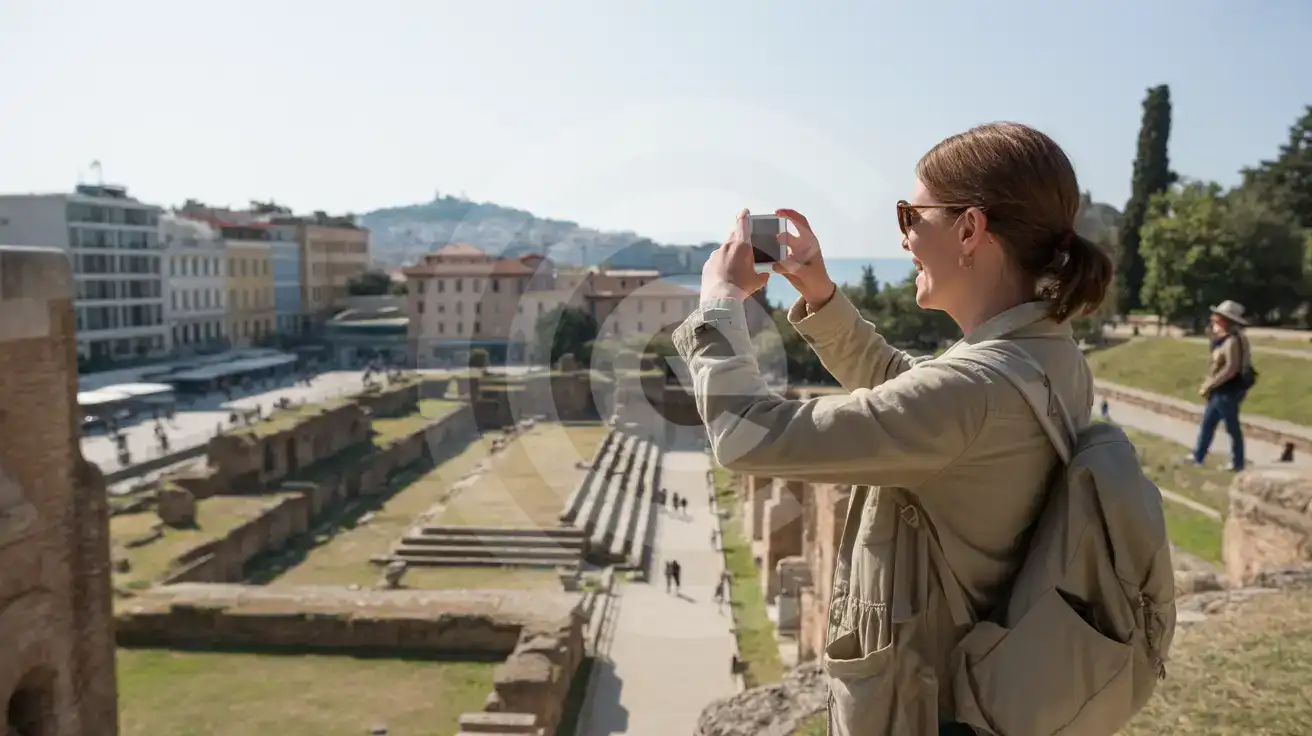
Solo female traveler photographing the excavated walkways and stone seating inside the Roman Forum of Thessaloniki
At Roman Forum of Thessaloniki, set up your eSIM before the trip so maps, messages, and tickets work the moment you arrive.

Compare eSIM Options at Roman Forum of Thessaloniki

Recommended
Local SIM / Operator
Roaming
Setup timeStore visit + paperworkAuto
No local ID neededLocal ID requiredUse home account
SpeedCarrier-gradePartner-dependent
Travel supportGreek onlyHome carrier hours
Keep home numberReplaces itSame number
Cost predictabilityBills can spikeBill-shock risk
Typical pricing
$12-18 / day
Typical day-pass tariff varies by home carrier

PRICING — PICK YOUR ESIMNO PLAN

Light traveler
5GB / 30d
$9.90
20% off with code FIRSTWELCOME20on your first order
≈ $7.92 USD with code
Buy now
Heavy traveler
20GB / 30d
$24.90
20% off with code FIRSTWELCOME20on your first order
≈ $19.92 USD with code
Buy now

Frequently Asked Questions (FAQs)

Activate it after you land in Greece. By the time you are heading in from Thessaloniki Airport Makedonia or walking the last few blocks off Egnatia toward the Roman Forum of Thessaloniki, your phone can already be pulling live directions and opening booking emails.

Yes. eSIMno is data-only, so your home SIM stays active for incoming voice calls while you use eSIM data around the Roman Forum of Thessaloniki for WhatsApp, FaceTime, maps, translation, and other internet-based tasks.

Yes, because the useful phone tasks happen after you leave the hotel. Around the Roman Forum of Thessaloniki you will be checking opening details, navigating the nearby streets, messaging people, and deciding whether to continue toward Aristotelous Square or the Rotunda, and that all works better on your own connection than on fixed hotel WiFi.

For a half-day around the Roman Forum of Thessaloniki, light use such as Maps, messaging, translation, and ticket access stays modest. If you are also uploading photos from the ruins, streaming video, or using navigation all day across Thessaloniki, pick a larger plan so you are covered for the rest of Greece too.

Yes. The Roman Forum of Thessaloniki sits in central Thessaloniki, so travelers regularly pair it with the Rotunda, churches near Egnatia, Aristotelous Square, and the waterfront in one outing. That makes mobile data useful for live walking directions, opening-hour checks, and choosing the fastest next move between stops.

That still works. You can buy a plan through eSIMno, install it quickly, and use it for the Roman Forum of Thessaloniki and the rest of your Greece trip without searching for a phone shop in central Thessaloniki.

GET A FULL20%OFFon your first order
Use code: FIRSTWELCOME20

Stay connected,
wherever you go

Seamless global eSIM coverage

Get Started
The Roman Forum of Thessaloniki sits right in the city center, which makes it convenient to reach and surprisingly easy to misread without live data. Streets around Egnatia and the upper lanes toward Ano Poli fold into each other, and a short walk can turn into several wrong turns if your phone is offline. That is where an eSIM helps immediately: you can check walking directions, pull up the day’s opening details, message your group, and book the next ride without stopping for a café password. If you arrived through Thessaloniki Airport Makedonia, it also means your connection keeps working from airport transfer to archaeological site without swapping physical SIM cards. This is also one of those visits where data matters during the visit, not just before it. Travelers use their phones here for translation, digital ticket records, cloud photo backup, and finding nearby stops for buses or the Thessaloniki Metro. If you plan to continue to the White Tower, the waterfront, museums, or an evening train from the city, you do not want your connection to end at the Roman Forum itself. A Greece eSIM keeps your route, bookings, and messages live while you move between neighborhoods. Buying before departure is the cleanest setup. Install the eSIM over home WiFi, keep it ready on your phone, and activate it after landing in Greece. That removes the kiosk detour, avoids hunting for a local SIM shop in central Thessaloniki, and gives you one data setup for the whole trip. Whether the Roman Forum of Thessaloniki is your first stop or part of a wider itinerary through Thessaloniki and beyond, the same plan keeps working nationwide.
Back to Greece
No more SIM kiosks

No more SIM kiosks

Skip the airport queues. Install your eSIM at home, activate when you land.

no roaming charges

No roaming surprises

Forget the $200 phone bill three weeks after your trip. Plain pricing, no hidden fees.

keep your physical sim

Keep your home number

Dual-SIM means your physical SIM stays active for calls and texts. eSIM handles only data.

easy installation

Setup in 2 minutes

Scan QR code, follow on-screen steps, you're connected. Works on any eSIM-compatible phone.

Pay SafelyVisa CardMaster CardGoogle PayPayPalApple Pay

How does eSIMNo Works?

Experience seamless global connectivity with our personal eSIM service. Enjoy faster speeds, wider coverage, and the convenience of online purchasing.

Buy a Data Plan

Buy a Data Plan

Search for your destination and pick any data plan

Step 1

Install your eSIM

Install your eSIM

Easy installation via qr code

Step 2

Activate Your eSIM

Activate Your eSIM

Only active when you are ready to use data

Step 3

Advantages

24/7 Customer Support

Reach our team via WhatsApp and email during business hours. Quick answers to common questions available anytime through our automated assistant.

Immediate delivery

Your eSIM arrives by email within minutes. Install it before you board your flight.

Worldwide Coverage

One eSIM, 160+ countries. Land anywhere and connect instantly — no SIM swapping, no roaming charges.

Check Compatibility

Check Compatibility

Before buying and installing an eSim, check if your phone supports one

Check if your phone is eSIM compatible

As you feel the need to use eSIM on your phone, the first question that arises is: does your mobile support eSIMs? And do eSIM-compatible devices work in all regions worldwide?

Some phones that support eSIM technology

  • IPhone XS and Later
  • Samsung Galaxy S20 and Later
  • Pixel 4 and Later
  • Xiaomi 12T Pro and Later
All eSIM-Compatible Phones

Frequently Asked Questions (FAQs)

Find helpful information to answer your questions

Can I tether or use Personal Hotspot with my eSIM?
Yes. Your eSIMno plan supports tethering and Personal Hotspot at no extra charge. Activate the Personal Hotspot feature in your device settings and connect other devices as you would with any cellular plan. Data used while tethering counts toward your plan allowance.
How can I verify if my eSIM is activated?
There are two clear indicators: (1) your phone's status bar shows the local carrier name once you arrive at your destination, and (2) the data icon (4G, LTE, or 5G) appears next to the eSIMno line in your cellular settings. If neither shows up, toggle airplane mode off and on, or restart your phone.
Can I make phone calls or send SMS?
eSIMno is a data-only service, so you can't make traditional voice calls or send SMS through the eSIM line. However, you can use messaging and calling apps over data - WhatsApp, iMessage, FaceTime, Telegram, Signal, and Google Meet all work normally.
Should I enable data roaming for the eSIM?
Yes - you must enable data roaming for the eSIM line, even though there are no roaming charges. The eSIM connects to a local partner network and your phone treats this as roaming. Enable it: iPhone > Settings > Cellular > eSIMno line > Data Roaming ON; Android > Settings > Network > SIMs > eSIMno > Roaming ON. This setting only affects the eSIM, not your home SIM.
What network speeds can I expect?
Most eSIMno plans connect at 4G/LTE or 5G speeds depending on local network availability and your device's capabilities. Speed varies by location, network congestion, and signal strength. In major cities and tourist areas, expect speeds comparable to local mobile carriers.
What makes eSIMno different from other eSIM services?
eSIMno partners directly with local operators in over 200 countries, eliminating intermediaries. This direct relationship lets us offer competitive pricing, extensive coverage, and faster activation than resellers who route data through third parties.
Can I install multiple eSIMs on the same phone?
Yes. Modern iPhones and Android devices support multiple eSIM profiles - typically 5 to 8 stored profiles, with 1 or 2 active simultaneously. You can install eSIMs for different countries and switch between them in settings without removing any.
What data plans are available for the Greece eSIM?
eSIMno provides various data plans ranging from 1 GB to unlimited data, with options from 7 days to 90 days of service. Plans also include regional and lifetime options for travelers who want flexibility across multiple destinations.
Can I use the eSIM on more than one device?
Each eSIM profile is tied to a single device once activated. If you need data on multiple devices (e.g., phone and tablet), you can either purchase separate eSIMs for each device or use the Personal Hotspot feature on your phone to share data with other devices.
Can I use the eSIM for my smartwatch?
Some smartwatches (Apple Watch Cellular, Samsung Galaxy Watch LTE) support eSIM, but they typically require a plan from your home carrier rather than a travel eSIM. eSIMno plans are designed for phones and tablets - check device compatibility before purchase if you intend to use a wearable.
How do I set up the eSIM on my device?
The fastest way is straight from your order confirmation email, which now contains - for each eSIM - the QR code, a one-tap install link, and the SM-DP+ / activation codes. On the phone you'll use, tap the one-tap install link; or, to use the QR, show it on another screen or a printout and scan it with that same phone (not another phone); or enter the codes manually. The email also has an "Install eSIM" button that opens your eSIM's detail page and launches the install pop-up (sign in if prompted), and you can reach the same pop-up anytime via Profile > My eSIMs > find your plan (shown as "Ready to install") > Install. After installing, turn Data Roaming ON for your eSIMno line (iPhone: Settings > Cellular; Android: Settings > Connections/Network) - without it the eSIM installs but shows no internet. Full guide in Help & Support.
How do I delete an eSIM I no longer need?
On iPhone: Settings > Cellular > tap the eSIM line > Remove eSIM. On Android: Settings > Network & Internet > SIMs > tap the eSIM > Erase. Deleting the eSIM frees up a profile slot. Make sure you don't need it anymore - once deleted, you can't reinstall the same profile.

Use Your Free Credit

You can earn up to 15% commission from your friends' purchases with your Reference code. Plus, your friends will get $2 off their first purchase when they use your code!

FIND OUT HOW
Refer a friend

Refer

A FRIEND

Step into the world of E-SIM, bring your friends and benefit together!