


Review Your Cart

Your cart is empty.

You haven't added any eSIM packages yet. Start exploring our plans to get connected!

Browse our eSIM Packages
🎉 Welcome offer: 20% off with promo code FIRSTWELCOME20

Egypt Egypt   / Great Sphinx of Giza

The Great Sphinx of Giza in profile at golden hour with the Pyramid of Khafre rising behind it against a warm desert sky

Great Sphinx of Giza eSIM: Egypt Data That Works Nationwide

You're walking toward the Great Sphinx with your timed-entry ticket QR ready to scan, photos of the ancient limestone guardian queuing to upload, and a rideshare pickup to coordinate back toward Grand Egyptian Museum for the afternoon. With eSIMno, your Egypt data activates the moment you switch off airplane mode after landing at Cairo International — no SIM kiosk queue, no haggling, just instant connection across the entire Giza Plateau and beyond.
View Plans
GET A FULL20%OFFon your first order
Use code: FIRSTWELCOME20

Stay connected,
wherever you go

Seamless global eSIM coverage

Explore our plans below

Plan Your Trip

Tell us what you'll do and how long you'll be away — we'll highlight the right plan.

7 days
1102030

What will you do?

Tap an activity above to see which plan fits your trip

Already a customer?

EARN UP TOON EVERY FRIEND'S PURCHASE
NETWORK: Etisalat The speed may vary depending on the location.

Quick Facts

Language
Arabic (عربي)
Currency
Egyptian Pound (EGP, E£)
Time Zone
E. Europe Standard Time (UTC+2)
Dialing Code
+20
Power Plug
Type C, E, F (round 2-pin, common across most of Europe)
Emergency
122 (police), 123 (ambulance), 180 (fire)
eSIMno Networks
Etisalat

How to Get Your eSIM

  1. Pick Your Egypt Plan
    Choose the data allowance that fits your Giza visit — a day at the Sphinx and pyramids plus Cairo exploration, or a multi-week Egypt circuit covering Luxor, Aswan, and the Red Sea coast.
  2. Install at Home Before Your Flight
    Download the eSIM profile over your home WiFi the night before departure. The profile sits dormant until you activate it, so there's no charge until you land.
  3. Activate After Landing at Cairo International
    Once your aircraft reaches the gate and the captain clears phone use, switch off airplane mode. Your phone connects to Etisalat within seconds — before you even reach passport control.
  4. Navigate Giza With Data Working
    Pull up your timed-entry QR for the Sphinx viewing area, confirm your rideshare pickup location near the plateau entrance, and upload photos while the golden-hour light hits the limestone.
  5. Keep the Same Plan Across Egypt
    Your eSIMno data works nationwide — same activation, same plan, no second purchase whether you're at the Grand Egyptian Museum, cruising the Nile, or diving the Red Sea.

Traveler Tips

  • Arrive at the Sphinx ticket gate by 7:30 AM to photograph the monument before tour buses fill the viewing platform — your phone's data handles the timed-entry QR scan and real-time crowd updates.
  • The Giza Plateau entrance nearest the Sphinx is on Al-Ahram Road; have your maps app loaded before the taxi drops you off, as street signage is sparse.
  • Keep your home SIM active for incoming calls — it stays dormant for voice while your eSIMno handles all data tasks like WhatsApp, Google Maps, and photo uploads.
  • Uber Egypt and Careem both operate pickups from the Giza Plateau parking area; request your ride 10 minutes before you finish to avoid the midday heat wait.
  • Download offline Arabic translation phrases the night before — cellular signal is strong across the plateau, but having backup text speeds bargaining at nearby vendor stalls.
  • The Sound and Light Show at the pyramids runs after sunset; your data handles the e-ticket scan and coordinates your return transport in the dark.

Why Data Matters at the Great Sphinx

The Great Sphinx sits at the eastern edge of the Giza Plateau, where your phone handles tasks that paper maps and printed tickets cannot. The timed-entry system for the Sphinx and pyramid complex relies on QR codes scanned at the checkpoint — your confirmation email loads instantly over Etisalat coverage, no fumbling for screenshots saved offline. Walking from the Sphinx toward the Great Pyramid of Khufu (a 600-meter path across uneven limestone), Google Maps pins your location so you don't wander into restricted excavation zones.

Rideshare coordination matters here because taxi negotiation at tourist sites invites inflated prices. Uber Egypt and Careem both show transparent fares from the plateau parking lot to downtown Cairo (around 45 minutes depending on traffic) or to the eSIMno plans for Great Sphinx of Giza, Giza, Egypt pickup zone near the Grand Egyptian Museum (15 minutes). Your driver sees your GPS pin, you see their license plate and ETA — no standing in the sun waving at unmarked cars.

Photo uploads run in the background while you explore. The Sphinx's weathered face catches different light every hour; uploading a morning shot to your group chat while you walk toward the Pyramid of Khafre means your travel companions see the view before you've even finished the circuit. Google Translate handles Arabic signage at the ticket booth and vendor stalls, converting hieroglyphic-styled souvenir tags and menu boards into readable English. Currency conversion apps show the current EGP-to-dollar rate when vendors quote prices, keeping negotiation grounded in real numbers.

Visiting the Sphinx

The Sphinx viewing area opens at 7:00 AM and closes around 5:00 PM in winter, extending to 6:00 PM in summer months. Ticket options include a combined Giza Plateau pass covering the Sphinx enclosure, all three major pyramids, and the Valley Temple — check the official Giza Pyramids site for current pricing tiers, as rates for foreign visitors adjust periodically. Timed-entry slots help manage crowds; booking ahead through the official channel secures your preferred morning window.

Dress for desert conditions: lightweight long sleeves protect against sun, comfortable closed-toe shoes handle the sandy limestone paths, and a hat or scarf shields your face during midday. Photography is permitted throughout the public viewing areas; drone flights require advance permits that most casual visitors skip. The nearest restroom facilities are at the main ticket plaza, a 5-minute walk from the Sphinx base.

Getting here from central Cairo takes 30-50 minutes by rideshare depending on traffic. The M3 metro line reaches Giza station, from which a taxi or rideshare covers the remaining 8 km to the plateau entrance. From Cairo International Airport, the drive runs 45-70 minutes; having your eSIM active means your rideshare app works the moment you exit the arrivals hall.

Capturing the Sphinx

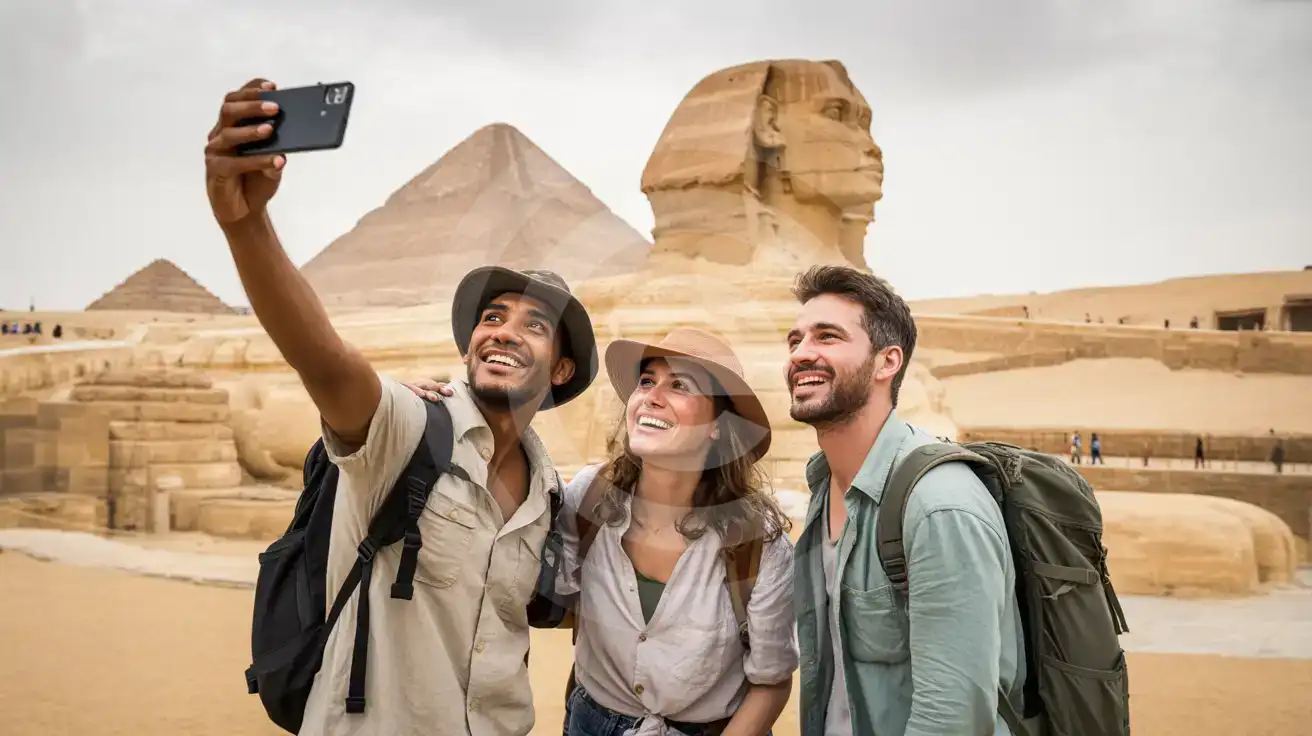
Three friends taking a group selfie in front of the Great Sphinx of Giza with the Pyramid of Khafre visible in the background
Activate your Egypt eSIM before departure so your photos upload instantly from the Sphinx viewing platform.

Compare eSIM Options at Great Sphinx of Giza

Recommended
Local SIM / Operator
Roaming
Setup timeStore visit + paperworkAuto
No local ID neededLocal ID requiredUse home account
SpeedCarrier-gradePartner-dependent
Travel supportArabic onlyHome carrier hours
Keep home numberReplaces itSame number
Cost predictabilityBills can spikeBill-shock risk
Typical pricing
$12-18 / day
Typical day-pass tariff varies by home carrier

PRICING — PICK YOUR ESIMNO PLAN

Light traveler
5GB / 30d
$15.90
20% off with code FIRSTWELCOME20on your first order
≈ $12.72 USD with code
Buy now
Heavy traveler
20GB / 30d
$30.90
20% off with code FIRSTWELCOME20on your first order
≈ $24.72 USD with code
Buy now

Frequently Asked Questions (FAQs)

Install the eSIM profile at home over WiFi the night before your flight. It stays dormant until you land — once your aircraft reaches the gate at Cairo International and you switch off airplane mode, your phone connects to Etisalat within seconds. By the time you clear passport control and step into arrivals, your rideshare app is already pulling Giza-bound drivers.

Etisalat coverage reaches the entire plateau with strong signal. The open desert terrain and macro tower placement mean your phone works at the Sphinx viewing area, along the causeway to the Great Pyramid, inside the Valley Temple, and at the Sound and Light Show seating after sunset. Signal stays consistent whether you're photographing the paws up close or walking the 600-meter path toward Khafre's pyramid.

Your eSIMno Egypt plan covers the entire country on one activation. The same data that handles your Sphinx ticket QR keeps working when you visit the Grand Egyptian Museum, take a felucca on the Nile in Luxor, or fly to Sharm El Sheikh for Red Sea diving. No second purchase, no swapping cards.

Keep your home SIM active in dual-SIM mode — incoming calls reach your regular number without setup because your home SIM stays on for voice. For outgoing calls, use WhatsApp, FaceTime, or Google Meet over your eSIMno data to avoid roaming charges. Your home SIM handles receive-only voice; your eSIM handles everything internet-related.

Arrive at the ticket gate by 7:30 AM when the plateau opens. Morning light hits the Sphinx face beautifully, and tour buses from Cairo hotels don't fill the viewing platform until 9:00-10:00 AM. Your data handles the timed-entry QR scan at the checkpoint and lets you upload photos before the midday heat drives everyone toward shade.

A full day of maps navigation, photo uploads, rideshare booking, and translation app use runs around 500 MB to 1 GB depending on how many high-resolution images you share. If you're also streaming the Sound and Light Show's audio guide or video-calling family from the plateau, budget toward the higher end. Multi-day Egypt plans give buffer for the rest of your itinerary.

GET A FULL20%OFFon your first order
Use code: FIRSTWELCOME20

Stay connected,
wherever you go

Seamless global eSIM coverage

Get Started
The Great Sphinx of Giza draws travelers who arrive with smartphone cameras ready, timed-entry confirmations on screen, and the rest of their Egypt itinerary sitting in apps that need data to function. Activating your eSIM before departure means your phone connects to Etisalat coverage the moment you taxi to the gate at Cairo International, bypassing the crowded SIM kiosks in the arrivals hall entirely. By the time you clear customs and step into the Giza-bound traffic, your maps, translation apps, and rideshare bookings are already working. The Sphinx viewing area sits on the eastern edge of the Giza Plateau, where cellular coverage from Etisalat macro towers reaches across the open desert with strong signal. Inside the ticket checkpoint and along the causeway toward the monument, your phone pulls directions, uploads photos, and handles the group chat coordinating your travel companions. The same plan keeps working when you head to the Sound and Light Show after sunset, when you visit the Solar Boat Museum the next morning, and when you take a day trip to Saqqara Necropolis 30 km south. eSIMno Egypt plans cover the entire country on one activation — from the Giza Plateau to Luxor temples, from Red Sea resorts in Hurghada to the Sinai coast at Sharm El Sheikh. No second purchase, no swapping physical cards, no hunting for top-up kiosks in unfamiliar neighborhoods. Your data works wherever your Egypt itinerary takes you, anchored by the same Etisalat network Egyptians use daily.
Back to Egypt
No more SIM kiosks

No more SIM kiosks

Skip the airport queues. Install your eSIM at home, activate when you land.

no roaming charges

No roaming surprises

Forget the $200 phone bill three weeks after your trip. Plain pricing, no hidden fees.

keep your physical sim

Keep your home number

Dual-SIM means your physical SIM stays active for calls and texts. eSIM handles only data.

easy installation

Setup in 2 minutes

Scan QR code, follow on-screen steps, you're connected. Works on any eSIM-compatible phone.

Pay SafelyVisa CardMaster CardGoogle PayPayPalApple Pay

How does eSIMNo Works?

Experience seamless global connectivity with our personal eSIM service. Enjoy faster speeds, wider coverage, and the convenience of online purchasing.

Buy a Data Plan

Buy a Data Plan

Search for your destination and pick any data plan

Step 1

Install your eSIM

Install your eSIM

Easy installation via qr code

Step 2

Activate Your eSIM

Activate Your eSIM

Only active when you are ready to use data

Step 3

Advantages

24/7 Customer Support

Reach our team via WhatsApp and email during business hours. Quick answers to common questions available anytime through our automated assistant.

Immediate delivery

Your eSIM arrives by email within minutes. Install it before you board your flight.

Worldwide Coverage

One eSIM, 160+ countries. Land anywhere and connect instantly — no SIM swapping, no roaming charges.

Check Compatibility

Check Compatibility

Before buying and installing an eSim, check if your phone supports one

Check if your phone is eSIM compatible

As you feel the need to use eSIM on your phone, the first question that arises is: does your mobile support eSIMs? And do eSIM-compatible devices work in all regions worldwide?

Some phones that support eSIM technology

  • IPhone XS and Later
  • Samsung Galaxy S20 and Later
  • Pixel 4 and Later
  • Xiaomi 12T Pro and Later
All eSIM-Compatible Phones

Frequently Asked Questions (FAQs)

Find helpful information to answer your questions

Can I extend my eSIM plan validity?
The validity of a package that is already running cannot be extended, but you can top up: a top-up adds a new package with its own data AND its own validity days. Packages run one at a time - the top-up waits in queue and activates automatically when your current package ends (data used up or days expired), and its own days start counting from that moment. In practice this keeps you connected longer, even though the current package's own end date does not move.
What makes eSIMno different from other eSIM services?
eSIMno partners directly with local operators in over 200 countries, eliminating intermediaries. This direct relationship lets us offer competitive pricing, extensive coverage, and faster activation than resellers who route data through third parties.
What network speeds can I expect?
Most eSIMno plans connect at 4G/LTE or 5G speeds depending on local network availability and your device's capabilities. Speed varies by location, network congestion, and signal strength. In major cities and tourist areas, expect speeds comparable to local mobile carriers.
Is the eSIM connection secure?
eSIM connections are as secure as standard cellular connections - encrypted by the carrier network. For added security on public networks (cafes, airports), use a VPN. The eSIM profile itself is digitally signed and can't be cloned like a physical SIM.
Will my eSIM work in airports immediately after landing?
Yes - eSIMs typically connect within seconds of switching off airplane mode at the gate. Major airports have strong cellular coverage from local partner networks, so you'll have data before reaching baggage claim. No setup needed at arrival.
How do I set up the eSIM on my device?
The fastest way is straight from your order confirmation email, which now contains - for each eSIM - the QR code, a one-tap install link, and the SM-DP+ / activation codes. On the phone you'll use, tap the one-tap install link; or, to use the QR, show it on another screen or a printout and scan it with that same phone (not another phone); or enter the codes manually. The email also has an "Install eSIM" button that opens your eSIM's detail page and launches the install pop-up (sign in if prompted), and you can reach the same pop-up anytime via Profile > My eSIMs > find your plan (shown as "Ready to install") > Install. After installing, turn Data Roaming ON for your eSIMno line (iPhone: Settings > Cellular; Android: Settings > Connections/Network) - without it the eSIM installs but shows no internet. Full guide in Help & Support.
Should I enable data roaming for the eSIM?
Yes - you must enable data roaming for the eSIM line, even though there are no roaming charges. The eSIM connects to a local partner network and your phone treats this as roaming. Enable it: iPhone > Settings > Cellular > eSIMno line > Data Roaming ON; Android > Settings > Network > SIMs > eSIMno > Roaming ON. This setting only affects the eSIM, not your home SIM.
Will the eSIM work on my iPad?
Yes, if your iPad model supports eSIM. iPad Pro (3rd generation and later), iPad Air (3rd generation and later), iPad mini (5th generation and later), and standard iPad (7th generation and later with cellular) all support eSIM. Installation works the same way as on iPhone.
Which eSIM is best for travelling to Egypt?
eSIMno is an excellent option for travelers heading to Egypt. We offer a diverse range of eSIM plans - including regional, local, and lifetime options - with reliable coverage on local networks.
Can I use the eSIM on more than one device?
Each eSIM profile is tied to a single device once activated. If you need data on multiple devices (e.g., phone and tablet), you can either purchase separate eSIMs for each device or use the Personal Hotspot feature on your phone to share data with other devices.
Can I use the eSIM right after purchase or do I need to wait?
Yes - you can install it immediately after purchase. Your order email arrives within minutes and contains the QR code, a one-tap install link and the manual codes, plus an "Install eSIM" button; you can also sign in > My eSIMs > Install any time. Installing right away does not start your plan - the validity countdown only begins when the eSIM connects to a mobile network inside your plan's coverage area. Keep the eSIM line and Data Roaming off until you are ready to start; if your plan covers the country you are in right now, turning the line on starts the countdown immediately.
Will my home phone number receive calls while I use the eSIM?
Yes - if your home SIM stays installed and active, calls and SMS to your home number arrive normally. The eSIM only handles data; voice service stays on your home line. Just remember that incoming calls and texts to your home number while abroad may trigger roaming charges from your home carrier.

Use Your Free Credit

You can earn up to 15% commission from your friends' purchases with your Reference code. Plus, your friends will get $2 off their first purchase when they use your code!

FIND OUT HOW
Refer a friend

Refer

A FRIEND

Step into the world of E-SIM, bring your friends and benefit together!