


Review Your Cart

Your cart is empty.

You haven't added any eSIM packages yet. Start exploring our plans to get connected!

Browse our eSIM Packages
🎉 Welcome offer: 20% off with promo code FIRSTWELCOME20

Egypt Egypt   / Sharm El Sheikh International Airport

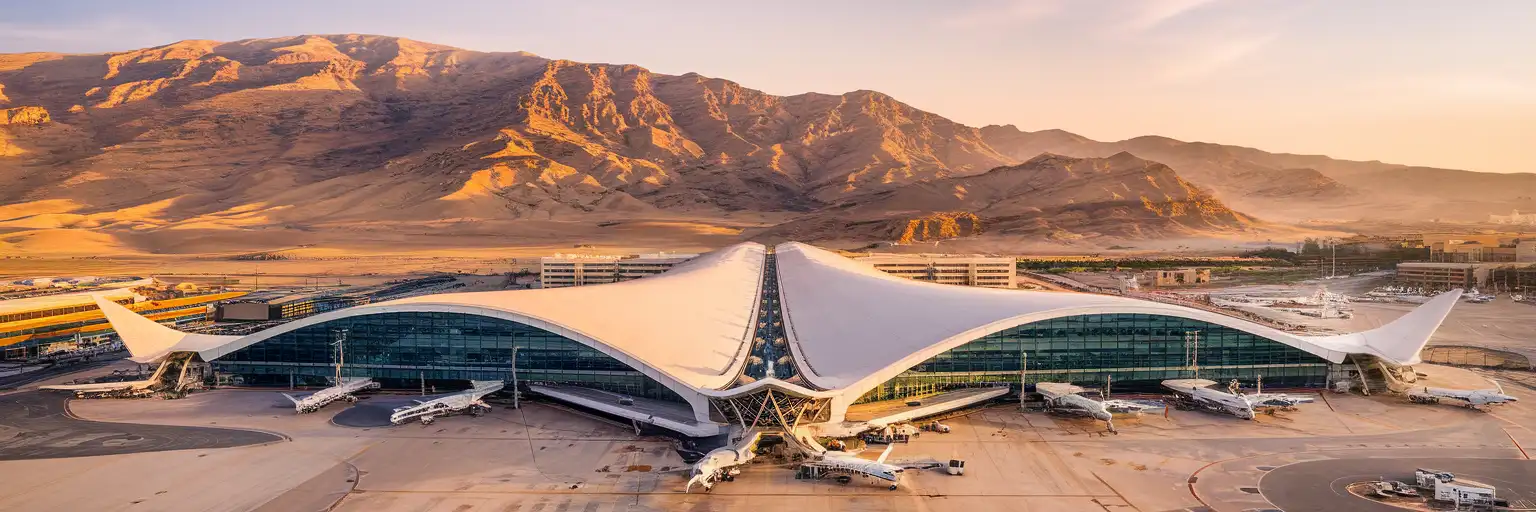
Sharm El Sheikh International Airport Terminal 1 exterior with curved white roofline and Sinai mountains at golden hour

Sharm El Sheikh Airport eSIM: Egypt Data That Works Nationwide

Your flight touches down at Sharm El Sheikh International Airport and you're already thinking about the hotel transfer message, the taxi fare to Naama Bay, and whether your dive operator replied. eSIMno gets your Egypt data ready before takeoff, so you skip the currency-exchange SIM kiosk and walk straight to arrivals with your phone already connected.
View Plans
GET A FULL20%OFFon your first order
Use code: FIRSTWELCOME20

Stay connected,
wherever you go

Seamless global eSIM coverage

Explore our plans below

Plan Your Trip

Tell us what you'll do and how long you'll be away — we'll highlight the right plan.

7 days
1102030

What will you do?

Tap an activity above to see which plan fits your trip

Already a customer?

EARN UP TOON EVERY FRIEND'S PURCHASE
NETWORK: Etisalat The speed may vary depending on the location.

Quick Facts

Language
Arabic (عربي)
Currency
Egyptian Pound (EGP, E£)
Time Zone
E. Europe Standard Time (UTC+2)
Dialing Code
+20
Power Plug
Type C, E, F (round 2-pin, common across most of Europe)
Emergency
122 (police), 123 (ambulance), 180 (fire)
eSIMno Networks
Etisalat

How to Get Your eSIM

  1. Buy Your Egypt Plan Before the Flight
    Choose your data allowance from the eSIMno Egypt plans while you're still at home. The purchase takes under 3 minutes and you'll receive a QR code by email immediately.
  2. Install Over Your Home WiFi
    Scan the QR code in your phone's eSIM settings before you leave for the airport. The profile downloads in seconds — no activation yet, just ready and waiting.
  3. Keep Your Home SIM Active
    Your phone runs both SIMs simultaneously. The home number stays live for incoming calls; the eSIMno line handles all Egypt data once you land at SSH.
  4. Activate After Landing at SSH
    When the aircraft reaches the gate and the cabin crew clears phone use, switch off airplane mode. Your eSIM connects to Etisalat within seconds — before you even reach passport control.
  5. Walk Past the SIM Kiosk
    Head straight through Terminal 1 arrivals to your transfer. No queue at the currency-exchange counter's SIM desk, no haggling over packages, no waiting while other passengers sort their cards.

Traveler Tips

  • Terminal 1 arrivals has Banque du Caire and National Bank of Egypt ATMs accepting international cards — check your bank's foreign-transaction alert via data before withdrawing.
  • Official airport taxis to Naama Bay run 200-350 EGP (15-20 minutes); confirm the fare on your phone's currency converter before departing.
  • Late-night arrivals (after 23:00) find a thinner taxi queue — pre-arrange your hotel transfer via WhatsApp so the driver is waiting at the exit.
  • The free airport WiFi requires registration that can time out mid-setup; your eSIM bypasses the captive portal entirely.
  • Visa on arrival costs USD 25 payable in cash at the bank counters before passport control — have the amount ready to skip the exchange queue.

Why You Need an eSIM at SSH

Sharm El Sheikh International Airport moves fast once you clear the visa counter. The walk from passport control to the arrivals hall takes under 5 minutes, and your hotel transfer driver is already holding a sign with your name. The problem is coordination: your WhatsApp thread with the driver, the Google Maps pin for Naama Bay pickup zone, and the confirmation email from your dive operator all need data the moment you step outside.

The Arrival Bottleneck

Terminal 1's SIM kiosk sits at the currency-exchange counter near the exit. During peak charter rotations (late morning and early evening European arrivals), the queue stretches 15-20 minutes as travelers fumble with passport copies, payment, and activation instructions in Arabic. Your eSIM skips that entirely — it's already connected by the time you reach baggage claim.

Transfer Coordination

Most Sharm resorts include minivan transfers, but independent travelers booking through Egypt Booking or GoBus shuttles need real-time confirmation. The pickup zone at Terminal 1 can get crowded with multiple operators calling names simultaneously. Having your booking reference, driver contact, and live GPS open on your phone cuts the confusion to zero.

Beyond the Airport

Your Egypt data keeps working on the 15-20 minute drive to Naama Bay, the 25-minute ride to Nabq Bay, and the 2.5-hour road trip to St. Catherine's Monastery. eSIMno plans for Sharm El Sheikh International Airport, Sharm El Sheikh, Egypt run on Etisalat, covering the coastal resorts, the desert interior, and the diving boat routes to Tiran Island without roaming fees or SIM swaps.

Visiting Sharm El Sheikh Airport

SSH operates two passenger terminals plus a VIP facility. Terminal 1 handles the bulk of international scheduled and charter traffic — EgyptAir, Turkish Airlines, Wizz Air, easyJet, TUI Airways, and major European operators. Terminal 2 serves overflow charter rotations during peak winter season. The terminals sit about 500 meters apart with a free shuttle bus running every 15-20 minutes.

Airside Services

Terminal 1 airside includes Costa Coffee, Cinnabon, Sbarro, and the Sharm El Sheikh Business Lounge (accessible via Priority Pass). Egypt Free Shops runs the duty-free area with Egyptian cotton, oud perfumes, and local dates. Terminal 2 offers a smaller café selection and limited retail.

Ground Transport

No rail link exists — all ground transport is by road. Official taxis queue outside arrivals; hotel transfers are the most common option for resort guests. Car rental desks (Avis, Hertz, Sixt) operate in Terminal 1 arrivals for travelers heading to Dahab, Ras Mohammed National Park, or St. Catherine's.

Inside Terminal 1 Arrivals

Solo male traveler walking through Sharm El Sheikh Airport Terminal 1 arrivals with smartphone and carry-on
Activate your eSIM after landing at SSH so your data is live before you reach the arrivals exit.

Compare eSIM Options at Sharm El Sheikh International Airport

Recommended
Local SIM / Operator
Roaming
Setup timeStore visit + paperworkAuto
No local ID neededLocal ID requiredUse home account
SpeedCarrier-gradePartner-dependent
Travel supportArabic onlyHome carrier hours
Keep home numberReplaces itSame number
Cost predictabilityBills can spikeBill-shock risk
Typical pricing
$12-18 / day
Typical day-pass tariff varies by home carrier

PRICING — PICK YOUR ESIMNO PLAN

Light traveler
5GB / 30d
$15.90
20% off with code FIRSTWELCOME20on your first order
≈ $12.72 USD with code
Buy now
Heavy traveler
20GB / 30d
$30.90
20% off with code FIRSTWELCOME20on your first order
≈ $24.72 USD with code
Buy now

Frequently Asked Questions (FAQs)

Activate after landing — when the aircraft reaches the gate and the crew clears phone use, switch off airplane mode. Your eSIM connects to Etisalat within seconds, giving you data before you even join the passport control queue at Terminal 1.

Yes. Your phone runs both SIMs simultaneously in dual-SIM mode. The home number stays live for incoming calls (no setup needed), while the eSIMno Egypt line handles all data — maps, WhatsApp, rideshare apps, everything internet-related.

Official airport taxis queue outside Terminal 1 arrivals. The drive to Naama Bay takes 15-20 minutes along the Peace Road. Have your hotel transfer confirmation and the driver's WhatsApp contact ready on your phone so you can coordinate pickup the moment you exit arrivals.

Yes. Your Egypt data covers the entire country — Ras Mohammed National Park, Dahab, St. Catherine's Monastery, even Cairo or Luxor if your trip extends. The plan runs on Etisalat nationwide, so there's no SIM swap needed when you leave the Sinai resort zone.

The free WiFi at Terminal 1 requires registration that can time out mid-setup, especially during crowded charter rotations. Your eSIM bypasses the captive portal entirely — you're connected the moment you power on after landing, no login screens or password hunts.

A week of resort travel with daily maps, WhatsApp messaging, restaurant lookups, and occasional video calls runs 3-5 GB comfortably. If you're streaming video poolside or uploading dive footage, consider a larger plan. eSIMno offers multiple tiers so you can match your usage.

GET A FULL20%OFFon your first order
Use code: FIRSTWELCOME20

Stay connected,
wherever you go

Seamless global eSIM coverage

Get Started
Sharm El Sheikh International Airport handles millions of charter and scheduled passengers each year bound for Red Sea diving resorts, Ras Mohammed day trips, and Sinai desert excursions. The arrival flow moves quickly once you clear the visa-on-arrival counter, but the SIM kiosk queue at Terminal 1 arrivals can add 20-30 minutes to your exit — time better spent in your hotel transfer minivan watching the desert landscape scroll past. An eSIM installed before departure activates the moment you taxi to the gate, giving you instant access to WhatsApp for your transfer confirmation, Google Maps for the 15-20 minute drive to Naama Bay, and real-time currency conversion when you tip the driver. SSH serves as the gateway to Egypt's southern Sinai resort zone, but your eSIMno plans for Sharm El Sheikh International Airport, Sharm El Sheikh, Egypt data keeps working if you venture beyond the beaches. A day trip to St. Catherine's Monastery (2.5 hours by road), a snorkeling boat to Tiran Island, or an overnight in Dahab all stay connected on the same plan. The Etisalat network covers the coastal roads, the mountain passes, and the resort strips without roaming fees or SIM swaps. Whether you're coordinating a late-night pickup after a delayed charter rotation or booking a last-minute dive slot from the airport café, your Egypt data is live from the moment the cabin crew clears phone use. Buy once, install at home, activate after landing — and keep the connection through every wadi, reef, and rooftop bar from SSH to the tip of Ras Mohammed.
Back to Egypt
No more SIM kiosks

No more SIM kiosks

Skip the airport queues. Install your eSIM at home, activate when you land.

no roaming charges

No roaming surprises

Forget the $200 phone bill three weeks after your trip. Plain pricing, no hidden fees.

keep your physical sim

Keep your home number

Dual-SIM means your physical SIM stays active for calls and texts. eSIM handles only data.

easy installation

Setup in 2 minutes

Scan QR code, follow on-screen steps, you're connected. Works on any eSIM-compatible phone.

Pay SafelyVisa CardMaster CardGoogle PayPayPalApple Pay

How does eSIMNo Works?

Experience seamless global connectivity with our personal eSIM service. Enjoy faster speeds, wider coverage, and the convenience of online purchasing.

Buy a Data Plan

Buy a Data Plan

Search for your destination and pick any data plan

Step 1

Install your eSIM

Install your eSIM

Easy installation via qr code

Step 2

Activate Your eSIM

Activate Your eSIM

Only active when you are ready to use data

Step 3

Advantages

24/7 Customer Support

Reach our team via WhatsApp and email during business hours. Quick answers to common questions available anytime through our automated assistant.

Immediate delivery

Your eSIM arrives by email within minutes. Install it before you board your flight.

Worldwide Coverage

One eSIM, 160+ countries. Land anywhere and connect instantly — no SIM swapping, no roaming charges.

Check Compatibility

Check Compatibility

Before buying and installing an eSim, check if your phone supports one

Check if your phone is eSIM compatible

As you feel the need to use eSIM on your phone, the first question that arises is: does your mobile support eSIMs? And do eSIM-compatible devices work in all regions worldwide?

Some phones that support eSIM technology

  • IPhone XS and Later
  • Samsung Galaxy S20 and Later
  • Pixel 4 and Later
  • Xiaomi 12T Pro and Later
All eSIM-Compatible Phones

Frequently Asked Questions (FAQs)

Find helpful information to answer your questions

What should I do if I see a 'No network' message after activating my eSIM?
If you see a 'No network' message after activation, try these steps in order: (1) Toggle airplane mode on for 10 seconds, then off. (2) Confirm data roaming is enabled for the eSIM line. (3) Manually select a network in cellular settings. (4) Restart your phone. If the issue continues, contact eSIMno support via WhatsApp or email.
Will my eSIM work in airports immediately after landing?
Yes - eSIMs typically connect within seconds of switching off airplane mode at the gate. Major airports have strong cellular coverage from local partner networks, so you'll have data before reaching baggage claim. No setup needed at arrival.
Can I tether or use Personal Hotspot with my eSIM?
Yes. Your eSIMno plan supports tethering and Personal Hotspot at no extra charge. Activate the Personal Hotspot feature in your device settings and connect other devices as you would with any cellular plan. Data used while tethering counts toward your plan allowance.
Do I need to deactivate my original SIM?
We recommend turning off cellular data and data roaming on your original SIM while abroad to avoid accidental roaming charges. You don't need to physically remove the SIM - just disable data and set the eSIM as your primary data line.
What data plans are available for the Egypt eSIM?
eSIMno provides various data plans ranging from 1 GB to unlimited data, with options from 7 days to 90 days of service. Plans also include regional and lifetime options for travelers who want flexibility across multiple destinations.
Can I use the eSIM to make video calls?
Yes - apps like FaceTime, WhatsApp, Zoom, Google Meet, and Microsoft Teams all work over your eSIM data. Video calls use about 200-400 MB per hour depending on quality, so factor that into your plan choice if you make long calls regularly.
How do I set up the eSIM on my device?
The fastest way is straight from your order confirmation email, which now contains - for each eSIM - the QR code, a one-tap install link, and the SM-DP+ / activation codes. On the phone you'll use, tap the one-tap install link; or, to use the QR, show it on another screen or a printout and scan it with that same phone (not another phone); or enter the codes manually. The email also has an "Install eSIM" button that opens your eSIM's detail page and launches the install pop-up (sign in if prompted), and you can reach the same pop-up anytime via Profile > My eSIMs > find your plan (shown as "Ready to install") > Install. After installing, turn Data Roaming ON for your eSIMno line (iPhone: Settings > Cellular; Android: Settings > Connections/Network) - without it the eSIM installs but shows no internet. Full guide in Help & Support.
Can I use my SIM card and eSIM at the same time?
Yes. On dual-SIM devices (most modern iPhones and Android phones), you can run your physical SIM and the eSIM simultaneously. Use your home SIM for calls and SMS, and the eSIM for mobile data. Keep in mind that leaving your home SIM active may trigger roaming charges if you use it for calls or texts abroad.
Can I install my eSIM before traveling?
Yes - setting it up before your trip is the easiest approach. Your confirmation email contains the QR code, a one-tap install link and the manual SM-DP+ / activation codes (the same options are also available via sign in > Profile > My eSIMs > Install). While on Wi-Fi at home, install it with the one-tap link on your phone, or - to use the QR - show it on another screen or a printout and scan it with the phone you are setting up (not another phone). Installing does not start your plan: the validity countdown only begins when the eSIM connects to a mobile network inside your plan's coverage area. Keep the eSIM line and its Data Roaming off until you are ready to start - if your plan covers the country you are in right now, turning the line on connects and starts the countdown immediately, even if you do not browse anything. Please note: once installed, an eSIM is considered used and is no longer eligible for a refund.
Will I get notifications when my data is running low?
Yes. eSIMno sends email and push notifications when you've used 50%, 80%, and 100% of your data allowance. You can also check usage anytime in the eSIMno Center or in your phone's cellular settings to track consumption in real time.
How long is the validity of the Egypt eSIM plans?
The validity of eSIM plans varies from 7 days to 90 days depending on the plan you choose. Lifetime options are also available for travelers who don't want their data to expire after a fixed period.
Which eSIM is best for travelling to Egypt?
eSIMno is an excellent option for travelers heading to Egypt. We offer a diverse range of eSIM plans - including regional, local, and lifetime options - with reliable coverage on local networks.

Use Your Free Credit

You can earn up to 15% commission from your friends' purchases with your Reference code. Plus, your friends will get $2 off their first purchase when they use your code!

FIND OUT HOW
Refer a friend

Refer

A FRIEND

Step into the world of E-SIM, bring your friends and benefit together!