

Quick Facts
- Time Zone
- Eastern Time (UTC−5 / UTC−4 DST)
- Dialing Code
- +1
- Currency
- US Dollar (USD, $)
- Power Plug
- Type A, B (flat 2-pin, common across North America)
- Language
- English
- Emergency
- 911 (police, fire, ambulance)
- eSIMno Networks
- AT&T, Verizon Wireless
How to Get Your eSIM
- Pick your US data plan
Choose a package sized to your DC visit — a 3-day plan covers most National Mall itineraries; a 7-day plan works if you're adding day trips to Arlington or Alexandria. - Install at home before your flight
Scan the QR code over your home WiFi and save the profile. The eSIM sits dormant until you activate it after landing at Dulles or Reagan National. - Activate after touchdown
Switch off airplane mode once the aircraft reaches the gate. Your phone locks onto AT&T or Verizon within seconds — before you reach passport control. - Set eSIMno as your data line
In Settings → Cellular, assign eSIMno for mobile data. Keep your home SIM active for voice if you want to receive calls on your regular number. - Head to the Memorial with data ready
Rideshare apps, Metro trip planners, and photo uploads all work the moment you step outside the terminal — no SIM kiosk detour, no airport WiFi signup.
Traveler Tips
- Arrive at sunrise for soft light on Lincoln's statue and near-empty steps — most crowds build after 10 AM.
- The 'I Have a Dream' marker sits 18 steps down from the chamber entrance on the landing — look for the engraved inscription underfoot.
- Foggy Bottom–GWU Metro station on the Blue, Orange, and Silver Lines is 15 minutes on foot from the memorial — use Google Maps live directions.
- Download offline maps of the National Mall before you leave your hotel; cellular signal dips slightly inside the marble chamber.
- Keep your home SIM active for incoming calls — eSIMno handles data, your home line handles voice without extra setup.
- The memorial is open 24 hours, but rangers staff the site from about 9:30 AM to 10 PM for questions and interpretive talks.
Why Data Matters at the Lincoln Memorial
The Lincoln Memorial sits at the western anchor of the National Mall, and the walk from here to the Capitol stretches nearly 2 miles — long enough that real-time transit apps like Google Maps and Citymapper earn their keep. The DC Circulator's National Mall route stops directly near the memorial, but service frequency varies by season; live bus-tracker updates on your phone beat guessing when the next vehicle arrives.
Photo uploads demand bandwidth. The view east across the Reflecting Pool toward the Washington Monument is one of the most photographed vistas in America, and golden-hour crowds generate thousands of simultaneous uploads. eSIMno's AT&T and Verizon connectivity handles the burst without throttling — your shots reach Instagram or iCloud while the light is still good.
Rideshare pickups cluster along Henry Bacon Drive NW, but surge pricing spikes after sunset when the memorial's dramatic lighting draws peak crowds. Having data ready lets you compare Uber and Lyft fares in real time, check the DC Metro schedule for the Blue or Silver Line back to Foggy Bottom–GWU, or walk 10 minutes south to the Martin Luther King, Jr. Memorial and catch a different vantage before your ride arrives.
An eSIMno plan for Lincoln Memorial, Washington D.C, United States keeps working across every stop on the Mall — the WWII Memorial, the Vietnam Veterans Memorial, the Smithsonian museums — and stays active if you extend your trip to New York, Chicago, or the West Coast.
Visiting the Lincoln Memorial
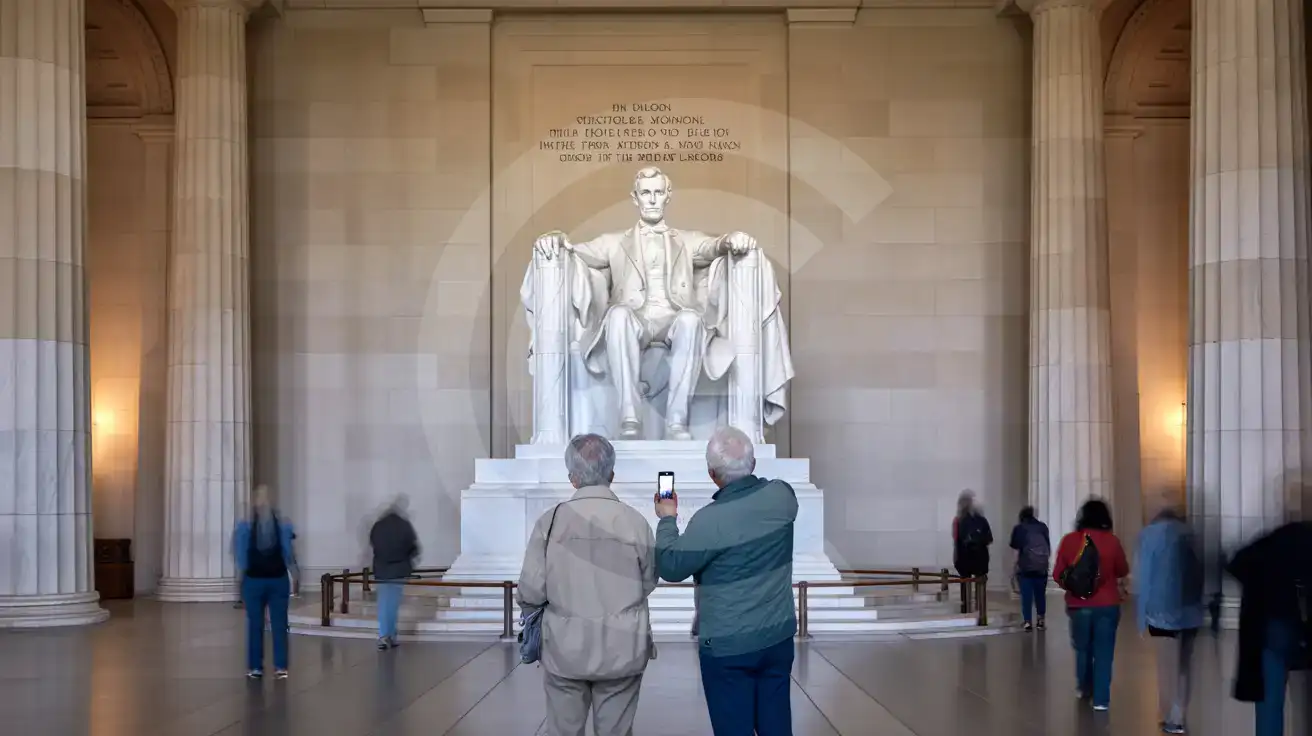
The memorial is open 24 hours a day, every day of the year, with no tickets and no security screening. National Park Service rangers are on-site from approximately 9:30 AM to 10 PM to answer questions. Photography is permitted throughout, including inside the main chamber; tripods are allowed for non-commercial use, but drones are prohibited over the entire National Mall.
Getting There
The closest Metro stop is Foggy Bottom–GWU on the Blue, Orange, and Silver Lines — roughly a 15-20 minute walk west along Constitution Avenue or through the campus edge of George Washington University. The DC Circulator's National Mall route drops passengers directly near the memorial's east steps. Street parking is limited and fills quickly; rideshare drop-offs work best on Henry Bacon Drive NW.
Accessibility
An elevator on the north side of the memorial provides step-free access to the main chamber. Wheelchair-accessible parking spaces are available but scarce; arriving by Metro or rideshare avoids the parking hunt.
Inside the Memorial Chamber
Compare eSIM Options at Lincoln Memorial
eSIMno | Local SIM / Operator | Roaming | |
|---|---|---|---|
| FEATURES | |||
| Setup time | Few minutes | Store kit, needs activation | Auto |
| No local ID needed | Online checkout | No SSN; passport at carrier stores | Use home account |
| Speed | 4G/LTE on AT&T, T-Mobile and Verizon; 5G in some areas | One carrier only | Partner-dependent |
| Travel support | English support 24/7 | English-language service | Home carrier hours |
| Keep home number | Dual SIM | Replaces it | Same number |
| Cost predictability | Fixed price | Advertised price needs Auto Pay | Bill-shock risk |