

Review Your Cart

Your cart is empty.

You haven't added any eSIM packages yet. Start exploring our plans to get connected!

Browse our eSIM Packages

Spain Spain   / Aquàrium Barcelona

8 plans · From $4.90 · QR code instantly by email

  • 2 networksMovistar · Orange
  • No ID check
  • Top-up available
  • Validity starts on activation

Plan Your Trip

Tell us what you'll do and how long you'll be away — we'll highlight the right plan.

7 days
1102030

What will you do?

Tap an activity above to see which plan fits your trip
Aquàrium Barcelona curved glass building at Port Vell marina with the Rambla de Mar bridge and Barcelona waterfront at golden hour

Aquàrium Barcelona eSIM: Spain Data That Works Nationwide

You're heading into Aquàrium Barcelona with timed-entry tickets on your phone, the metro route back to your hotel, and photos ready to share the moment you surface from the Oceanarium tunnel. eSIMno gets your Spain data ready before you board, so your phone works the instant you land at Josep Tarradellas Barcelona-El Prat Airport.

Already a customer?

EARN UP TOON EVERY FRIEND'S PURCHASE
NETWORK: Movistar & Orange Depending on the plan you choose, you'll connect to one or more of these networks.

Quick Facts

Language
Valencian (Español)
Currency
Euro (EUR, €)
Time Zone
Central European Time (UTC+1, UTC+2 summer)
Dialing Code
+34
Power Plug
Type C, E, F (round 2-pin, common across most of Europe)
Emergency
112
eSIMno Networks
Movistar, Orange

How to Get Your eSIM

  1. Pick your Spain data plan
    Choose from 1GB to 20GB options based on your trip length. A 3-5 day Barcelona visit with aquarium tickets, metro navigation, and photo uploads runs comfortably on 3-5GB.
  2. Install at home before your flight
    Scan the QR code over your home WiFi — takes under 2 minutes. Label the profile 'Spain Travel' so you find it easily after landing at El Prat.
  3. Activate after touchdown
    Once the aircraft reaches the gate and you switch off airplane mode, enable your eSIM line in Settings. Your phone connects to Movistar or Orange within seconds.
  4. Keep your home SIM for calls
    Dual-SIM setup means incoming calls still reach your home number. Use WhatsApp or FaceTime over eSIM data for outgoing calls — skip the roaming charges.
  5. Navigate to Port Vell with live data
    Pull up Google Maps for the Aerobus route to Plaça Catalunya, then walk La Rambla to the marina. Your Aquàrium Barcelona ticket QR loads instantly at the entrance scanner.

Traveler Tips

  • Book timed-entry tickets online through the official Aquàrium Barcelona site — walk-up queues stretch 30-45 minutes on summer weekends, while mobile tickets scan directly at the turnstile.
  • The 80-meter Oceanarium tunnel is the photo highlight; have your phone ready with data active since WiFi signal drops in the lower tank levels.
  • Barceloneta metro station on the L4 yellow line sits 650 meters from the aquarium entrance — a flat 8-minute walk along the Passeig de Joan de Borbó promenade.
  • Morning visits (10:00-11:30) see lighter crowds; the shark feeding happens around 12:00 and draws the biggest gatherings at the tunnel.
  • Your Spain eSIM keeps working when you leave Port Vell — same data at La Boqueria market, same data on the train to Girona, same data across the country.

Why Data Matters at Aquàrium Barcelona

The moment you tap your timed-entry ticket at Aquàrium Barcelona's turnstile, your phone becomes your guide. The aquarium's interactive app layers species information over the 35 tanks, the augmented-reality shark experience needs a live connection to render the animation, and the Oceanarium tunnel — an 80-meter walk-through acrylic tube with sand tiger sharks, ocean sunfish, and giltheads gliding overhead — is the shot your group chat is waiting for.

Free marina WiFi covers the outdoor promenade but struggles inside the concrete-and-glass structure housing 11,000 marine animals. The lower levels where the Mediterranean and tropical tanks sit are the weakest zones. eSIMno plans for Aquàrium Barcelona, Barcelona, Spain bypass that entirely — Movistar and Orange signals hold through the building, so your ticket loads, your photos upload, and your rideshare pickup to Barceloneta Beach or La Rambla schedules without hunting for a hotspot.

After the aquarium, Port Vell spreads into the Maremagnum shopping complex, the IMAX cinema, and the Rambla de Mar bridge back toward the Gothic Quarter. Each stop expects a phone that works: the cinema's mobile tickets, the restaurant reservation on TheFork, the metro route to your evening plans at Spotify Camp Nou. One eSIM handles the aquarium morning, the beachfront afternoon, and the stadium night — no SIM swap, no roaming bill, no queue at the airport kiosk you walked past at El Prat.

Visiting Aquàrium Barcelona

Aquàrium Barcelona opens daily from 10:00, with closing times varying between 19:30 (winter weekdays) and 21:00 (summer weekends and holidays). Adult tickets run €24-26 through the official site, with family bundles and combined passes for the Maremagnum IMAX available. Timed-entry slots fill on weekends and school holidays — booking 2-3 days ahead locks in your preferred window and generates the QR code your phone needs at the gate.

The building sits at Moll d'Espanya in Port Vell, reachable via L4 metro to Barceloneta (8-minute walk) or L3 to Drassanes (12-minute walk through the Rambla). The Aerobus from El Prat drops at Plaça Catalunya, from which the aquarium is a 1.2km downhill walk or a single metro stop. No dress code applies, but the tunnel and tank viewing areas are air-conditioned — a light layer helps if you've come straight from the beach.

Exploring Port Vell

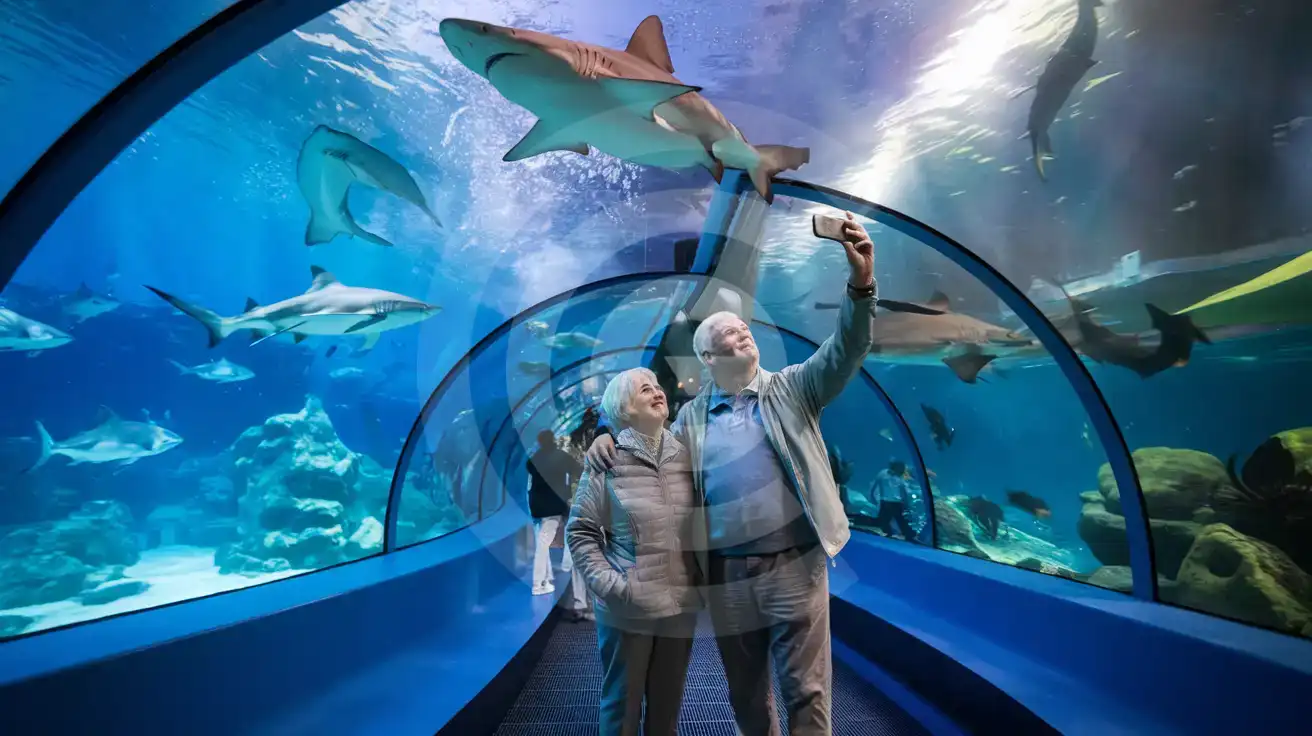
Senior couple photographing sharks in the Aquàrium Barcelona Oceanarium tunnel with smartphones
Inside the Oceanarium tunnel at Aquàrium Barcelona — activate your eSIM before the trip so your phone works the moment you arrive.

Compare eSIM Options at Aquàrium Barcelona

Recommended
Local SIM / Operator
Roaming
Setup timeRegistered in store before the SIM worksAuto
No local ID neededPhoto ID required by law at purchaseUse home account
SpeedOne network onlyPartner-dependent
Travel supportSpanish-language serviceHome carrier hours
Keep home numberReplaces itSame number
Cost predictabilityPrepaid, no bill shockBill-shock risk
Typical pricing
The SIM must be registered with your passport before it works, and it runs on one network.
Prepaid, billed every 28 days, on the Vodafone network only.
$12-18 / day
Typical daily roaming rate; varies by home carrier

PRICING — PICK YOUR ESIMNO PLAN

Light traveler
5GB / 30 days
$11.90
20% off for memberson your first order
≈ $9.52 USD member price
Buy now
Heavy traveler
20GB / 30 days
$27.90
20% off for memberson your first order
≈ $22.32 USD member price
Buy now

Frequently Asked Questions (FAQs)

Install the eSIM profile at home before your flight using your home WiFi. After your plane lands at El Prat and taxis to the gate, switch off airplane mode and enable the Spain profile. By the time you're walking through the Aerobus queue toward Plaça Catalunya, your phone is already pulling up the L4 metro route to Barceloneta and your aquarium ticket QR.
Yes. eSIMno connects through Movistar and Orange, both of which maintain strong indoor coverage across Port Vell. The Oceanarium tunnel and tropical tank floors are below ground level where free WiFi weakens, but cellular signal holds — your interactive app content, photos, and messages keep working throughout the visit.
A single aquarium visit with ticket QR loading, augmented-reality shark content, photo uploads, and metro navigation uses around 300-500MB. If you're combining the aquarium with La Boqueria, Barceloneta Beach, and evening plans in the Gothic Quarter, budget 1-1.5GB for the full day — well within a 3GB or 5GB plan.
Absolutely. The Spain data plan covers the entire country on the same networks. Your eSIM works at Aquàrium Barcelona in the morning, at Park Güell that afternoon, on the AVE train to Madrid the next day, and anywhere else you travel in Spain — no reactivation, no second purchase, no SIM swap.
Take the Aerobus (runs every 5-10 minutes, around €7 one-way) to Plaça Catalunya — roughly 35 minutes depending on traffic. From there, walk 15 minutes down La Rambla to Port Vell, or take the L4 metro one stop to Barceloneta and walk 8 minutes along the promenade. Your eSIM data lets you track real-time bus arrivals and compare routes before committing.
Strongly recommended. Timed-entry slots fill on weekends and school holidays, and walk-up queues stretch 30-45 minutes in peak season. Online tickets generate a QR code that scans directly at the turnstile — your phone needs data to load it, which your eSIM provides the moment you arrive at the marina.
Aquàrium Barcelona sits at the heart of Port Vell, Barcelona's historic harbor transformed into a modern leisure waterfront. The journey from El Prat Airport takes around 35 minutes via Aerobus to Plaça Catalunya, then a 15-minute walk down La Rambla to the marina — or a single L4 metro ride to Barceloneta followed by a short stroll along the promenade. Your phone handles the ticket confirmation, the transit timing, and the group chat coordinating where to meet at the shark tunnel. Inside the aquarium, you'll want data for the interactive exhibits, the augmented-reality shark experience, and sharing that walk-through Oceanarium video before the moment passes. The building's thick glass and concrete construction can make free WiFi inconsistent in the lower levels where the main tanks sit. Your own eSIM connection keeps working regardless of crowd density or which floor you're exploring. The same Spain data plan that powers your aquarium visit keeps working when you head to Park Güell the next morning, catch a match at Camp Nou that evening, or extend your trip to Valencia or Seville. One plan, one QR install at home, nationwide coverage from the moment your flight lands until you board the return.
Back to Spain

Connected in 3 steps

  1. Choose your planSearch for your destination, then pick the data and number of days.
  2. Install at homeYour eSIM arrives by email and installs in a few minutes with one tap or a QR code.
  3. Connect when you landYour plan's validity starts with its first connection in the coverage area.

Why eSIMno?

  • No more SIM kiosksSkip the airport queues. Install your eSIM at home, activate when you land.
  • No roaming surprisesForget the $200 phone bill three weeks after your trip. Plain pricing, no hidden fees.
  • Keep your own numberDual-SIM means your physical SIM stays active for calls and texts. eSIM handles only data.
  • Setup in 2 minutesScan QR code, follow on-screen steps, you're connected. Works on any eSIM-compatible phone.

Is my phone eSIM compatible?

Most phones released in recent years support eSIM. Check yours in the list before you buy.

  • iPhone XR, XS and later
  • Samsung Galaxy S20 and later
  • Google Pixel 4 and later
  • Xiaomi 12T Pro and later
All eSIM-Compatible Phones

Our guarantees

  • Secure payment with 3D SecurePay by card; every payment goes through your bank's 3D Secure check.VisaMastercard
  • 14-day refund if not installedIf you haven't installed your eSIM yet, you can get a refund within 14 days of purchase, no reason needed.Refund policy
  • 24/7 Customer SupportReach our team via WhatsApp and email during business hours. Quick answers to common questions available anytime through our automated assistant.

Frequently Asked Questions (FAQs)

How fast does the eSIM activate after I switch off airplane mode?
Activation typically takes 10-30 seconds after airplane mode is switched off, depending on local network availability. In some cases it's nearly instant; in remote areas it may take a minute or two. If it doesn't connect within 5 minutes, restart your phone or check that data roaming is enabled.
Can I make phone calls or send SMS?
It depends on the plan you choose. Most eSIMno plans are data-only: on those you cannot place regular calls or send SMS from the eSIM line, but messaging and calling apps work normally over the data connection - WhatsApp, iMessage, FaceTime, Telegram, Signal and Google Meet. We also offer voice plans in selected destinations, and on those calling and SMS work from the eSIM line itself, which comes with its own French phone number and unlimited calling across Europe. Every plan card shows which type it is, so check the plan type before you buy. If you are looking at a voice plan, please also read who you can call and text, and what happens to the phone number - both are explained in their own questions below.
What should I do if I see a 'No network' message after activating my eSIM?
If you see a 'No network' message after activation, try these steps in order: (1) Toggle airplane mode on for 10 seconds, then off. (2) Confirm data roaming is enabled for the eSIM line. (3) Manually select a network in cellular settings. (4) Restart your phone. If the issue continues, contact eSIMno support via WhatsApp or email.
What customer support is available if I have issues?
eSIMno offers support via WhatsApp and email. Our team helps with installation, troubleshooting, billing questions and refund requests during business hours, and our automated assistant answers common questions 24/7. Most issues are resolved within minutes during business hours.
Can I share data from my eSIM with someone else's phone?
Yes, through Personal Hotspot. Activate hotspot on your phone, share the password, and the other device connects to your data. Data used by connected devices counts toward your eSIM plan, so monitor usage to avoid running out faster than expected.
When should I set up my eSIM?
A Wi-Fi connection is required to install your eSIM, so we recommend setting it up before you leave home. Activation can happen later, either right before departure or after you land at your destination - but the initial QR scan needs Wi-Fi.
Can I use the eSIM to make video calls?
Yes - apps like FaceTime, WhatsApp, Zoom, Google Meet, and Microsoft Teams all work over your eSIM data. Video calls use about 200-400 MB per hour depending on quality, so factor that into your plan choice if you make long calls regularly.
Who can I call and text on a voice plan?
Outgoing calls and SMS are unlimited across Europe - that is the calling area, and it is not the same as where the plan gives you data. Incoming calls and SMS go further: they reach you from anywhere in the world, they are free, and they do not use up your allowance. So if someone back home calls or texts your eSIM number, it arrives no matter where they are calling from. If you mainly need to be reachable rather than to make calls, that matters more than the outgoing area.
How can I verify if my eSIM is activated?
There are two clear indicators: (1) your phone's status bar shows the local carrier name once you arrive at your destination, and (2) the data icon (4G, LTE, or 5G) appears next to the eSIMno line in your cellular settings. If neither shows up, turn airplane mode on and then off again, or restart your phone.
Do I need to remove my eSIM after my trip?
You don't have to remove it. When your plan ends, the eSIM stops providing data and moves to Archived in Profile > My eSIMs. If you keep it installed on your phone, you can top it up there and use it again - no new QR code needed (top-ups aren't available for unlimited and voice plans). If you need the space, you can delete the old profile in your phone's cellular settings; after that, you'll need a new eSIM for your next trip.
Can I keep my WhatsApp number while using an eSIM?
Yes. Your WhatsApp number stays linked to your home SIM, so all your chats, contacts, and groups remain unchanged. WhatsApp uses data (not the SIM line directly) for messages and calls, so it works seamlessly over your eSIMno data.
How can I purchase the Spain eSIM?
You can purchase your eSIM directly from the eSIMno website - select a Spain plan and complete the payment. Within minutes you'll receive an order confirmation email that contains everything you need to install: a QR code, a one-tap install link, the SM-DP+ address and activation code, plus an "Install eSIM" button. You can install straight from that email, or sign in anytime and go to Profile > My eSIMs > Install to get the same options.
All questions