

Review Your Cart

Your cart is empty.

You haven't added any eSIM packages yet. Start exploring our plans to get connected!

Browse our eSIM Packages

Mexico Mexico   / Templo Mayor Museum

8 plans · From $6.90 · QR code instantly by email

  • 2 networksAT&T · Telcel
  • No ID check
  • Top-up available
  • Validity starts on activation

Plan Your Trip

Tell us what you'll do and how long you'll be away — we'll highlight the right plan.

7 days
1102030

What will you do?

Tap an activity above to see which plan fits your trip
Exterior view of Templo Mayor Museum and archaeological ruins in Mexico City at golden hour

Templo Mayor Museum eSIM: Mexico Data That Works Nationwide

You're stepping into the ruins beside Zócalo with your museum ticket email to pull up, Google Maps ready for the next stop, and a ride back through Centro Histórico still to book. With eSIMno, you can install your Mexico eSIM before the trip, then activate it after landing so your data is ready at Templo Mayor Museum and keeps working across the rest of Mexico.

Already a customer?

EARN UP TOON EVERY FRIEND'S PURCHASE
NETWORK: AT&T & Telcel Depending on the plan you choose, you'll connect to one or more of these networks.

Quick Facts

Language
Spanish (Español)
Currency
Mexican Peso (MXN, $)
Time Zone
Central Standard Time (UTC-6)
Dialing Code
+52
Power Plug
Type A, B (flat 2-pin, common across North America)
Emergency
911 (general)
eSIMno Networks
AT&T, Telcel

How to Get Your eSIM

  1. Pick Your Mexico Plan Before The Trip
    Buy your eSIM before flying into Mexico City so you are not comparing SIM options after a long arrival at Benito Juárez airport. If Templo Mayor Museum is on your first-day list, having data ready saves time from the airport ride onward.
  2. Install It Over Stable WiFi At Home
    Complete the installation before departure while you still have reliable WiFi and time to read the setup steps carefully. That keeps your arrival day focused on getting into Centro Histórico, not troubleshooting in a taxi or hotel lobby.
  3. Activate After Landing In Mexico
    Turn the eSIM on after landing, once phone use is allowed and you are ready to connect on the ground. By the time you leave the airport or open your route into the historic center, your Mexico data is already live.
  4. Use It For The Templo Mayor Arrival Flow
    On the way to the museum, use data for Google Maps, rideshare pickup, WhatsApp messages, and your Templo Mayor Museum ticket email or confirmation page. That matters around the Zócalo, where short walking routes can still involve detours, crowds, and security barriers.
  5. Keep It Running For The Rest Of Mexico
    Your plan is not limited to the museum area. After Templo Mayor Museum, the same eSIM keeps working for Metro directions, restaurant bookings, airport transfers, and any onward travel across Mexico.

Traveler Tips

  • Arrive close to opening if Templo Mayor Museum is part of a Zócalo morning, because the area fills quickly after 10:00 and live map routing helps you dodge street closures around the cathedral side.
  • Keep your museum ticket confirmation and ID email easy to reach before you enter the Templo Mayor complex, since pulling it up on mobile data is faster than hunting for a café connection in Centro Histórico.
  • If your home SIM stays active for voice, incoming calls still reach your regular number with no extra setup needed; use WhatsApp or FaceTime over data for outgoing calls so you do not trigger roaming charges on your home line.
  • The walk from Templo Mayor Museum to Bellas Artes is about 20 to 25 minutes through the historic center, so live navigation on your phone is useful if you are chaining multiple stops in one afternoon.
  • Metro riders heading away from the Zócalo should check Line 2 service and station entrances before they descend, because the nearest access points around Centro Histórico can shift with crowd control and civic events.
  • Download your airline, hotel, and booking emails before your museum day, then let the eSIM handle everything dynamic: route changes, translation, ride-booking, and group chat updates while you are on foot.

Why Data Matters at Templo Mayor Museum

Templo Mayor Museum is one of those places where your phone is part of the visit from the first minute. You are in the middle of Centro Histórico, steps from Metropolitan Cathedral of Mexico City, the Zócalo, and busy pedestrian routes where plans change block by block. Mobile data lets you pull up the Templo Mayor Museum confirmation email, check opening details, message your travel partner on WhatsApp, and reroute with Google Maps if a street around the square is restricted for an event or security setup. That is a very different use case from sitting in a hotel on stable WiFi; here, movement is constant and every decision happens in real time.

The value continues after you leave the gate. A museum stop here often rolls straight into a walk toward Palacio Nacional, lunch in the historic core, or a Metro transfer toward Alameda or Reforma. With data on your phone, you can compare a walking route against a rideshare pickup, open Uber or DiDi without delay, translate menu items, and keep your group chat alive while everyone drifts between stops. If you are heading back toward your hotel before evening traffic tightens, live navigation matters more than static screenshots.

This is also where buying before the trip beats fixing connectivity on the day. If you land in Mexico City in the morning and visit Templo Mayor Museum that same afternoon, you do not want your first hour in the center spent hunting for a SIM shop. eSIMno plans for Templo Mayor Museum, Mexico City, Mexico let you install in advance, activate after landing, and arrive ready for the actual tasks that matter on-site: maps, booking lookups, ride apps, translation, messaging, cloud photos, and all the small checks that keep a packed Mexico City day running smoothly.

Visiting Templo Mayor Museum

Templo Mayor Museum and the adjacent archaeological zone are a compact stop on the map, but the visit works better when you treat it as part of a broader Centro Histórico day. The site sits just east of the main square, and the easiest approach is on foot once you are already in the Zócalo area. If you are arriving straight from another neighborhood, leave extra time for street-level congestion in the historic core, especially from late morning into the afternoon.

Check the official museum page shortly before your visit for current opening days, last-entry timing, and ticket policy, because museum schedules and admission rules can change. Screenshots help, but live access is better if you need to confirm a same-day detail at the entrance. Photography rules can also vary by exhibition area, so having data ready for the current visitor information page is useful.

Inside the wider district, mobile service matters because the next move comes fast: finding lunch, locating the nearest Metro entrance, booking a car when your feet give out, or checking traffic before returning to your hotel. Templo Mayor is not an isolated ruin outside the city; it is embedded in one of the busiest visitor zones in Mexico, where connected planning saves real time.

Inside The Templo Mayor Visit

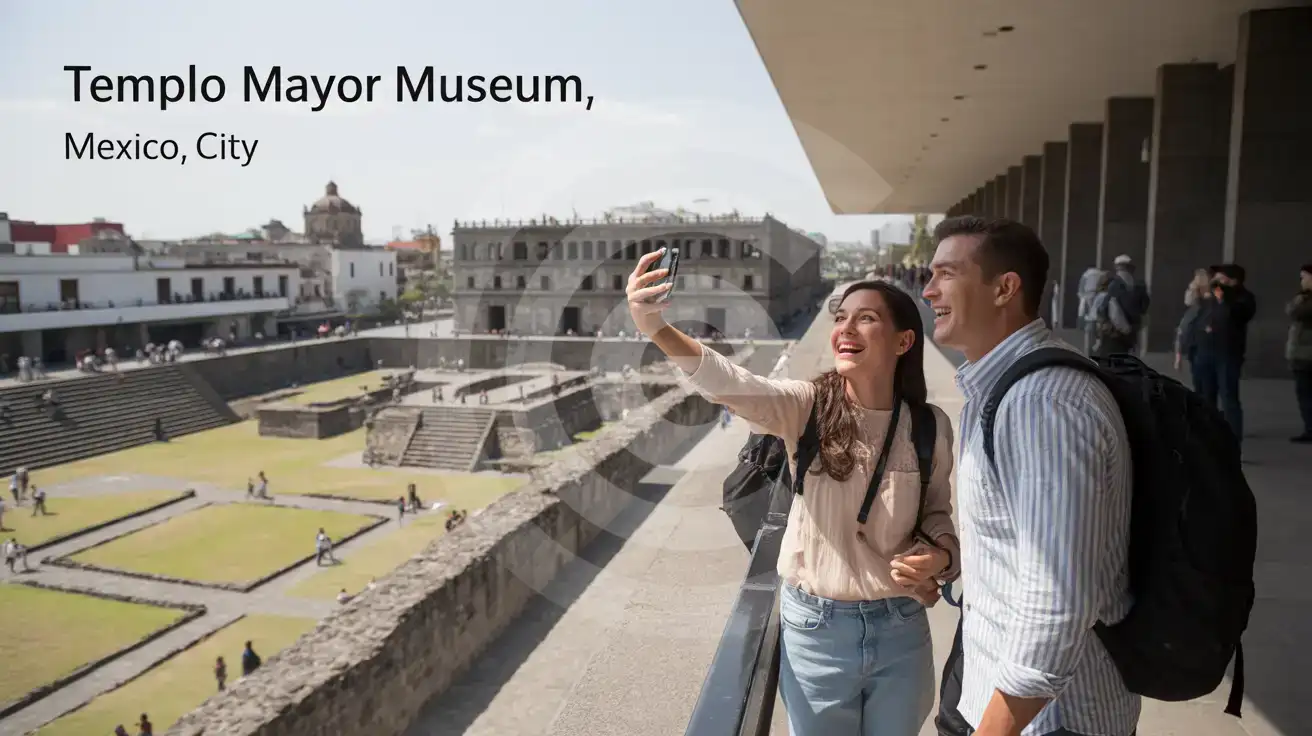
Couple on the walkway inside the Templo Mayor archaeological zone in Mexico City
At Templo Mayor Museum, Mexico City, Mexico, having data ready means maps, tickets, and rides work the moment plans change.

Compare eSIM Options at Templo Mayor Museum

Recommended
Local SIM / Operator
Roaming
Setup timeDoes not work until registration is completeAuto
No local ID neededPassport plus a live face checkUse home account
SpeedOne network onlyPartner-dependent
Travel supportSpanish-language serviceHome carrier hours
Keep home numberReplaces itSame number
Cost predictabilityPrepaid, no bill shockBill-shock risk
5GB / 30 daysLight traveler
5.5GB / 30 days
$17.61
Prepaid package on the Telcel network only.
$12-18 / day
$450.00
30 days × daily rate
Typical daily roaming rate; varies by home carrier
10GB / 30 daysStandard travelerMost popular
8GB / 30 days
$29.35
Prepaid package on the Telcel network only.
20GB / 30 daysHeavy traveler
8GB / 30 days
$29.35
Prepaid package on the Telcel network only.

Frequently Asked Questions (FAQs)

Activate it after landing in Mexico, not before departure. That way your data starts when you actually need it for the ride into Centro Histórico, your Templo Mayor Museum booking email, and live directions around the Zócalo.
Yes — the plan is for Mexico, not just the museum block. You can use the same data connection from Templo Mayor Museum to Chapultepec, Coyoacán, Mexico City International Airport, and any later stop on your Mexico trip.
Screenshots help, but live data is better around Templo Mayor Museum because your plans can shift fast once you are between the ruins, the cathedral side, and nearby streets. You may need fresh walking directions, a rideshare pickup point, a translation app, or a same-day check on museum access details.
Keep your home SIM active for voice and use the eSIM for data. Incoming calls still reach your regular number with no extra setup, and around Templo Mayor Museum you can place outgoing calls through WhatsApp, FaceTime, Telegram, or another internet-based app instead of using native roaming.
The simplest flow is to turn on your eSIM after landing, then use your phone immediately for Uber or DiDi, or for step-by-step public transport directions into Centro Histórico. By the time you are approaching the Zócalo or walking the final blocks to Templo Mayor Museum, your route, messages, and backup ride options are already on hand.
That is exactly why travelers buy early instead of waiting until they reach the historic center. With eSIMno, you can install before the trip, test that the profile is on your phone, and arrive at Templo Mayor Museum focused on the visit instead of troubleshooting connectivity in the street.
Templo Mayor Museum sits right in the middle of a phone-heavy part of Mexico City. You are moving between the museum entrance, the archaeological zone, the Zócalo, and nearby streets where navigation, ticket confirmations, translation, messaging, and ride-booking all happen on the fly. That is exactly where a Mexico eSIM pays off. Instead of relying on venue WiFi or stopping at a SIM counter after arrival, you install once before departure and switch it on after landing. By the time you reach Centro Histórico, your phone is already handling maps, WhatsApp messages, photo uploads, and real-time route checks. This page is built for travelers searching for data at Templo Mayor Museum, not for readers who still need a general city guide. The practical need here is immediate: open your booking email, check museum hours, message the people you are meeting, and work out whether you are walking to Palacio Nacional, heading toward Bellas Artes, or calling a car back to your hotel. Mobile data also helps once you leave the ruins, because Mexico City trips rarely stop at one site. A plan bought for Templo Mayor Museum keeps working on the way from Mexico City International Airport into the center and later across neighborhoods like Reforma, Coyoacán, and Polanco. If your Mexico itinerary continues beyond the capital, nationwide coverage matters even more. You might visit Teotihuacan the next day, fly onward to Cancún, or split time between Mexico City and Playa del Carmen. Buying one eSIM before your flight is simpler than hunting for a physical SIM after arrival, swapping tiny cards, or depending on unstable hotspot access during a packed sightseeing day. For travelers with purchase intent, the smart move is simple: set up your Mexico eSIM in advance, activate after landing, and let your phone work from the first museum scan to the last airport transfer.
Back to Mexico

Connected in 3 steps

  1. Choose your planSearch for your destination, then pick the data and number of days.
  2. Install at homeYour eSIM arrives by email and installs in a few minutes with one tap or a QR code.
  3. Connect when you landYour plan's validity starts with its first connection in the coverage area.

Why eSIMno?

  • No more SIM kiosksSkip the airport queues. Install your eSIM at home, activate when you land.
  • No roaming surprisesForget the $200 phone bill three weeks after your trip. Plain pricing, no hidden fees.
  • Keep your own numberDual-SIM means your physical SIM stays active for calls and texts. eSIM handles only data.
  • Setup in 2 minutesScan QR code, follow on-screen steps, you're connected. Works on any eSIM-compatible phone.

Is my phone eSIM compatible?

Most phones released in recent years support eSIM. Check yours in the list before you buy.

  • iPhone XR, XS and later
  • Samsung Galaxy S20 and later
  • Google Pixel 4 and later
  • Xiaomi 12T Pro and later
All eSIM-Compatible Phones

Our guarantees

  • Secure payment with 3D SecurePay by card; every payment goes through your bank's 3D Secure check.VisaMastercard
  • 14-day refund if not installedIf you haven't installed your eSIM yet, you can get a refund within 14 days of purchase, no reason needed.Refund policy
  • 24/7 Customer SupportReach our team via WhatsApp and email during business hours. Quick answers to common questions available anytime through our automated assistant.

Frequently Asked Questions (FAQs)

How fast does the eSIM activate after I switch off airplane mode?
Activation typically takes 10-30 seconds after airplane mode is switched off, depending on local network availability. In some cases it's nearly instant; in remote areas it may take a minute or two. If it doesn't connect within 5 minutes, restart your phone or check that data roaming is enabled.
Can I make phone calls or send SMS?
It depends on the plan you choose. Most eSIMno plans are data-only: on those you cannot place regular calls or send SMS from the eSIM line, but messaging and calling apps work normally over the data connection - WhatsApp, iMessage, FaceTime, Telegram, Signal and Google Meet. We also offer voice plans in selected destinations, and on those calling and SMS work from the eSIM line itself, which comes with its own French phone number and unlimited calling across Europe. Every plan card shows which type it is, so check the plan type before you buy. If you are looking at a voice plan, please also read who you can call and text, and what happens to the phone number - both are explained in their own questions below.
What should I do if I see a 'No network' message after activating my eSIM?
If you see a 'No network' message after activation, try these steps in order: (1) Toggle airplane mode on for 10 seconds, then off. (2) Confirm data roaming is enabled for the eSIM line. (3) Manually select a network in cellular settings. (4) Restart your phone. If the issue continues, contact eSIMno support via WhatsApp or email.
What customer support is available if I have issues?
eSIMno offers support via WhatsApp and email. Our team helps with installation, troubleshooting, billing questions and refund requests during business hours, and our automated assistant answers common questions 24/7. Most issues are resolved within minutes during business hours.
Can I share data from my eSIM with someone else's phone?
Yes, through Personal Hotspot. Activate hotspot on your phone, share the password, and the other device connects to your data. Data used by connected devices counts toward your eSIM plan, so monitor usage to avoid running out faster than expected.
When should I set up my eSIM?
A Wi-Fi connection is required to install your eSIM, so we recommend setting it up before you leave home. Activation can happen later, either right before departure or after you land at your destination - but the initial QR scan needs Wi-Fi.
Can I use the eSIM to make video calls?
Yes - apps like FaceTime, WhatsApp, Zoom, Google Meet, and Microsoft Teams all work over your eSIM data. Video calls use about 200-400 MB per hour depending on quality, so factor that into your plan choice if you make long calls regularly.
Who can I call and text on a voice plan?
Outgoing calls and SMS are unlimited across Europe - that is the calling area, and it is not the same as where the plan gives you data. Incoming calls and SMS go further: they reach you from anywhere in the world, they are free, and they do not use up your allowance. So if someone back home calls or texts your eSIM number, it arrives no matter where they are calling from. If you mainly need to be reachable rather than to make calls, that matters more than the outgoing area.
How can I verify if my eSIM is activated?
There are two clear indicators: (1) your phone's status bar shows the local carrier name once you arrive at your destination, and (2) the data icon (4G, LTE, or 5G) appears next to the eSIMno line in your cellular settings. If neither shows up, turn airplane mode on and then off again, or restart your phone.
Do I need to remove my eSIM after my trip?
You don't have to remove it. When your plan ends, the eSIM stops providing data and moves to Archived in Profile > My eSIMs. If you keep it installed on your phone, you can top it up there and use it again - no new QR code needed (top-ups aren't available for unlimited and voice plans). If you need the space, you can delete the old profile in your phone's cellular settings; after that, you'll need a new eSIM for your next trip.
Can I keep my WhatsApp number while using an eSIM?
Yes. Your WhatsApp number stays linked to your home SIM, so all your chats, contacts, and groups remain unchanged. WhatsApp uses data (not the SIM line directly) for messages and calls, so it works seamlessly over your eSIMno data.
How can I purchase the Mexico eSIM?
You can purchase your eSIM directly from the eSIMno website - select a Mexico plan and complete the payment. Within minutes you'll receive an order confirmation email that contains everything you need to install: a QR code, a one-tap install link, the SM-DP+ address and activation code, plus an "Install eSIM" button. You can install straight from that email, or sign in anytime and go to Profile > My eSIMs > Install to get the same options.
All questions