
Review Your Cart

Your cart is empty.

You haven't added any eSIM packages yet. Start exploring our plans to get connected!

Browse our eSIM Packages

Malta eSIM Malta  

8 plans · From $4.90 · QR code instantly by email

  • 3 networksGO · Melita · Vodafone
  • No ID check
  • Top-up available
  • Validity starts on activation

Plan Your Trip

Tell us what you'll do and how long you'll be away — we'll highlight the right plan.

7 days
1102030

What will you do?

Tap an activity above to see which plan fits your trip
Valletta's fortified Grand Harbour waterfront with traditional Maltese balconies and limestone bastions at golden hour

Malta eSIM: Mediterranean Island Data That Works From Valletta to Gozo

Your Air Malta flight is descending into Luqa and you're already pulling up the Tallinja bus schedule to Valletta, checking your Hypogeum timed-entry QR, and confirming tonight's Marsaxlokk seafood reservation. With an eSIMno plan installed before takeoff, your phone connects to GO, Melita, or Vodafone the moment you switch off airplane mode — skip the SIM kiosk queue entirely and walk straight to the 4-euro airport bus with directions already loaded.

Already a customer?

EARN UP TOON EVERY FRIEND'S PURCHASE
NETWORK: GO & Melita & Vodafone Depending on the plan you choose, you'll connect to one or more of these networks.

Quick Facts

Capital
Valletta
Language
Maltese
Currency
Euro (EUR, €)
Time Zone
Central European Standard Time (UTC+1)
Dialing Code
+356
Power Plug
Type G (3-pin rectangular, common in UK and several Asian markets)
Emergency
112
eSIMno Networks
GO, Melita, Vodafone

How to Get Your eSIM

  1. Pick Your Malta Data Plan
    Choose from 1GB to 20GB options based on your trip length. A week exploring Valletta, Mdina, and Gozo typically needs 3-5GB for maps, tickets, and photo uploads.
  2. Complete the 2-Minute Purchase
    Checkout takes under two minutes. Your eSIM QR code and installation instructions arrive by email within seconds — save them before boarding.
  3. Install Over WiFi at Home
    Scan the QR code while still on your home network. The profile installs in under a minute. Label it 'Malta Data' in your phone settings for easy switching.
  4. Activate After Landing at Luqa
    Once your aircraft reaches the gate, switch off airplane mode and enable data roaming on the eSIM line. Your phone connects to GO, Melita, or Vodafone within seconds.
  5. Keep Your Home SIM for Calls
    Your original number stays active for incoming calls and texts. Use WhatsApp, FaceTime, or Telegram over eSIM data for outgoing calls — avoid roaming charges on your home line.

Traveler Tips

  • Book Hypogeum tickets 4-6 weeks ahead online — only 80 visitors enter daily, and your QR confirmation is the only entry proof accepted at the door.
  • The Tallinja bus app shows live arrivals for all Malta routes; the €1.50 single fare (€3 in summer) is paid by tapping a contactless card or buying through the app.
  • Download offline Google Maps for Malta and Gozo before visiting underground sites like the Catacombs of St. Paul — cellular signal drops completely below ground.
  • Bolt and eCabs apps both operate across Malta; compare prices before booking, especially for the 25-minute ride from Luqa airport to Sliema (expect €15-20).
  • The Gozo Channel ferry from Ċirkewwa departs every 45 minutes in summer; check the live schedule on their app since weather delays are common in winter months.

Why Data Matters Across Malta

Malta rewards spontaneous exploration, and spontaneous exploration demands real-time data. The X4 express bus from Luqa airport to Valletta runs every 30 minutes — miss one and you're standing in Mediterranean sun for half an hour unless the Tallinja app shows the X7 to Sliema arriving sooner. Bolt and eCabs both serve the airport, but surge pricing spikes during cruise-ship arrivals at the Grand Harbour; checking both apps from the arrivals hall saves €5-8 on the ride to your hotel.

Inside Valletta's 400-year-old fortifications, attractions cluster within a 15-minute walk, but opening hours vary wildly — St. John's Co-Cathedral closes at 4:30 PM on weekdays while the National Museum of Archaeology stays open until 7 PM. Pulling schedules mid-stroll beats discovering locked doors. The Hypogeum in Paola requires a QR ticket scanned at the entrance; the underground site has zero WiFi and zero cell signal, so load your confirmation before descending the stairs. Same for the Catacombs of St. Paul in Rabat — your eSIMno plans for Malta keep you connected above ground, but offline downloads are essential for anything subterranean.

Day trips to Gozo and Comino multiply the data demand. The Gozo Channel ferry from Ċirkewwa to Mġarr takes 25 minutes; live departure boards in the app save the 45-minute wait if a crossing is full. Once on Gozo, the Citadella in Victoria and Ramla Bay sit 8 kilometers apart with infrequent buses connecting them — rideshare apps or Google Maps transit directions make the difference between efficient exploration and wasted hours. Comino's Blue Lagoon has no infrastructure at all: book your boat return through one of the licensed operators (check times on their mobile sites) or risk getting stranded when the last launch leaves at 5 PM.

About Malta & What Travelers Come For

Gateway to the Mediterranean

Malta sits 80 kilometers south of Sicily, a limestone archipelago of three inhabited islands — Malta, Gozo, and Comino — with a combined population under 520,000. Valletta, the capital, earned UNESCO World Heritage status for its intact Baroque streetscape, while the entire archipelago holds more churches per square kilometer than any nation on Earth. English and Maltese share official status, making navigation effortless for most travelers.

What Travelers Come For

The Hypogeum of Ħal-Saflieni draws prehistory enthusiasts to the only underground temple complex in the world, carved 5,000 years ago. St. John's Co-Cathedral in Valletta houses two Caravaggio masterpieces and a marble-inlaid floor covering 400 knights' tombs. Mdina's silent medieval streets offer car-free wandering through honey-colored palazzos, while the Three Cities — Birgu, Senglea, and Cospicua — deliver fortress views without the Valletta crowds. On Gozo, the Citadella fortification and Dwejra's coastal cliffs (where the Azure Window once stood) reward the ferry crossing. Comino's Blue Lagoon is pure turquoise swimming between May and October.

When to Visit

Peak season runs June through September with temperatures above 30°C and packed Blue Lagoon boats. Shoulder months (April-May, October) offer comfortable 20-25°C weather and thinner crowds at Valletta attractions. Winter brings occasional rain but mild 15°C days ideal for walking the fortifications without the summer heat.

Getting Around Malta

Airport Transfers

Malta International Airport in Luqa sits 8 kilometers from Valletta and 10 kilometers from Sliema. The X4 express bus reaches Valletta's City Gate terminus in 25 minutes; the X2 serves Sliema and St. Julian's in 35-40 minutes. Both run every 30 minutes from 5:30 AM until 11 PM, with fares around €4 for the express routes. Bolt and eCabs rideshares reach Valletta in 15 minutes and Sliema in 20 minutes, typically €12-18 depending on traffic and surge.

Public Transit

The Tallinja bus network covers the entire main island with a hub-and-spoke system radiating from Valletta. Single rides cost €1.50 in winter and €2-3 in summer peak season; the Tallinja card or contactless payment works on all routes. Key tourist routes include the 41/42 loop through Mdina and Rabat, the 222 coastal route to Marsaxlokk, and the X1 express to Ċirkewwa ferry terminal for Gozo crossings. Buses can be infrequent after 9 PM.

Island Hopping

Gozo Channel ferries depart Ċirkewwa for Mġarr harbour every 45 minutes in summer, hourly in winter. The 25-minute crossing costs €4.65 round-trip (paid on return). From Mġarr, buses reach Victoria's Citadella in 20 minutes. Comino has no ferry terminal — private boat operators from Ċirkewwa, Sliema, and Bugibba run Blue Lagoon trips for €15-25 return including beach time. Book morning departures to secure a spot before the lagoon fills with day-trippers.

Exploring Malta's Ancient Streets

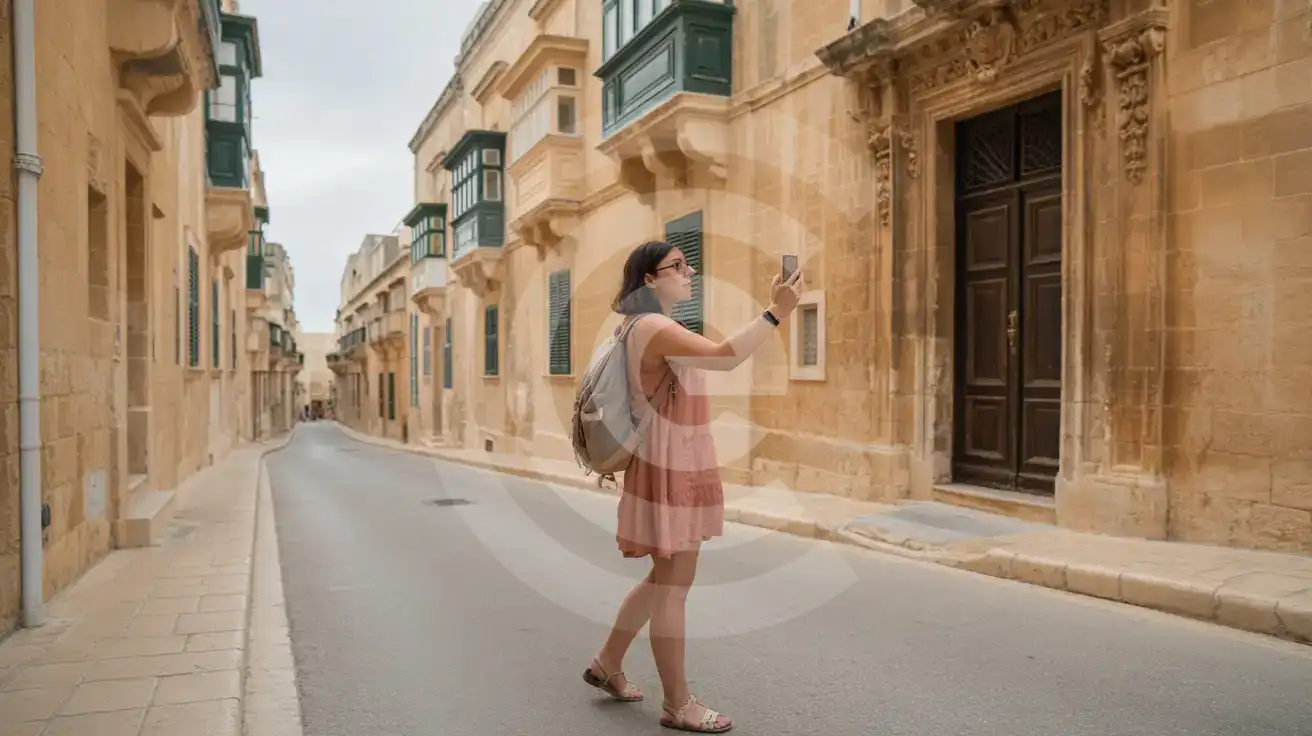
Solo female traveler photographing a Baroque palazzo doorway in the ancient walled streets of Mdina, Malta
Activate your Malta eSIM before landing so maps and translations work the moment you step into Mdina's medieval lanes.

Compare eSIM Providers for Malta

Recommended
Local SIM / Operator
Roaming
Setup timeStore visit + paperworkAuto
No local ID neededLocal ID requiredUse home account
SpeedCarrier-gradePartner-dependent
Travel supportOperator shops and call centreHome carrier hours
Keep home numberReplaces itSame number
Cost predictabilityBills can spikeBill-shock risk
Typical pricing
—
$12-18 / day
Typical daily roaming rate; varies by home carrier

PRICING — PICK YOUR ESIMNO PLAN

Light traveler
5GB / 30 days
$9.90
20% off for memberson your first order
≈ $7.92 USD member price
Buy now
Heavy traveler
20GB / 30 days
$24.90
20% off for memberson your first order
≈ $19.92 USD member price
Buy now

Frequently Asked Questions (FAQs)

Install the eSIM profile over WiFi at home before your flight, then activate it after landing at Luqa. By the time you're walking through the arrivals hall toward the Tallinja bus stop or Bolt pickup zone, your phone is already pulling live directions to Valletta.
Your home SIM stays active for incoming calls and texts — no setup needed. For outgoing calls, use WhatsApp, FaceTime, or Telegram over your eSIMno data to avoid roaming charges on your home carrier.
Coverage on Gozo is strong across Victoria, Mġarr harbour, and Ramla Bay. Comino's Blue Lagoon has basic signal for messaging and maps, though speeds drop during peak crowding. The Gozo Channel ferry crossing maintains connectivity throughout the 25-minute journey.
Most travelers use 3-5GB over a week of active exploration — enough for daily maps navigation between Valletta and Mdina, dozens of attraction QR codes, restaurant bookings through OpenTable or TheFork, and moderate photo sharing. Heavy video uploaders should consider 10GB plans.
The Hypogeum and St. Paul's Catacombs have no cellular reception whatsoever below ground. Download your ticket QR codes and any audio guide content before descending — your data plan keeps you connected everywhere above surface level.
eSIMno Malta plans cover Maltese networks only. If you're catching the Virtu Ferries catamaran to Pozzallo (90 minutes), you'd need a separate Italy plan or a multi-country European bundle for the Sicilian portion of your trip.
Malta packs UNESCO fortresses, turquoise swimming coves, and 7,000-year-old temples into three islands smaller than most cities. Travelers land at Malta International Airport in Luqa and immediately need directions — whether catching the X4 express to Valletta (25 minutes, €4), booking a Bolt to Sliema, or confirming the Gozo Channel ferry schedule from Ċirkewwa. An eSIM activated before departure means your phone is live on local networks the moment the aircraft reaches the gate, no fumbling with passport copies at an airport kiosk. The capital Valletta spans barely 600 meters tip to tip, but those narrow limestone streets hide dozens of museums, churches, and cafés requiring mobile tickets, audio guide downloads, and reservation confirmations. Mdina's silent medieval alleys offer no public WiFi whatsoever — your data plan is the only reliable connection for translation apps and taxi bookings. Over on Gozo, Ramla Bay and the Citadella sit beyond walking distance from any urban hub, making rideshare apps and Google Maps essential for independent exploration. Malta's three carriers — GO, Melita, and Vodafone — deliver strong 4G coverage across Valletta, Sliema, St. Julian's, and the ferry routes to Comino's Blue Lagoon. Rural Gozo and underground sites like the Hypogeum can show weaker signal, but surface-level connectivity stays reliable island-wide. Grab your mt esim or malta esim plan through eSIMno before boarding, activate after landing, and spend your first Mediterranean afternoon exploring instead of queuing.

Connected in 3 steps

  1. Choose your planSearch for your destination, then pick the data and number of days.
  2. Install at homeYour eSIM arrives by email and installs in a few minutes with one tap or a QR code.
  3. Connect when you landYour plan's validity starts with its first connection in the coverage area.

Why eSIMno?

  • No more SIM kiosksSkip the airport queues. Install your eSIM at home, activate when you land.
  • No roaming surprisesForget the $200 phone bill three weeks after your trip. Plain pricing, no hidden fees.
  • Keep your own numberDual-SIM means your physical SIM stays active for calls and texts. eSIM handles only data.
  • Setup in 2 minutesScan QR code, follow on-screen steps, you're connected. Works on any eSIM-compatible phone.

Is my phone eSIM compatible?

Most phones released in recent years support eSIM. Check yours in the list before you buy.

  • iPhone XR, XS and later
  • Samsung Galaxy S20 and later
  • Google Pixel 4 and later
  • Xiaomi 12T Pro and later
All eSIM-Compatible Phones

Our guarantees

  • Secure payment with 3D SecurePay by card; every payment goes through your bank's 3D Secure check.VisaMastercard
  • 14-day refund if not installedIf you haven't installed your eSIM yet, you can get a refund within 14 days of purchase, no reason needed.Refund policy
  • 24/7 Customer SupportReach our team via WhatsApp and email during business hours. Quick answers to common questions available anytime through our automated assistant.

Frequently Asked Questions (FAQs)

How fast does the eSIM activate after I switch off airplane mode?
Activation typically takes 10-30 seconds after airplane mode is switched off, depending on local network availability. In some cases it's nearly instant; in remote areas it may take a minute or two. If it doesn't connect within 5 minutes, restart your phone or check that data roaming is enabled.
Can I make phone calls or send SMS?
It depends on the plan you choose. Most eSIMno plans are data-only: on those you cannot place regular calls or send SMS from the eSIM line, but messaging and calling apps work normally over the data connection - WhatsApp, iMessage, FaceTime, Telegram, Signal and Google Meet. We also offer voice plans in selected destinations, and on those calling and SMS work from the eSIM line itself, which comes with its own French phone number and unlimited calling across Europe. Every plan card shows which type it is, so check the plan type before you buy. If you are looking at a voice plan, please also read who you can call and text, and what happens to the phone number - both are explained in their own questions below.
What should I do if I see a 'No network' message after activating my eSIM?
If you see a 'No network' message after activation, try these steps in order: (1) Toggle airplane mode on for 10 seconds, then off. (2) Confirm data roaming is enabled for the eSIM line. (3) Manually select a network in cellular settings. (4) Restart your phone. If the issue continues, contact eSIMno support via WhatsApp or email.
What customer support is available if I have issues?
eSIMno offers support via WhatsApp and email. Our team helps with installation, troubleshooting, billing questions and refund requests during business hours, and our automated assistant answers common questions 24/7. Most issues are resolved within minutes during business hours.
Can I share data from my eSIM with someone else's phone?
Yes, through Personal Hotspot. Activate hotspot on your phone, share the password, and the other device connects to your data. Data used by connected devices counts toward your eSIM plan, so monitor usage to avoid running out faster than expected.
When should I set up my eSIM?
A Wi-Fi connection is required to install your eSIM, so we recommend setting it up before you leave home. Activation can happen later, either right before departure or after you land at your destination - but the initial QR scan needs Wi-Fi.
Can I use the eSIM to make video calls?
Yes - apps like FaceTime, WhatsApp, Zoom, Google Meet, and Microsoft Teams all work over your eSIM data. Video calls use about 200-400 MB per hour depending on quality, so factor that into your plan choice if you make long calls regularly.
Who can I call and text on a voice plan?
Outgoing calls and SMS are unlimited across Europe - that is the calling area, and it is not the same as where the plan gives you data. Incoming calls and SMS go further: they reach you from anywhere in the world, they are free, and they do not use up your allowance. So if someone back home calls or texts your eSIM number, it arrives no matter where they are calling from. If you mainly need to be reachable rather than to make calls, that matters more than the outgoing area.
How can I verify if my eSIM is activated?
There are two clear indicators: (1) your phone's status bar shows the local carrier name once you arrive at your destination, and (2) the data icon (4G, LTE, or 5G) appears next to the eSIMno line in your cellular settings. If neither shows up, turn airplane mode on and then off again, or restart your phone.
Do I need to remove my eSIM after my trip?
You don't have to remove it. When your plan ends, the eSIM stops providing data and moves to Archived in Profile > My eSIMs. If you keep it installed on your phone, you can top it up there and use it again - no new QR code needed (top-ups aren't available for unlimited and voice plans). If you need the space, you can delete the old profile in your phone's cellular settings; after that, you'll need a new eSIM for your next trip.
Can I keep my WhatsApp number while using an eSIM?
Yes. Your WhatsApp number stays linked to your home SIM, so all your chats, contacts, and groups remain unchanged. WhatsApp uses data (not the SIM line directly) for messages and calls, so it works seamlessly over your eSIMno data.
How can I purchase the Malta eSIM?
You can purchase your eSIM directly from the eSIMno website - select a Malta plan and complete the payment. Within minutes you'll receive an order confirmation email that contains everything you need to install: a QR code, a one-tap install link, the SM-DP+ address and activation code, plus an "Install eSIM" button. You can install straight from that email, or sign in anytime and go to Profile > My eSIMs > Install to get the same options.
All questions