Review Your Cart

Your cart is empty.

You haven't added any eSIM packages yet. Start exploring our plans to get connected!

Browse our eSIM Packages

Ireland Unlimited eSIM Ireland Unlimited Data

4 plans · From $5.90 · QR code instantly by email

  • 2 networkseir · Three
  • No ID check
  • Validity starts on activation

Plan Your Trip

Tell us how long you'll be away — we'll highlight the right plan.

3 days
1357
Unlimited data for your trip of 3 days
Recommended: Unlimited · 3 Days — $13.90 Show in list
Traveller tethering laptop from smartphone hotspot inside a traditional Irish pub with rainy countryside visible through windows

Ireland Unlimited eSIM – Stay Connected Without Running Out

You remember the moment your data hit zero on Dingle Peninsula—navigation gone, no signal, no backup plan. With eSIMno's Ireland Unlimited eSIM, that scenario disappears. You get 1 GB of high-speed data every day, and when it's used up, your connection slows to 128 Kbps but never cuts off entirely.

Already a customer?

EARN UP TOON EVERY FRIEND'S PURCHASE
NETWORK: eir & Three Depending on the plan you choose, you'll connect to one or more of these networks.

Quick Facts

Plan Type
Unlimited data (fair use)
Coverage
Ireland
Validity
1, 3, 5 or 7 days
Networks
eir, Three, Vodafone
Daily High-Speed Quota
1 GB, then 128 Kbps
Top-up
Not available
Phone Number
None (data only)

How to Get Your eSIM

  1. Purchase your plan
    Choose from 1, 3, 5 or 7 days of unlimited data. Complete checkout and your eSIM details arrive by email within minutes.
  2. Install the eSIM
    Scan the QR code or enter details manually in your phone's settings. You can install before departure or upon arrival in Ireland.
  3. Activate and connect
    Enable the eSIM profile once you land. Your phone connects to eir (formerly Meteor) or Three networks automatically.
  4. Use your daily allowance
    Enjoy 1 GB of high-speed data each day. If you exceed it, your connection continues at 128 Kbps until the next reset.

How the Unlimited Plan Works

Every day you receive 1 GB of high-speed data on eir or Three networks across Ireland. Use it for streaming, uploads, video calls or heavy browsing—whatever you need.

Once that 1 GB is gone, your speed drops to 128 Kbps. This is slow, but deliberate: it is enough for Google Maps navigation, WhatsApp messages, email and basic web pages. It is not enough for video streaming, VoIP calls or large downloads. The connection never cuts off entirely—you always have something.

Your daily quota resets at 00:00 UTC. That is a fixed moment in UTC, not midnight where you are, so check your phone's UTC offset if you plan around it. Every unlimited bundle—whether 1 day or 7 days—provides the same 1 GB daily high-speed allowance.

This is a data-only eSIM. There is no phone number included, which means no voice calls and no SMS. If you need to make calls or receive verification codes via SMS, consider the Ireland Phone Number eSIM instead, which includes a working phone number.

Stay Connected on the Wild Atlantic Way

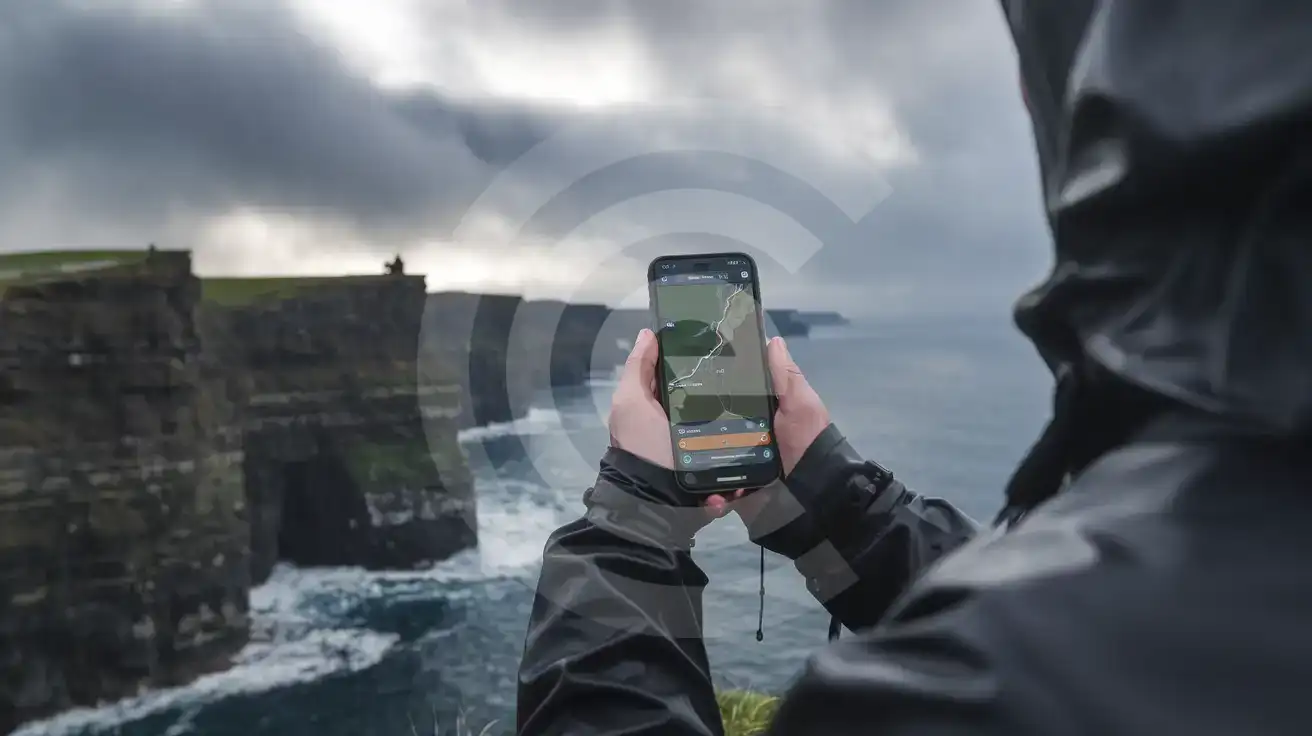
Hiker using smartphone navigation at the Cliffs of Moher on Ireland's Atlantic coast
Even after your daily quota, 128 Kbps keeps your maps working along Ireland's rugged coastline.

Is This Plan Right for You?

The Unlimited plan fits if: you have been caught without data before and refuse to let it happen again. It suits travellers who rely on maps and messaging throughout the day and want the peace of mind that comes from knowing the connection cannot simply vanish. If you tether a laptop occasionally for email or light browsing, 1 GB daily plus fallback speed handles that. If unpredictable usage keeps you anxious about data counters, this removes that worry.

A standard data plan fits better if: you stream video regularly, make frequent VoIP calls, or need coverage for more than 7 days. The longest unlimited plan available is 7 days; for trips beyond that, you can explore the Ireland for data plans with extended validity options. Heavy video users will hit the 1 GB quota quickly and find 128 Kbps frustrating for anything beyond text-based apps. If you know your usage is modest and predictable—say, under 500 MB daily—a fixed-data plan may cost less overall.

Traveller Tips

  • Download offline maps for rural Ireland before you leave. At 128 Kbps, re-downloading large map tiles is painfully slow.
  • The daily reset happens at 00:00 UTC. Check your phone's UTC offset so you know when your high-speed allowance returns.
  • Queue large uploads and downloads for the first part of the day while you still have high-speed data available.
  • Keep messaging apps set to auto-download media only on Wi-Fi—this preserves your quota for navigation and essential browsing.
  • This is data only: no phone number means no SMS verification codes. Use email-based verification or an authenticator app instead.
  • The eSIM cannot be topped up. If your validity ends and you need more time, purchase a fresh plan rather than searching for a refill option.

Going Somewhere Else?

This plan covers a single country. If your trip takes you elsewhere - or you are still comparing destinations - see every country with an unlimited data eSIM and pick the one that matches your route.

Compare Connectivity Options for Ireland

Recommended
Local SIM / Operator
Roaming
Setup timeStore visit + paperworkAuto
No local ID neededLocal ID requiredUse home account
SpeedCarrier-gradePartner-dependent
Travel supportOperator shops and call centreHome carrier hours
Keep home numberReplaces itSame number
Cost predictabilityBills can spikeBill-shock risk

Frequently Asked Questions (FAQs)

Your connection speed drops to 128 Kbps for the rest of that day. This is slow but functional—enough for maps, messaging apps and email. It is not fast enough for video streaming or VoIP calls. Your connection is never cut off entirely.
The daily allowance resets at 00:00 UTC. That is a fixed moment in UTC, not midnight where you are, so check your phone's UTC offset if you plan around it.
No. The Ireland Unlimited eSIM cannot be refilled or topped up. When your chosen validity period ends, the line closes. If you need more time in Ireland, you would purchase a new eSIM.
No. This is a data-only eSIM with no phone number, no voice calls and no SMS capability. If you need to make calls or receive SMS verification codes, consider a voice plan instead.
Yes, if you have the map area cached. At 128 Kbps, basic navigation works—your location updates and turn-by-turn directions function. However, loading new map imagery or Street View will be very slow. Download offline maps before your trip for the best experience.
The longest Ireland Unlimited plan available is 7 days. For trips longer than a week, standard data plans with extended validity are a better choice.
The Ireland Unlimited eSIM gives you 1 GB of high-speed data every day. Once you hit that daily quota, the speed drops to 128 Kbps—slow, but still functional for maps, messaging apps and email. The connection is never cut off entirely, which means you will not find yourself stranded without navigation or unable to send a message. This is data only: there is no phone number, no voice calls and no SMS included. This plan works best for travellers who have been caught short before and want the security of knowing their connection will not vanish mid-journey. If you are navigating rural Ireland, need constant access to maps and translation apps, or simply cannot risk being offline at a critical moment, unlimited with a fair-use slowdown beats a fixed data cap. However, if you stream video regularly, make internet calls throughout the day, or need more than 7 days of coverage, this is not the right fit—the slowdown speed cannot support video or VoIP, and the longest validity available is 7 days. The line cannot be refilled or topped up. When your chosen validity ends—whether 1, 3, 5 or 7 days—the eSIM closes and you would need to purchase a new one. The daily high-speed allowance resets at 00:00 UTC; that is a fixed moment in UTC, not midnight where you are, so check your phone's UTC offset if you plan around it. For trips longer than a week, consider standard data plans with extended validity instead.

Connected in 3 steps

  1. Choose your planSearch for your destination, then pick the data and number of days.
  2. Install at homeYour eSIM arrives by email and installs in a few minutes with one tap or a QR code.
  3. Connect when you landYour plan's validity starts with its first connection in the coverage area.

Why eSIMno?

  • No more SIM kiosksSkip the airport queues. Install your eSIM at home, activate when you land.
  • No roaming surprisesForget the $200 phone bill three weeks after your trip. Plain pricing, no hidden fees.
  • Keep your own numberDual-SIM means your physical SIM stays active for calls and texts. eSIM handles only data.
  • Setup in 2 minutesScan QR code, follow on-screen steps, you're connected. Works on any eSIM-compatible phone.

Is my phone eSIM compatible?

Most phones released in recent years support eSIM. Check yours in the list before you buy.

  • iPhone XR, XS and later
  • Samsung Galaxy S20 and later
  • Google Pixel 4 and later
  • Xiaomi 12T Pro and later
All eSIM-Compatible Phones

Our guarantees

  • Secure payment with 3D SecurePay by card; every payment goes through your bank's 3D Secure check.VisaMastercard
  • 14-day refund if not installedIf you haven't installed your eSIM yet, you can get a refund within 14 days of purchase, no reason needed.Refund policy
  • 24/7 Customer SupportReach our team via WhatsApp and email during business hours. Quick answers to common questions available anytime through our automated assistant.

Frequently Asked Questions (FAQs)

How fast does the eSIM activate after I switch off airplane mode?
Activation typically takes 10-30 seconds after airplane mode is switched off, depending on local network availability. In some cases it's nearly instant; in remote areas it may take a minute or two. If it doesn't connect within 5 minutes, restart your phone or check that data roaming is enabled.
Can I make phone calls or send SMS?
It depends on the plan you choose. Most eSIMno plans are data-only: on those you cannot place regular calls or send SMS from the eSIM line, but messaging and calling apps work normally over the data connection - WhatsApp, iMessage, FaceTime, Telegram, Signal and Google Meet. We also offer voice plans in selected destinations, and on those calling and SMS work from the eSIM line itself, which comes with its own French phone number and unlimited calling across Europe. Every plan card shows which type it is, so check the plan type before you buy. If you are looking at a voice plan, please also read who you can call and text, and what happens to the phone number - both are explained in their own questions below.
What should I do if I see a 'No network' message after activating my eSIM?
If you see a 'No network' message after activation, try these steps in order: (1) Toggle airplane mode on for 10 seconds, then off. (2) Confirm data roaming is enabled for the eSIM line. (3) Manually select a network in cellular settings. (4) Restart your phone. If the issue continues, contact eSIMno support via WhatsApp or email.
What customer support is available if I have issues?
eSIMno offers support via WhatsApp and email. Our team helps with installation, troubleshooting, billing questions and refund requests during business hours, and our automated assistant answers common questions 24/7. Most issues are resolved within minutes during business hours.
Can I share data from my eSIM with someone else's phone?
Yes, through Personal Hotspot. Activate hotspot on your phone, share the password, and the other device connects to your data. Data used by connected devices counts toward your eSIM plan, so monitor usage to avoid running out faster than expected.
When should I set up my eSIM?
A Wi-Fi connection is required to install your eSIM, so we recommend setting it up before you leave home. Activation can happen later, either right before departure or after you land at your destination - but the initial QR scan needs Wi-Fi.
Can I use the eSIM to make video calls?
Yes - apps like FaceTime, WhatsApp, Zoom, Google Meet, and Microsoft Teams all work over your eSIM data. Video calls use about 200-400 MB per hour depending on quality, so factor that into your plan choice if you make long calls regularly.
Who can I call and text on a voice plan?
Outgoing calls and SMS are unlimited across Europe - that is the calling area, and it is not the same as where the plan gives you data. Incoming calls and SMS go further: they reach you from anywhere in the world, they are free, and they do not use up your allowance. So if someone back home calls or texts your eSIM number, it arrives no matter where they are calling from. If you mainly need to be reachable rather than to make calls, that matters more than the outgoing area.
How can I verify if my eSIM is activated?
There are two clear indicators: (1) your phone's status bar shows the local carrier name once you arrive at your destination, and (2) the data icon (4G, LTE, or 5G) appears next to the eSIMno line in your cellular settings. If neither shows up, turn airplane mode on and then off again, or restart your phone.
Do I need to remove my eSIM after my trip?
You don't have to remove it. When your plan ends, the eSIM stops providing data and moves to Archived in Profile > My eSIMs. If you keep it installed on your phone, you can top it up there and use it again - no new QR code needed (top-ups aren't available for unlimited and voice plans). If you need the space, you can delete the old profile in your phone's cellular settings; after that, you'll need a new eSIM for your next trip.
Can I keep my WhatsApp number while using an eSIM?
Yes. Your WhatsApp number stays linked to your home SIM, so all your chats, contacts, and groups remain unchanged. WhatsApp uses data (not the SIM line directly) for messages and calls, so it works seamlessly over your eSIMno data.
How can I purchase the Ireland Unlimited eSIM?
You can purchase your eSIM directly from the eSIMno website - select a Ireland Unlimited plan and complete the payment. Within minutes you'll receive an order confirmation email that contains everything you need to install: a QR code, a one-tap install link, the SM-DP+ address and activation code, plus an "Install eSIM" button. You can install straight from that email, or sign in anytime and go to Profile > My eSIMs > Install to get the same options.
All questions