

Quick Facts
- Best for arrival
- Mobile data if you need maps, rideshare, or transit updates right away from Sea-Tac
- Free WiFi usefulness
- Good for short tasks at the airport, hotels, and some cafes; less reliable while moving through crowded tourist areas
- Where WiFi works best
- Hotels, cafes, airport waiting time, and longer indoor stops
- Where data usually wins
- Pike Place Market, ferry transfers, stadium zones, waterfront walks, and downtown navigation
- Typical traveler spend
- Free with public WiFi, hotel WiFi often included, eSIM cost depends on data amount and trip length
- eSIMno Networks
- AT&T, T-Mobile, Verizon
WiFi or Mobile Data in Seattle?
Seattle is compact on a map, but it doesn’t always feel compact once you’re actually moving through it. Hills, waterfront detours, market crowds, ferry timing, and stadium traffic all create those little moments where your phone needs to work immediately. That’s why we usually think of Seattle WiFi as a backup and mobile data as the main plan.
Free WiFi is still worth using. At Seattle-Tacoma International Airport, it’s handy for a quick message after landing. At hotels like The Edgewater Hotel or Kimpton Hotel Monaco Seattle, it’s often the best option for heavier tasks once you’ve checked in. If you’re sitting down for coffee in Capitol Hill or near University of Washington, WiFi can save data too.
But for active sightseeing days, mobile data is usually the smoother choice. It helps when you’re finding the right entrance at Chihuly Garden and Glass, checking opening times for the Seattle Aquarium, or figuring out whether to walk from Pioneer Square to the Seattle Waterfront. If you want to sort that before the trip starts, you can explore eSIMno plans for Seattle and have data ready the moment you land.
How to Connect
- 1. At Seattle-Tacoma International Airport, decide fast
If you’ve just landed at Sea-Tac and only need to message someone or check one email, airport WiFi may be enough. If you’re heading straight to Link light rail, calling a rideshare, or navigating to Downtown Seattle with luggage, switch to mobile data so you’re not depending on a busy public network while moving. - 2. At Pike Place Market, don’t count on WiFi for live navigation
Pike Place is fun, crowded, and a little chaotic in the best way. Between lower levels, indoor corners, and packed walkways near the market and Seattle Waterfront, public WiFi isn’t something we’d plan around. This is a good moment to rely on mobile data for maps, mobile payments, and meeting-point messages. - 3. During a Washington State Ferries transfer, use data for timing
If you’re connecting through the ferry terminal for a Bainbridge or Bremerton run, timing matters more than browsing. Ferry schedules, gate info, and last-minute changes are easier to handle on mobile data, especially when you’re walking between the waterfront and terminal areas instead of sitting still on a secure network. - 4. At hotel check-in, switch back to WiFi for heavier tasks
Once you arrive at The Westin Seattle, Hyatt Regency Seattle, or another downtown hotel, hotel WiFi is usually the right choice for backups, video calls, and app updates. Keep mobile data on as your fallback for lobby dead spots, elevator handoffs, or if you head back out right away toward Space Needle or Capitol Hill.
Tips That Actually Help
- Download ferry schedules, hotel confirmations, and an offline map before you leave the airport. Seattle days often involve more transit switching than people expect.
- If you’re going to a game near Lumen Field or T-Mobile Park, expect heavier network demand before kickoff or first pitch. Pull up tickets early.
- Seattle weather changes fast. If you duck into cafes or museums to escape rain, use that stop for WiFi-heavy tasks and save mobile data for the next move.
What It Usually Costs
Here’s the practical breakdown. Public WiFi is often free, but the trade-off is inconsistency, slower speeds at busy times, and the usual caution around open networks. Hotel WiFi may be included in your room rate, though some properties reserve faster tiers for loyalty members or premium bookings. Cafe WiFi usually comes with the price of a drink or meal.
Mobile data is the paid option, but it’s also the one that keeps working while you’re in motion. For many travelers, that matters more in Seattle than they expect. A day that starts at Sea-Tac can easily turn into Pike Place Market, the Seattle Great Wheel, a ferry ride, and dinner in Capitol Hill. That’s a lot of moving parts for a connection plan built only around free hotspots.
We’ve also noticed Seattle is the kind of place where people make spontaneous detours. You might plan for the Space Needle and end up adding Kerry Park at sunset or a quick stop in Pioneer Square. Having data already active makes those pivots much easier.
Seattle Connectivity on the Move
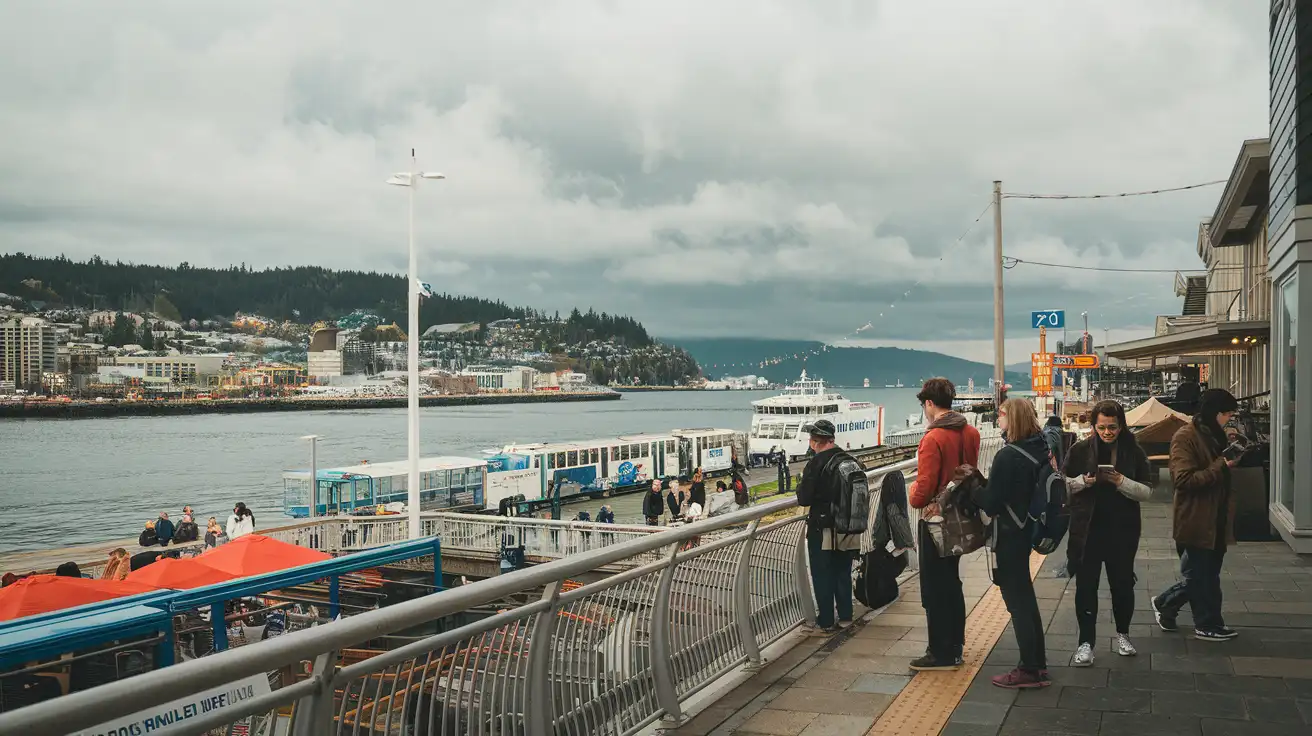
Compare Internet Plans in Seattle
 Recommended Recommended | Local SIM / Operator | Roaming | |
|---|---|---|---|
| FEATURES | |||
| Setup time | Few minutes | Store visit + paperwork | Auto |
| No local ID needed | Online checkout | Local ID required | Use home account |
| Speed | 4G/LTE; 5G in some areas | Carrier-grade | Partner-dependent |
| Travel support | English support 24/7 | Operator shops and call centre | Home carrier hours |
| Keep home number | Dual SIM | Replaces it | Same number |
| Cost predictability | Fixed price | Bills can spike | Bill-shock risk |
| PRICING | |||
Typical pricing | See plans below | — | — |
PRICING — PICK YOUR ESIMNO PLAN
Featured eSIM plans
American Mobile

American Mobile
American Mobile
American Mobile
American Mobile
American Mobile


